This post is older than 2 years and might not be relevant anymore
More Info: Consider searching for newer posts
This discussion has been locked.
You can no longer post new replies to this discussion. If you have a question you can start a new discussion

SEGGER Embedded Studio - Zephyr base not set

Hi,

I am having some issues with my SDK configuration. First of all, I am using nRF Connect for Desktop on a Win10 machine. There I installed the Toolchain Manager in order to develop with the SDK. Next I selected to install v1.5.0-rc1 and when starting SEGGER Embedded Studio from SDK directory I get "Zephyr base not set". I have checked the section on how to install the SDK manually but I'm not sure what the message "Zephyr base not set" means. What am I missing and how do I fix it?

Parents
  • Hello Markus,

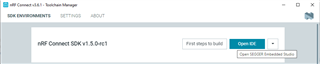
    did you start SEGGER Embedded Studio via the "Open IDE" button in the Toolchain Manager (see picture below)?

    Regards, 

    Markus Schellenberger

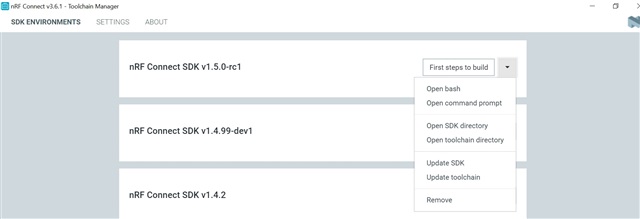
  • No I did not since that option is not present? I was wondering what the instruction "Start SEGGER Embedded Studio by clicking Open IDE" under "First steps to build" referred to, now I know. Has there maybe been some glitch in my SDK installation? Should I try to install another version from the Toolchain Manager?

  • It looks like that the installation did not went through completely, which explains the missing ZEPHYR_BASE.

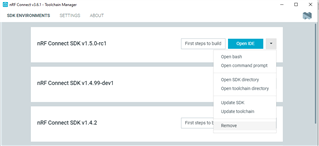
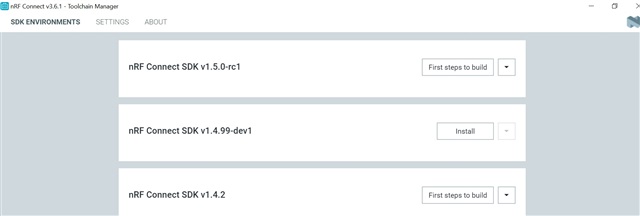
    It should be enough to re-install nRF Connect SDK v1.5.0-rc1, but please remove the existing installation first (see picture below).

    If you have an active VPN connection, I recommend you deactivate it during the installation process.

    Regards,

    Markus

  • I tried to re-install according to your instructions but the result was the same, Open IDE not present. Now I'm trying to install the SDK when I selected to run nRF Connect as administrator. I did not see any instructions that this was required (start nRF Connect by selecting the Windows option "run as administrator"), but it's worth a try!

    Looking at the log there was no indication that something went wrong? This is from when I re-installed and did not get the Open IDE option.:

    2021-02-18T12:14:27.359Z INFO Start to install toolchain v1.5.0-rc1
    2021-02-18T12:14:27.362Z INFO Installing ncs-toolchain-v1.5.0-rc1-20210215-2c30941.zip at C:\Users\...\ncs\v1.5.0-rc1\toolchain
    2021-02-18T12:14:27.362Z DEBUG Install with toolchain version 20210215
    2021-02-18T12:14:27.363Z DEBUG Install with sha512 b214a17a01ba72ec9e2c39a072692e85374dd0de6d6d4db43452f28fba2896ac23e7883db008707305292b8e107cf8dc593ac8535a26001b6b7ab0f923269a43
    2021-02-18T12:14:27.409Z INFO Downloading toolchain v1.5.0-rc1
    2021-02-18T12:28:29.888Z INFO Finished downloading version v1.5.0-rc1 of the toolchain after approximately 14 minute(s)
    2021-02-18T12:28:29.891Z INFO Unpacking toolchain v1.5.0-rc1
    2021-02-18T12:32:03.737Z INFO Finished unpacking version v1.5.0-rc1; win32; ia32 of the toolchain after approximately 4 minute(s)
    2021-02-18T12:32:03.740Z INFO Update config file
    2021-02-18T12:32:03.768Z INFO Cloning nRF Connect SDK v1.5.0-rc1
    2021-02-18T12:32:03.802Z INFO Initializing environment for v1.5.0-rc1
    2021-02-18T12:32:10.317Z INFO Finished cloning version v1.5.0-rc1 of the nRF Connect SDK after approximately 0 minute(s)

  • Running nRF Connect as administrator did not solve the issue. I also tried to install another version of the SDK without any improvements, Open IDE not present.

Reply Children
  • Normally, it should not be necessary to install the SDK as administrator.

    The installation log is supposed to look like this:

    2021-02-18T13:35:26.597Z INFO Start to install toolchain v1.5.0-rc1
    2021-02-18T13:35:26.597Z INFO Installing ncs-toolchain-v1.5.0-rc1-20210215-2c30941.zip at C:\Users\...\ncs\v1.5.0-rc1\toolchain
    2021-02-18T13:35:26.597Z DEBUG Install with toolchain version 20210215
    2021-02-18T13:35:26.597Z DEBUG Install with sha512 b214a17a01ba72ec9e2c39a072692e85374dd0de6d6d4db43452f28fba2896ac23e7883db008707305292b8e107cf8dc593ac8535a26001b6b7ab0f923269a43
    2021-02-18T13:35:26.617Z INFO Downloading toolchain v1.5.0-rc1
    2021-02-18T13:35:34.306Z INFO Finished downloading version v1.5.0-rc1 of the toolchain after approximately 0 minute(s)
    2021-02-18T13:35:34.308Z INFO Unpacking toolchain v1.5.0-rc1
    2021-02-18T13:36:17.214Z INFO Finished unpacking version v1.5.0-rc1; win32; ia32 of the toolchain after approximately 1 minute(s)
    2021-02-18T13:36:17.215Z INFO Update config file
    2021-02-18T13:36:17.223Z INFO Cloning nRF Connect SDK v1.5.0-rc1
    2021-02-18T13:36:17.234Z INFO Initializing environment for v1.5.0-rc1
    2021-02-18T13:36:29.323Z INFO Updating zephyr repository for v1.5.0-rc1
    2021-02-18T13:37:03.976Z INFO Updating mcuboot repository for v1.5.0-rc1
    2021-02-18T13:37:06.559Z INFO Updating nrfxlib repository for v1.5.0-rc1
    2021-02-18T13:37:28.242Z INFO Updating trusted repository for v1.5.0-rc1
    2021-02-18T13:37:41.088Z INFO Updating tfm repository for v1.5.0-rc1
    2021-02-18T13:37:43.341Z INFO Updating connectedhomeip repository for v1.5.0-rc1
    2021-02-18T13:37:58.188Z INFO Updating cmock repository for v1.5.0-rc1
    2021-02-18T13:38:00.794Z INFO Updating unity repository for v1.5.0-rc1
    2021-02-18T13:38:03.666Z INFO Updating mbedtls repository for v1.5.0-rc1
    2021-02-18T13:38:15.326Z INFO Updating nanopb repository for v1.5.0-rc1
    2021-02-18T13:38:19.041Z INFO Updating Alexa repository for v1.5.0-rc1
    2021-02-18T13:38:20.546Z INFO Updating cddl repository for v1.5.0-rc1
    2021-02-18T13:38:22.157Z INFO Updating cmsis repository for v1.5.0-rc1
    2021-02-18T13:38:24.239Z INFO Updating canopennode repository for v1.5.0-rc1
    2021-02-18T13:38:26.158Z INFO Updating civetweb repository for v1.5.0-rc1
    2021-02-18T13:38:30.708Z INFO Updating fatfs repository for v1.5.0-rc1
    2021-02-18T13:38:32.536Z INFO Updating hal_nordic repository for v1.5.0-rc1
    2021-02-18T13:38:35.146Z INFO Updating hal_st repository for v1.5.0-rc1
    2021-02-18T13:38:40.628Z INFO Updating libmetal repository for v1.5.0-rc1
    2021-02-18T13:38:42.308Z INFO Updating lvgl repository for v1.5.0-rc1
    2021-02-18T13:38:47.374Z INFO Updating mbedtls repository for v1.5.0-rc1
    2021-02-18T13:38:49.673Z INFO Updating mcumgr repository for v1.5.0-rc1
    2021-02-18T13:38:51.249Z INFO Updating net repository for v1.5.0-rc1
    2021-02-18T13:38:56.819Z INFO Updating open repository for v1.5.0-rc1
    2021-02-18T13:38:58.715Z INFO Updating loramac repository for v1.5.0-rc1
    2021-02-18T13:39:02.856Z INFO Updating openthread repository for v1.5.0-rc1
    2021-02-18T13:39:13.187Z INFO Updating segger repository for v1.5.0-rc1
    2021-02-18T13:39:14.776Z INFO Updating tinycbor repository for v1.5.0-rc1
    2021-02-18T13:39:16.675Z INFO Updating tinycrypt repository for v1.5.0-rc1
    2021-02-18T13:39:18.103Z INFO Updating littlefs repository for v1.5.0-rc1
    2021-02-18T13:39:22.199Z INFO Updating mipi repository for v1.5.0-rc1
    2021-02-18T13:39:23.819Z INFO Updating nrf_hw_models repository for v1.5.0-rc1
    2021-02-18T13:39:25.390Z INFO Updating edtt repository for v1.5.0-rc1
    2021-02-18T13:39:27.715Z INFO Finished cloning version v1.5.0-rc1 of the nRF Connect SDK after approximately 3 minute(s)

    Obviously, the repositories have not been downloaded to your computer. Probably they have been blocked. If there are no active VPN connections, the anti-virus program might be the reason. Could you perform a re-installation with your anti-virus deactivated?   

  • Thanks for the log! Ok, I will try to do a re-installation of the SDK with my anti-virus deactivated.

  • Deactivating the anti-virus on a corporate machine is not always easy, I cannot do that myself so support from IT department is awaiting.

    In the meantime I am looking at the possibilities to get what I need without setting up the full toolchain. If I understand it correctly, there are precompiled examples in the SDK that can be used for testing. I have tried the blinking LEDs (drag and drop to my DevKit drive) and it worked fine. Now, is it expected that the examples for BLE peripheral works the same way? It should work to just drag and drop "ble_app_beacon_pca10040_s132.hex" to my DevKit drive?

  • Yes, the examples for BLE peripheral work the same way. Since "ble_app_beacon_pca10040_s132.hex" isn’t part of the NCS, I assume that you are currently using the nRF5 SDK?

    https://www.nordicsemi.com/Software-and-Tools/Software/nRF5-SDK

    Even if I recommend the NCS, you practically do not need the Toolchain Manager if you are not working with the 91 and 53 series. You can use the nRF5 SDK, if its features satisfy your purposes (compared to the NCS, no new features will be provided).

    https://infocenter.nordicsemi.com/index.jsp?topic=%2Fstruct_sdk%2Fstruct%2Fsdk_nrf5_latest.html

  • Yes, I am using nRF5_SDK_17.0.2_d674dde due to the anti-virus issue I have when downloading NCS with the Toolchain Manager application.

    Ok, I will try some more examples from the nRF5 SDK then, the idea is that my DUT (Device Under Test, a wearable) should be able to search/scan for devices and establish a BLE connection. Do you know if there are a specific precompiled example in any SDK that would suit this purpose?

Related