This post is older than 2 years and might not be relevant anymore
More Info: Consider searching for newer posts

Nordic thingy 91 led are completely off and connection to the cloud is not successful

Hello, 

I am a newbie and trying to setup nordic thingy 91. I have booted the updated version of modem firm ware and also the "thingy91_nbiot_2020-10-30_5522ca2b.hex" file.

When I switch on the device the led's are completely off and  I am unable to add the device to the cloud

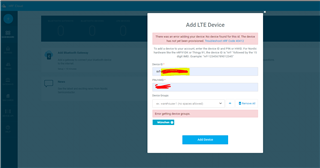
the error from the nrf cloud it shown above in the image.

I thought it might be having low battery issues and connected it a micro usb for charging, still no luck.

Could you please let me know some workaround on how to get it back?

Parents
  • Hello, 

    Sounds like the thingy91_nbiot_2020-10-30_5522ca2b.hex has not been programmed correct. What method did you use to program the Thingy:91? MCUboot or external debug probe? Did you program the modem fw first, and then application? This is the correct order to program the Thingy:91, as programming the modem fw first will erase application on the nRF9160.

    If you programmed using an external debug probe, did you make sure to set SW2 to correct position? The Thingy:91 has a UART log output, maybe connect to the Thingy:91 using e.g. LTE Link Monitor to see if there is any output. 

    Kind regards,
    Øyvind

Reply
  • Hello, 

    Sounds like the thingy91_nbiot_2020-10-30_5522ca2b.hex has not been programmed correct. What method did you use to program the Thingy:91? MCUboot or external debug probe? Did you program the modem fw first, and then application? This is the correct order to program the Thingy:91, as programming the modem fw first will erase application on the nRF9160.

    If you programmed using an external debug probe, did you make sure to set SW2 to correct position? The Thingy:91 has a UART log output, maybe connect to the Thingy:91 using e.g. LTE Link Monitor to see if there is any output. 

    Kind regards,
    Øyvind

Children
Related