This post is older than 2 years and might not be relevant anymore
More Info: Consider searching for newer posts

Thingy91 - No devices available in nRF Connect

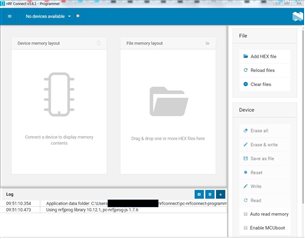
Hey all - I'm new and trying to connect Thingy91 to nRF Connect V3.6.1 for the first time. When I open the Programmer app I only see "No devices available" in the drop down.

Thingy91 is connected to Windows 10 via USB and turned on with the LEDs flashing. Windows does not seem to recognize the device via USB? I have tried multiple cables, USB ports, and computers. Please advise. Thank you
Parents Reply Children
  • Hi,

    I have the same problem. nRF Connect v3.6.1 - Programmer (No devices available) Win10 with USB connection with Thingy91 v1.4.0 With original firmware. Thingy is  fully functionnal with LTE connection within nRFCloud... 

    Log file:

    2021-02-28T03:56:04.732Z INFO Application data folder: C:\Users\User\AppData\Roaming\nrfconnect\pc-nrfconnect-programmer
    2021-02-28T03:56:04.842Z DEBUG App pc-nrfconnect-programmer v1.4.8 official
    2021-02-28T03:56:04.843Z DEBUG App path: C:\Users\User\.nrfconnect-apps\node_modules\pc-nrfconnect-programmer
    2021-02-28T03:56:04.843Z DEBUG nRFConnect 3.6.1 is supported by the app (^3.6.0)
    2021-02-28T03:56:04.843Z DEBUG nRFConnect path: C:\Users\User\AppData\Local\Programs\nrfconnect\resources\app.asar
    2021-02-28T03:56:04.843Z DEBUG HomeDir: C:\Users\User
    2021-02-28T03:56:04.843Z DEBUG TmpDir: C:\Users\User\AppData\Local\Temp
    2021-02-28T03:56:04.860Z INFO Using nrfjprog library 10.12.1, pc-nrfjprog-js 1.7.6
    2021-02-28T03:56:05.740Z VERBOSE Could not fetch serial number for serial port at COM10
    2021-02-28T03:56:05.741Z VERBOSE Could not fetch serial number for serial port at COM1
    2021-02-28T03:56:05.741Z VERBOSE Could not fetch serial number for serial port at COM11

    Tx for help,

    Martin

Related