This post is older than 2 years and might not be relevant anymore
More Info: Consider searching for newer posts

Missing advertisements in Android version of nRF Connect

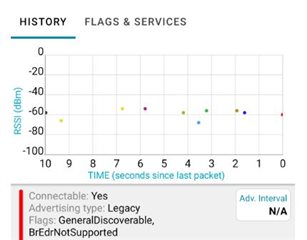
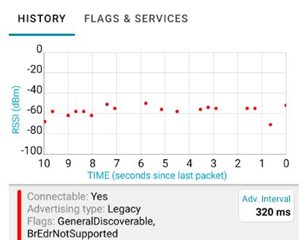
I've created a peripheral that is advertising about every 320ms but am seeing less than half of those packets in nRF Connect on my Android mobile (configured to run in low latency mode; Galaxy S20+, nRF Connect v4.24.3).  I've attached two screenshots showing a 10 second plot filtered on my device.  In the first screenshot below I've got the advertised payload configured to update each advertisement (different colors).  In the second screenshot it is a static advertising payload (same color).  In both cases you can see that a significant number of advertisements are missed despite the peripheral only being a couple feet away. (about 10 of 30 successfully received in #1; 18 of 30 successfully received in #2)

Can anyone help me understand what is happening or what I can do to improve the number seen within nRF?
Parents
  • Hi Adam, 
    Could you explain a little bit more on the "Low latency mode" you used ? If you turn that off would the performance get better ? 
    I would suggest to verify that the device actually advertises with the expected interval using a sniffer.

    Did you advertise in all three channels ? 

    Have you checked with other phones  ?  I suspect that the phone may not scanning in 100% duty cycle. 

  • "low latency mode" is the scanning mode option that nRF Connect has under the Scanner settings (along with enable continuous scan). It's my understanding that these settings will allow the app to put the device in scanning mode at or near 100%.

    Yes, I've confirmed the device is advertising at the expected rate.

    Yes, all 3 channels and sniffer confirms this.

    I've seen it on multiple phones. Is there a way to log or check to see when the phone enters/exits scanning?

  • Hi Adam, 
    Sorry that I didn't know about this latency mode. It's the default mode on the nRF Connect. 
    It could be that the phone doesn't allow BLE scanning at 100% duty cycle to save power. You can also try to test turn off Wifi if it can improve the performance. 
    Interference could also be an issue as well. Please try to test in a RF chamber ( e.g your home microwave oven). I did a test in my microwave and the phone captured 30/30 packets in 10s compare to only 15-20 packets in 10s when testing outside. 

Reply
  • Hi Adam, 
    Sorry that I didn't know about this latency mode. It's the default mode on the nRF Connect. 
    It could be that the phone doesn't allow BLE scanning at 100% duty cycle to save power. You can also try to test turn off Wifi if it can improve the performance. 
    Interference could also be an issue as well. Please try to test in a RF chamber ( e.g your home microwave oven). I did a test in my microwave and the phone captured 30/30 packets in 10s compare to only 15-20 packets in 10s when testing outside. 

Children
Related