

Hi,
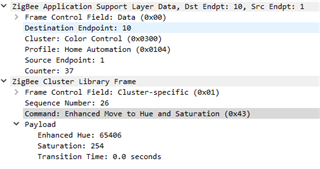
I'm currently developing the code of a RGB led lamp. The thing is, when I change the color while sniffing with Wireshark, I see only 1 payload (the way it should be), but I get two callbacks at zcl_device_cb with the ZB_ZCL_ATTR_COLOR_CONTROL_ENHANCED_CURRENT_HUE_ID instead of one.
The first callback it's random info (the value parameter), I don't know why is there and that's why I'm trying to understand.
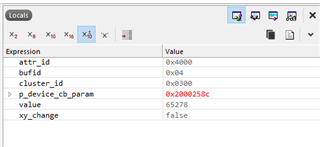
The second callback contains the actual info (value parameter), but only half of it. The only info I can get is the Enhanced HUE value, but the saturation nor the transition time.
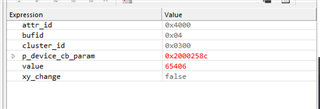
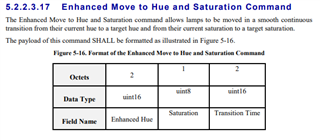
As you can see in the ZCL specification, saturation and transition time should be also there.
Wireshark screenshot:
The callback handler function:
static zb_void_t zcl_device_cb(zb_bufid_t bufid)
{
    zb_uint16_t                      cluster_id;
    zb_uint16_t                      attr_id;
    zb_zcl_device_callback_param_t * p_device_cb_param = ZB_BUF_GET_PARAM(bufid, zb_zcl_device_callback_param_t);

    NRF_LOG_INFO("Received new ZCL callback %hd on endpoint %hu", p_device_cb_param->device_cb_id, p_device_cb_param->endpoint);

    /* Set default response value. */
    p_device_cb_param->status = RET_OK;

    switch (p_device_cb_param->device_cb_id)
    {
        case ZB_ZCL_LEVEL_CONTROL_SET_VALUE_CB_ID:
            level_control_set_value(p_device_cb_param->cb_param.level_control_set_value_param.new_value);
            break;

        case ZB_ZCL_SET_ATTR_VALUE_CB_ID:
            cluster_id = p_device_cb_param->cb_param.set_attr_value_param.cluster_id;
            attr_id    = p_device_cb_param->cb_param.set_attr_value_param.attr_id;

            if (cluster_id == ZB_ZCL_CLUSTER_ID_ON_OFF)
            {
                uint8_t value = p_device_cb_param->cb_param.set_attr_value_param.values.data8;

                if (attr_id == ZB_ZCL_ATTR_ON_OFF_ON_OFF_ID)
                {
                    on_off_set_value((zb_bool_t)value);
                }
            }
            else if (cluster_id == ZB_ZCL_CLUSTER_ID_LEVEL_CONTROL)
            {
                uint16_t value = p_device_cb_param->cb_param.set_attr_value_param.values.data16;
                if (attr_id == ZB_ZCL_ATTR_LEVEL_CONTROL_CURRENT_LEVEL_ID)
                {
                    level_control_set_value(value);
                }
            }
            else if (cluster_id == ZB_ZCL_CLUSTER_ID_COLOR_CONTROL)
            {
                uint16_t value = p_device_cb_param->cb_param.set_attr_value_param.values.data16;

                switch (attr_id)
                {
                    case ZB_ZCL_ATTR_COLOR_CONTROL_CURRENT_HUE_ID:
                        color_control_set_value_hue(value);
                        break;

                    case ZB_ZCL_ATTR_COLOR_CONTROL_ENHANCED_CURRENT_HUE_ID:
                        color_control_set_value_enhanced_hue(value, m_dev_ctx.color_control_attr.set_color_info.current_saturation, 0);
                        break;

                    case ZB_ZCL_ATTR_COLOR_CONTROL_CURRENT_SATURATION_ID:
                        color_control_set_value_saturation(value);
                        break;

                    case ZB_ZCL_ATTR_COLOR_CONTROL_CURRENT_X_ID:
                        m_dev_ctx.color_control_attr.set_color_info.current_X = p_device_cb_param->cb_param.set_attr_value_param.values.data16;
                        color_control_set_value_xy();
                        break;

                    case ZB_ZCL_ATTR_COLOR_CONTROL_CURRENT_Y_ID:
                        m_dev_ctx.color_control_attr.set_color_info.current_Y = p_device_cb_param->cb_param.set_attr_value_param.values.data16;
                        color_control_set_value_xy();
                        break;

                    default:
                        NRF_LOG_INFO("Unused attribute");
                        break;
                }
            }
            else
            {
                /* Other clusters can be processed here */
                NRF_LOG_INFO("Unhandled cluster attribute id: %d", cluster_id);
            }
            break;

        default:
            p_device_cb_param->status = RET_ERROR;
            NRF_LOG_INFO("Default case, returned error");
            break;
    }

    NRF_LOG_INFO("zcl_device_cb status: %hd", p_device_cb_param->status);
}
Could someone in the development team show me or explain me how I should handle the callback for the command Enhanced Move to Hue and Saturation? I can't find any info at all in your documentation.
Thanks.
Regards,
Carlos

