This post is older than 2 years and might not be relevant anymore
More Info: Consider searching for newer posts

nrf52840 DK ble_app_uart connection failure

As a beginner,I’m sorry for asking such a stupid question,but it has annoyed me for a long time.

I built and downloaded the program to my DK,and I used PuTTY to connect it,but it didn’t show up “UART started” after I resented the board.

I had changed several terminal such as CMD,nrf command line tool,Jlink and teraterm,but that didn’t work.

I wander what would the problem is , may I have the answer please.

Parents
  • I managed to make it work, I did the following:

    • Connected the nRF52840 DK to the computer and turned it on
    • Opened the Device Manager and found the COM port:

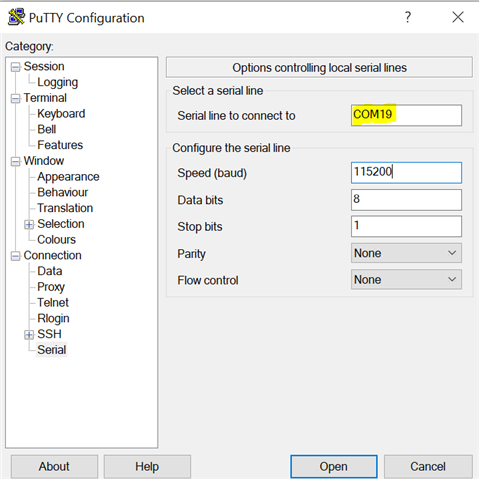
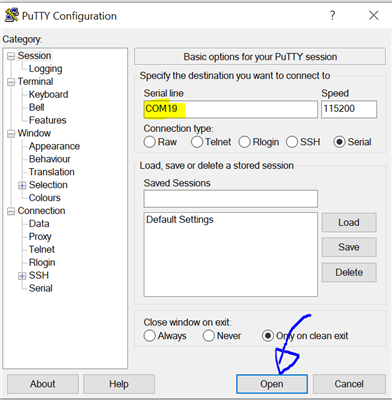
    • Opened Putty with the settings from here

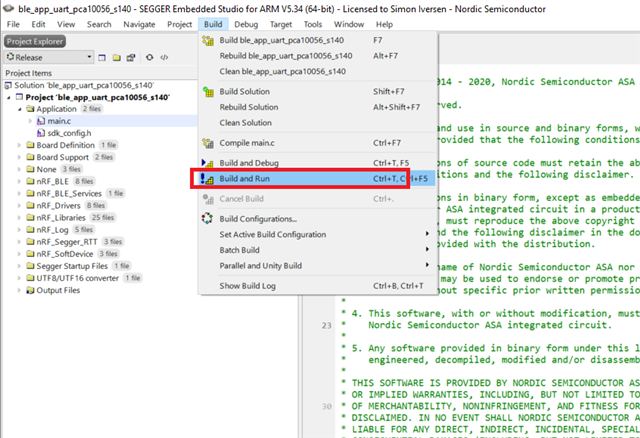
    • Opened nRF5_SDK_17.0.2_d674dde\examples\ble_peripheral\ble_app_uart\pca10056\s140\ses\ble_app_uart_pca10056_s140.emProject and built and ran it:

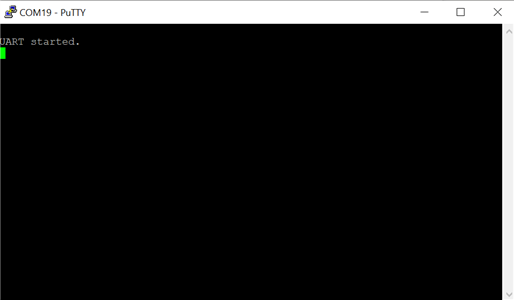
    • Saw "UART started" in the terminal

    Best regards,

    Simon

Reply
  • I managed to make it work, I did the following:

    • Connected the nRF52840 DK to the computer and turned it on
    • Opened the Device Manager and found the COM port:

    • Opened Putty with the settings from here

    • Opened nRF5_SDK_17.0.2_d674dde\examples\ble_peripheral\ble_app_uart\pca10056\s140\ses\ble_app_uart_pca10056_s140.emProject and built and ran it:

    • Saw "UART started" in the terminal

    Best regards,

    Simon

Children
Related