This post is older than 2 years and might not be relevant anymore
More Info: Consider searching for newer posts

Serial error with nRF sniffer install

Nordic colleagues,

We just received our nRF 52840 DK and are attempting to install the nRF Sniffer application to use with Wireshark.  We were able to program the DK with the appropriate 52840 DK hex files using the Programmer application (within the nRF Connect Desktop application). 

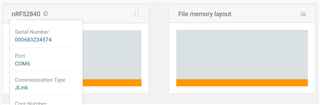
Note:  The colors for the device and file memory only showed orange (was it suppose to show green after install?).  After the Erase & Write the log stated:  "Core0: Non-volatile memory has been read. 2 non-empty memory blocks identified,"
 

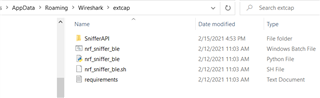
We successfully added the the pip text install into the Sniffer folder as directed and copied the files over to the Wireshark extcap folder.

Note:  There are two extcap folders in WIreshark.  The Personal extcap path is different  than the Global extcap path; but, we did paste files into both folders.
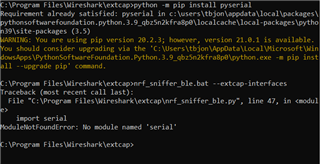
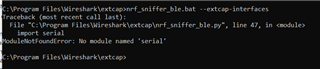
However, when we attempted to test the Sniffer using the "nrf_sniffer_ble.bat --extcap-interfaces" we received the following error message:
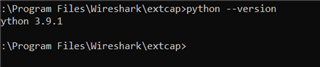
We did confirm Python version is in the path as cited in the Nordic instructions:
Unclear were we went wrong.   The DK's LED 1 is continuously flashing (not pulsing like originally) and the DK's LED 5 is staying on.

Welcome comments on what we missed.

PS  We also don't see the option to view the Interface Toolbar from the View menu within Wireshark.

Parents Reply Children
  • Reviewing post now and just did the where python command which produced the following:

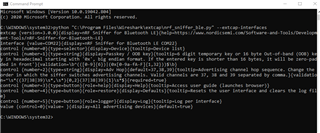
  • Just attempted to run the nrf sniffer ble file python file directly from the Wireshark / extcap folder.  The python cmd screen pops open for a second and then disappears.

  • The script will exit as soon as it is complete, so it is a bit hard to see the output. Can you try to run it from the command line instead? 

    Command to use

    > python "C:\Program Files\Wireshark\extcap\nrf_sniffer_ble.py" --extcap-interfaces

    And expected result

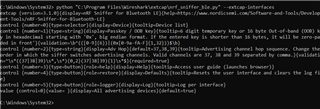
  • So I didn't see the Python folder in the Windows folder but I did paste the above command and it seemed to work there.

  • Thanks for checking. So it looks like the nrf_sniffer_ble.py work fine when invoked directly, but not when it is invoked via the nrf_sniffer_ble.bat batch script for some reason. The problem with this is that Wireshark needs the batch script to work in order to load the plugin. It seems to be the same issue as was described in the other post I linked to earlier.

    As a test, could you try to replace the original nrf_sniffer_ble.bat file with the one attached below? I removed all the steps that should be redundant for your setup. With this script I would expect you to get the same output from  "nrf_sniffer_ble.bat --extcap-interfaces" as you get with "C:\Program Files\Wireshark\extcap\nrf_sniffer_ble.py" --extcap-interfaces"

    Note:  There are two extcap folders in WIreshark.  The Personal extcap path is different  than the Global extcap path; but, we did paste files into both folders.

    Can you try to only keep the plug-in in one of these folders? I'm not sure if it will work if you have it in both.

    Modified batch script

    @echo off
    rem Path to this batch file
    set NRF_SNIFFER_BLE_PATH=%~dp0
    rem Remove the "\" from the end of the path
    set NRF_SNIFFER_BLE_PATH=%NRF_SNIFFER_BLE_PATH:~0,-1%
    rem Activate virtualenv if present
    rem if exist "%NRF_SNIFFER_BLE_PATH%\env\Scripts\activate.bat" call "%NRF_SNIFFER_BLE_PATH%\env\Scripts\activate.bat"
    rem Find out if the launcher is installed and available
    rem where py > NUL 2>&1 
    rem if %ERRORLEVEL% EQU 0 (
    rem     py -3 "%NRF_SNIFFER_BLE_PATH%\nrf_sniffer_ble.py" %*
    rem ) else (
    rem     python "%NRF_SNIFFER_BLE_PATH%\nrf_sniffer_ble.py" %*
    rem )
    python "%NRF_SNIFFER_BLE_PATH%\nrf_sniffer_ble.py" %*

Related