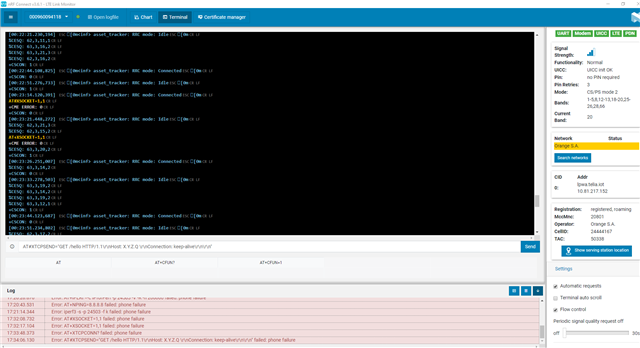
AT#XBIND=8080
AT#XTCPCONN="X.Y.Z.Q",8080
AT#XTCPCONN?
AT#XTCPSEND="GET /hello HTTP/1.1\r\nHost: X.Y.Z.Q \r\nConnection: keep-alive\r\n\r\n"
AT#XTCPRECV=200,30
AT#XSOCKET=0
Hello,
The HyperText Transfer Protocol (HTTP) 400 Bad Request response status code indicates that the server cannot or will not process the request due to something that is perceived to be a client error (e.g., malformed request syntax, invalid request message framing, or deceptive request routing).
Are you sure this is correct way to communicate?
Kind regards,
Øyvind
Hi Øyvind
Thanks for the reply. Do you have any example for us to emulate HTTP over TCP? That would be very helpful.
Regards
NordicUser
Hi,
Is there a reason for why you are using NCS tag v1.2.0 with mfw 1.2.3. These have not been tested together, so we cannot guarantee compatibility. I would recommend using NCS tag v1.5.0, which was released yesterday, that is tested with mfw 1.2.3.
Have a look at the official NCS samples, or the included network samples in the Zephyr repository.
Kind regards,
Øyvind
Dear colleague,
I tried to emulate HTTP traffic with command AT shared by using nRF9160 DK but it's failing. what's the "AT TCPSEND command"? it's an other application need to be installed.

Thanks and Regards,
Adil
Dear colleague,
I tried to emulate HTTP traffic with command AT shared by using nRF9160 DK but it's failing. what's the "AT TCPSEND command"? it's an other application need to be installed.

Thanks and Regards,
Adil
Hi Adil,
The AT#XTCPSEND command is a proprietary command in the Serial LTE Modem Application, which allows you to send the data over the connection.
Kind regards,
Øyvind
Hi,
Why it's not working, it' not used in the right interface?
Thanks and Regards,
Adil
Please open a new ticket with your issue.
Thank you.
Kind regards,
Øyvind