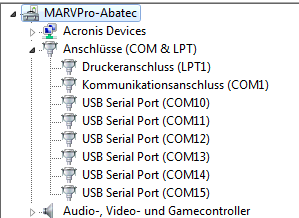
At my system (production) there are 6 serial ports and 2 programmer (ARM-Flasher from Segger) connected.
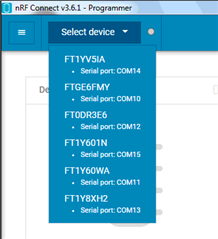
The nRF Connect - Programmer only display 5 COM-Ports and NO Segger-ARM-Flasher-Programmer.
Also the COM1 not displayed
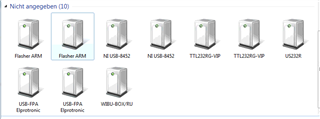
At my system (production) there are 6 serial ports and 2 programmer (ARM-Flasher from Segger) connected.
The nRF Connect - Programmer only display 5 COM-Ports and NO Segger-ARM-Flasher-Programmer.
Also the COM1 not displayed
Hi,
The programmer app requires a J-link debugger, so I'm afraid it will not work with yourJ-Flash programmers. But is there a particular reason you want to use this app in production? Segger should have programs that are more suitable for this purpose.
Best regards,
Vidar
Hello, it is working with the Segger ARM-Flasher.
At a other System (PC) when only 2 serial ports avaiable the Sergger-ARM-Flasher will be displayed with his serial number. Also the "Modem update" function with the Segger-ARM-Flasher works at this System(PC).
Only at this production system when 6 serial ports avaiable and 2 Segger-ARM-Flasher exist only 5 devices displayed at the selection menu.
Also the programming of the nRF9160 SLM FW can do with the Segger-ARM-Flasher and JFlash-Program.
This is a fall back solutopn (manual programming) because i tryed many other solutions for production programming but nothing works.
nrfprog command line -> Not works with the "modem update" instructions (https://infocenter.nordicsemi.com/index.jsp?topic=%2Fnan_041%2FAPP%2Fnan_production_programming%2Fintro.html)
nrfprog.dll not works because there are need of a DLL-Wrapper with callback functions
pynrfprog (with Python) not works -> Get a DLL-Error message and it stops (https://devzone.nordicsemi.com/f/nordic-q-a/53208/updating-nrf9160-modem-firmware-through-the-command-line)
So we have no more idea at our compony how do a good and stabil "modem update" for production.
Hello,
Thanks for the clarification. I didn't know that the J-Flash could work, we only state J-link support in the documentation.
Christian Bruckner said:Only at this production system when 6 serial ports avaiable and 2 Segger-ARM-Flasher exist only 5 devices displayed at the selection menu.
Does it work when you have fewer programmers connected? Also, are they connected via a USB Hub?
Christian Bruckner said:nrfprog command line
nrfjprog does not suppor modem updates. But does it work reliably when you program the application FW?
Christian Bruckner said:pynrfprog (with Python) not works -> Get a DLL-Error message and it stops (https://devzone.nordicsemi.com/f/nordic-q-a/53208/updating-nrf9160-modem-firmware-through-the-command-line)
Do you always get this error? Can you post a screenshot of the error here?
Hello,
Thanks for the clarification. I didn't know that the J-Flash could work, we only state J-link support in the documentation.
Christian Bruckner said:Only at this production system when 6 serial ports avaiable and 2 Segger-ARM-Flasher exist only 5 devices displayed at the selection menu.
Does it work when you have fewer programmers connected? Also, are they connected via a USB Hub?
Christian Bruckner said:nrfprog command line
nrfjprog does not suppor modem updates. But does it work reliably when you program the application FW?
Christian Bruckner said:pynrfprog (with Python) not works -> Get a DLL-Error message and it stops (https://devzone.nordicsemi.com/f/nordic-q-a/53208/updating-nrf9160-modem-firmware-through-the-command-line)
Do you always get this error? Can you post a screenshot of the error here?