

Hi, I tried to set up the environment for the nRF Connect SDK v1.5.0 using nRF Connect for Desktop on Ubuntu 18.04.
In step 2 (Cloning the SDK), I got some errors while trying to install the requirements:
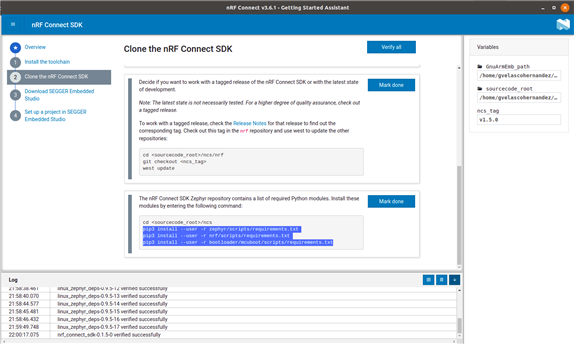
$ pip3 install --user -r zephyr/scripts/requirements.txt

... a lot of text ...

Downloading https://files.pythonhosted.org/packages/fa/2d/2154d8cb773064570f48ec0b60258a4522490fcb115a6c7c9423482ca993/cryptography-3.4.6.tar.gz (546kB)
100% |████████████████████████████████| 552kB 1.0MB/s
Complete output from command python setup.py egg_info:
Traceback (most recent call last):
File "<string>", line 1, in <module>
File "/tmp/pip-build-hepf6ysd/cryptography/setup.py", line 14, in <module>
from setuptools_rust import RustExtension
ModuleNotFoundError: No module named 'setuptools_rust'

=============================DEBUG ASSISTANCE==========================
If you are seeing an error here please try the following to
successfully install cryptography:

Upgrade to the latest pip and try again. This will fix errors for most
users. See: https://pip.pypa.io/en/stable/installing/#upgrading-pip
=============================DEBUG ASSISTANCE==========================


----------------------------------------
Command "python setup.py egg_info" failed with error code 1 in /tmp/pip-build-hepf6ysd/cryptography/
pip3 install --user -r nrf/scripts/requirements.txt                                                                                                            22:26:49⌚
Double requirement given: west>=0.7.2 (from -r nrf/scripts/requirements-doc.txt (line 4)) (already in west>=0.9.0 (from -r nrf/scripts/requirements-base.txt (line 1)), name='west')
pip3 install --user -r bootloader/mcuboot/scripts/requirements.txt                                                                                             22:27:08⌚
Collecting cryptography>=2.6 (from -r bootloader/mcuboot/scripts/requirements.txt (line 1))
  Using cached https://files.pythonhosted.org/packages/fa/2d/2154d8cb773064570f48ec0b60258a4522490fcb115a6c7c9423482ca993/cryptography-3.4.6.tar.gz
    Complete output from command python setup.py egg_info:
    Traceback (most recent call last):
      File "<string>", line 1, in <module>
      File "/tmp/pip-build-2j29r17d/cryptography/setup.py", line 14, in <module>
        from setuptools_rust import RustExtension
    ModuleNotFoundError: No module named 'setuptools_rust'

            =============================DEBUG ASSISTANCE==========================
            If you are seeing an error here please try the following to
            successfully install cryptography:

            Upgrade to the latest pip and try again. This will fix errors for most
            users. See: https://pip.pypa.io/en/stable/installing/#upgrading-pip
            =============================DEBUG ASSISTANCE==========================


    ----------------------------------------
Command "python setup.py egg_info" failed with error code 1 in /tmp/pip-build-2j29r17d/cryptography/
Am I missing something?

