This post is older than 2 years and might not be relevant anymore
More Info: Consider searching for newer posts

How to configure nRF82540 for using multiple BLE packages in one connection interval?

Hi,

I try to achieve high throughput via BLE connection between two nRF82540dk boards. I would like to maximize duty cycle of transmission in the connection interval.
Unfortunately I observe only one or two BLE packets in each interval.
How can I configure SoftDevice to transmit more packets in one interval?

I use slighly modified ble_app_uart_c_pca10056_s140 and ble_app_uart_pca10056_s140 as starting point examples for the serial connection.
A stream of 244 bytes packets is sent from peripheral to the central device. 

Other options:
1) BLE PHY 2Mbps,
2) Connection interval = 7.5ms
3) NRF_SDH_BLE_GAP_EVENT_LENGTH = 6

Kind regards,

Piotr Romaniuk

Parents
  • Hello,

    I try to achieve high throughput via BLE connection between two nRF82540dk boards.

    Have you seen the throughput test results in the SoftDevice documentation? It details which parameters was used during the tests, to reach the different throughput speeds.

    I would like to maximize duty cycle of transmission in the connection interval.
    3) NRF_SDH_BLE_GAP_EVENT_LENGTH = 6

    Please change your event length to allow for more notifications being sent every connection event.
    Since you are only holding a single connection, you can use the entire 'duty-cycle' of the connection interval for this connection.
    You thus may set your event length to 500 (or any other high number), to allow for the event to span the entire interval, if needed.
    Could you also confirm for me that connection event length extension is configured in your project?
    It is default in all newer SDK versions, but I do not know which version you are working with. You might find this answer by my colleague helpful, for an explanation of the parameter.
    You may also find the online power-profiler useful to have a look at, to visualize how the different connection settings will affect your radio usage.

    Please try this, and let me know if you achieve the sought-after radio usage.

    Best regards,
    Karl

  • Hi Karl,

    Yes, I saw the documentation, it reports 1.4Mbps, I have only 250kbps. 

    Please change your event length to allow for more notifications being sent every connection event.
    Since you are only holding a single connection, you can use the entire 'duty-cycle' of the connection interval for this connection

    In my configuration Connection Interval is set 7.5ms, and NRF_SDH_BLE_GAP_EVENT_LENGTH = 6 (i.e. 6x1.25ms = 7.5ms) hence I assigned whole interval for communication. The chip should transmit with almost 100% duty cycle, but it doesn't.

    As you saw on the oscillogram above setting of the event length is not effective. The SoftDevice transmits mostly one packet in the cycle.

    What I am doing wrong?

    Kind regards,
    Piotr Romaniuk

    PS
    I am using SDK 17.0.2 (nRF5_SDK_17.0.2_d674dde)

  • Hello Piotr,

    Piotr Romaniuk said:
    Yes, I saw the documentation, it reports 1.4Mbps, I have only 250kbps. 

    That sounds very strange.
    Could you share with me your entire sdk_config.h file, and the BLE configuration you are doing in your application, for me to have a look through?

    Are you familiar with the nRF Sniffer? It is a powerful tool to wield when developing with BLE.
    It would be great to see a sniffer trace of the on-air BLE communication happening.

    Best regards,
    Karl

Reply
  • Hello Piotr,

    Piotr Romaniuk said:
    Yes, I saw the documentation, it reports 1.4Mbps, I have only 250kbps. 

    That sounds very strange.
    Could you share with me your entire sdk_config.h file, and the BLE configuration you are doing in your application, for me to have a look through?

    Are you familiar with the nRF Sniffer? It is a powerful tool to wield when developing with BLE.
    It would be great to see a sniffer trace of the on-air BLE communication happening.

    Best regards,
    Karl

Children
  • Hi Karl,

    below you may find my sdk_config.h file.

    2577.sdk_config.h

    Are you familiar with the nRF Sniffer? It is a powerful tool to wield when developing with BLE.

    No, I did not use it. For now I have only two DK boards, that are involved into communication.

    I also tried to increase connection interval (it works) but I cannot increase event length over 6. If I did that the program reports a memory problem.

    Kind regards,
    Piotr Romaniuk

    PS
    My goal is high troughput in short time (I need to send 8KB block of data). 

  • Hello again Piotr,

    Piotr Romaniuk said:
    below you may find my sdk_config.h file.

    Thank for you sharing. Could you also provide the snippet of code containing all your BLE configurations, from your main.c file?

    Piotr Romaniuk said:
    No, I did not use it. For now I have only two DK boards, that are involved into communication.

    I see. It would help a lot to see a trace of this communication, to verify what is actually happening on air. I will leave this as a recommendation for future development.
    With a sniffer trace, we could also have verified that the peripheral notifies the central that there is more data to be transferred in each connection event. This is hard to verify without a trace.
    If the peripheral does not set its "more data" field to true, the central will not send an empty packet to initiate the continued transfer. How have you implemented the queueing of data to be transmitted on the peripheral side?
    And, just to be clear, is this 8 kB transfer from peripheral to central, or is it central to peripheral?

    Piotr Romaniuk said:
    My goal is high troughput in short time (I need to send 8KB block of data). 

    I see. Have you tested the configuration mentioned in the BLE throughput documentation I referenced earlier? Specifically, the configurations from Table 2.
    Make sure that your event length here is configured to match the longer connection interval.
    Keep in mind that if you are in an environment with a lot of noise, you might experience a lower throughput due to the higher chance of packet corruption on longer transfers.

    Best regards,
    Karl

  • Hi Karl,

    Could you also provide the snippet of code containing all your BLE configurations, from your main.c file?

    sure. 

    [...]
    
    #define APP_ADV_INTERVAL                128                                          /**< The advertising interval (in units of 0.625 ms. This value corresponds to 40 ms). */
    
    #define APP_ADV_DURATION                18000                                       /**< The advertising duration (180 seconds) in units of 10 milliseconds. */
    
    #define MIN_CONN_INTERVAL               MSEC_TO_UNITS(7.5, UNIT_1_25_MS)             /**< Minimum acceptable connection interval (20 ms), Connection interval uses 1.25 ms units. */
    #define MAX_CONN_INTERVAL               MSEC_TO_UNITS(7.5, UNIT_1_25_MS)             /**< Maximum acceptable connection interval (75 ms), Connection interval uses 1.25 ms units. */
    #define SLAVE_LATENCY                   0                                           /**< Slave latency. */
    #define CONN_SUP_TIMEOUT                MSEC_TO_UNITS(4000, UNIT_10_MS)             /**< Connection supervisory timeout (4 seconds), Supervision Timeout uses 10 ms units. */
    #define FIRST_CONN_PARAMS_UPDATE_DELAY  APP_TIMER_TICKS(5000)                       /**< Time from initiating event (connect or start of notification) to first time sd_ble_gap_conn_param_update is called (5 seconds). */
    #define NEXT_CONN_PARAMS_UPDATE_DELAY   APP_TIMER_TICKS(30000)                      /**< Time between each call to sd_ble_gap_conn_param_update after the first call (30 seconds). */
    #define MAX_CONN_PARAMS_UPDATE_COUNT    3                                           /**< Number of attempts before giving up the connection parameter negotiation. */
    
    [...]
    
    int main(void)
    {
        bool erase_bonds;
    
        // Initialize.
        uart_init();
        log_init();
        timers_init();
        buttons_leds_init(&erase_bonds);
        //power_management_init();
        ble_stack_init();
        gap_params_init();
        gatt_init();
        services_init();
        advertising_init();
        conn_params_init();
    
        nrf_gpio_cfg_output( pin_trig2 );
        nrf_gpio_cfg_output( pin_dbg2 );
    
        // Start execution.
        printf("\r\nUART started.\r\n");
        NRF_LOG_INFO("Debug logging for UART over RTT started.");
        advertising_start();
    
        // Enter main loop.
        for (;;)
        {
            if( m_conn_handle != BLE_CONN_HANDLE_INVALID ){
              idle_state_handle();
            }
        }
    }
    
    
    static void idle_state_handle(void)
    {
        uint32_t err_code;
        uint8_t data_array[244]; 
        int16_t data[100], i, index = sizeof(data_array)-1;
    
        /*if (NRF_LOG_PROCESS() == false)
        {
            nrf_pwr_mgmt_run();
        }*/
    
        for(i = 0; i < (index - 1); i++) 
          data_array[i] = 'U';
    
        static uint8_t pkt_cnt;
        pkt_cnt++;
        if( pkt_cnt >60)
          pkt_cnt=0;
    
        data_array[0]= pkt_cnt+'@';
        data_array[index - 1] = '\n';
        data_array[index] = '\r';
    
        for(i = 0; i < 6; i++){
            data_array[1] = '@'+i;
            do
            {
                uint16_t length = (uint16_t)index+1;
                err_code = ble_nus_data_send(&m_nus, data_array, &length, m_conn_handle);
                
                /*if ((err_code != NRF_ERROR_INVALID_STATE) &&
                    (err_code != NRF_ERROR_RESOURCES) &&
                    (err_code != NRF_ERROR_NOT_FOUND))
                {
                    APP_ERROR_CHECK(err_code);
                }*/
            } while (err_code == NRF_ERROR_RESOURCES);
            nrf_gpio_pin_toggle( pin_dbg2 );
        }
        /*do
        {
            uint16_t length = (uint16_t)index;
            err_code = ble_nus_data_send(&m_nus, data_array, &length, m_conn_handle);
            if ((err_code != NRF_ERROR_INVALID_STATE) &&
                (err_code != NRF_ERROR_RESOURCES) &&
                (err_code != NRF_ERROR_NOT_FOUND))
            {
                APP_ERROR_CHECK(err_code);
            }
        } while (err_code == NRF_ERROR_RESOURCES);*/
        nrf_gpio_pin_write( pin_trig2, 1);
        nrf_delay_ms(100);
        nrf_gpio_pin_write( pin_trig2, 0);
    }
    

    And, just to be clear, is this 8 kB transfer from peripheral to central, or is it central to peripheral?

    From peripheral to central.

    Have you tested the configuration mentioned in the BLE throughput documentation I referenced earlier? Specifically, the configurations from Table 2.

    I tried, but I cannot set event length larger than 6 (i.e. 7.5ms). Runtime memory error appears.

    Kind regards,

    Piotr Romaniuk

  • Piotr Romaniuk said:
    sure. 

    Thank you for sharing this code snippet.

    Piotr Romaniuk said:
    I tried, but I cannot set event length larger than 6 (i.e. 7.5ms). Runtime memory error appears.

    Where do you get this error, and what is the exact error message you encounter?
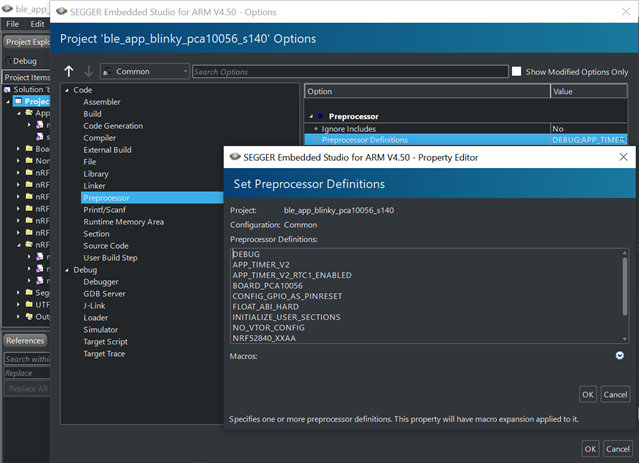
    Have you defined DEBUG in your preprocessor defines, like shown in the included image?
    This will make a detailed error message be printed to your loggers backend, if a non-NRF_SUCCESS error code is passed to an APP_ERROR_CHECK.


    From your included code snippet it does not look like you pass the returned error codes to an APP_ERROR_CHECK, but rather check them 'manually'. While you are free to do so for specific functions, it is advisable to pass them to an error check and implement the intended handling there instead, for the general case.

    Best regards,
    Karl 

  • Hi Karl,

    DEBUG is not defined in my configuration but I see stack trace and location of APP_ERROR_CHECK that was critical:

    The error code was equal 4.

    Have you defined DEBUG in your preprocessor defines

    If I define DEBUG as you said, there are following messages:

    <info> app_timer: RTC: initialized.
    <warning> nrf_sdh_ble: Insufficient RAM allocated for the SoftDevice.
    <warning> nrf_sdh_ble: Change the RAM start location from 0x20002AE8 to 0x20002BF0.
    <warning> nrf_sdh_ble: Maximum RAM size for application is 0x3D410.
    <error> nrf_sdh_ble: sd_ble_enable() returned NRF_ERROR_NO_MEM.
    <error> app: ERROR 4 [NRF_ERROR_NO_MEM] at [...]\nordic\DeviceDownload\nRF5SDK1702d674dde\nRF5_SDK_171
    PC at: 0x000302F3

    Karl, I sent you private message, where I shared complete code (by a link to zip file) for both devices. I hope you can repeat my problem at your site. 

    Kind regards,

    Piotr Romaniuk

Related