This post is older than 2 years and might not be relevant anymore
More Info: Consider searching for newer posts

nRF Connect SDK to large for nrf52811?

Hello,

I watched some of your webinars from the embedded world with the nrf connect SDK and wanted to give it a try. The basic examples (blinking an LED, …) worked fine with the nrf52840dk_nrf52811 setting. But the BLE examples failed because of the lack of memory (SRAM). Did I miss a setting or is the nrf connect SDK to heavy for the small chips like 52810, 52811, 52805? The price of the bigger chips would not be the problem but we need the small footprint.

Kind regards

Dominik

Parents
  • 24kB is certainly tight, but it is not impossible. I tried the periodic advertisement demo and it compiles for Nrf52811 with 17354 bytes of RAM so I do not understand what you are showing. However the demo zephyr/samples/bluetooth/peripheral would not fit indeed, a first attempt fails with a lack of 992 bytes. At this point, you have to learn to configure the compilation. Changing the log mode from "deferred" to "minimal footprint" was all it takes and this demo passes with 94.66% of RAM usage. I have not tried to compile with the nrfconnect tool as that is not supported under linux, rather using west/cmake:

    Once you have created a build directory with west or cmake, open a terminal in it and the, depending on how you configured, try these:

    ninja guiconfig

    or

    make guiconfig

    It gives you a simplified access to the configuration of Zephyr and you have a search function. Modify (if you know what you are doing) and save the configuration, then compile again.

    The problem is, as long as an application does not fit into the memory, there is limited feedback as to why. So my strategy would be to compile for a bigger target like Nrf52840 and bring the footprint down there. There is also a nice feature to understand memory usage:

    ninja ram_report

    or

    ninja_rom_report

    In any case, 24k is not much for bluetooth and even less for other protocols.

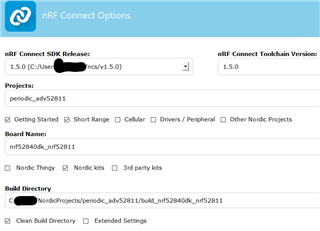
  • I followed the stepps in from https://devzone.nordicsemi.com/nordic/nrf-connect-sdk-guides/b/getting-started/posts/nrf-connect-sdk-tutorial---part-1-ncs-v1-4-0 and tried the same for a sample project from ncs (periodic_adv).

    Copied Folder with the sample (periodic_adv) à open Segger embedded Studio via nrf Connect / Toolchain Manager à Choose file, Open nRF Connect SDK Projet à used the settings from the picture above à changed nothing and just build the solution

    Anyway, we have a working prototype with the old SDK and the nrf52811. I just wanted to evaluate if it is possible to switch. So, the bottom-line is, the new SDK is too heavy for the smaller Chips, right? Or at least for the most applications.

  • OK, I get it. I installed both zephyrproject and ncs. Although both use Zephyr, there is a apparently quite a difference between the two concerning Bluetooth. I compiled the project once with ncs, once with the classical zephyr project and there is a difference of 8kB and that is due to the presence of the Softdevice in ncs (which is absent in Zephyrproject, a different Bluetooth stack is used there). NCS should allow to use that alternative Bluetooth stack, I think?

Reply
  • OK, I get it. I installed both zephyrproject and ncs. Although both use Zephyr, there is a apparently quite a difference between the two concerning Bluetooth. I compiled the project once with ncs, once with the classical zephyr project and there is a difference of 8kB and that is due to the presence of the Softdevice in ncs (which is absent in Zephyrproject, a different Bluetooth stack is used there). NCS should allow to use that alternative Bluetooth stack, I think?

Children
No Data
Related