
Sorry I thought that dropping the document in the pane would post its contents.
Nordic secure_bootloader_uart_mbr_pca10056_debug questions
The project uses custom hardware with the MIMEW nRF52833 Module MS88SF2 connected to a Silabs ARM microcontroller. For now, we will update only our Nordic application and not the SoftDevice or bootloader. The update will be performed via the serial channel and not by way of the BLE interface. We do not have a button on the Nordic board so I plan to set the NRF_POWER_GPREGRET register and repower the Nordic board to enter bootloader mode.
I use the latest SDK 17.0.2. This is my first time uses the Nordic secure bootloader. I tried looking for answers on the forum but there is a lot of older stuff from previous SDK versions.
I understand that the uECC has a license that prevents it distribution in your example projects, but I would think that all of the SDK config defines would be set correctly for it. I finally got it to compile by the following steps. I may have gotten something wrong.
I work on the pca10056_uart_debug project in SES.
I added my publc key to the project.
Changed NRF_BL_DFU_ENTER_METHOD_BUTTON to zero.
Got uECC.h: No such file or directory
Got:
#error "More than one backend enabled for secp256r1 (NIST 256-bit).");
Got:
Linking secure_bootloader_uart_mbr_pca10056_debug.elf
Output/Release/Obj/secure_bootloader_uart_mbr_pca10056_debug/nrf_crypto_ecc.o:E:/Nordic/nRF5_SDK_17.0.2_d674dde/components/libraries/crypto/nrf_crypto_ecc.c:376: undefined reference to `nrf_crypto_backend_micro_ecc_public_key_from_raw'
Output/Release/Obj/secure_bootloader_uart_mbr_pca10056_debug/nrf_crypto_ecc.o:(.rodata.public_key_from_raw_impl+0x4): undefined reference to `nrf_crypto_backend_micro_ecc_public_key_from_raw'
Output/Release/Obj/secure_bootloader_uart_mbr_pca10056_debug/nrf_crypto_ecc.o:(.rodata.public_key_from_raw_impl+0x8): undefined reference to `nrf_crypto_backend_micro_ecc_public_key_from_raw'
Output/Release/Obj/secure_bootloader_uart_mbr_pca10056_debug/nrf_crypto_ecc.o:(.rodata.public_key_from_raw_impl+0xc): undefined reference to `nrf_crypto_backend_micro_ecc_public_key_from_raw'
Output/Release/Obj/secure_bootloader_uart_mbr_pca10056_debug/nrf_crypto_ecdsa.o:E:/Nordic/nRF5_SDK_17.0.2_d674dde/components/libraries/crypto/nrf_crypto_ecdsa.c:153: undefined reference to `nrf_crypto_backend_micro_ecc_verify'
Output/Release/Obj/secure_bootloader_uart_mbr_pca10056_debug/nrf_crypto_ecdsa.o:(.rodata.verify_impl+0x4): undefined reference to `nrf_crypto_backend_micro_ecc_verify'
Output/Release/Obj/secure_bootloader_uart_mbr_pca10056_debug/nrf_crypto_ecdsa.o:(.rodata.verify_impl+0x8): undefined reference to `nrf_crypto_backend_micro_ecc_verify'
Output/Release/Obj/secure_bootloader_uart_mbr_pca10056_debug/nrf_crypto_ecdsa.o:(.rodata.verify_impl+0xc): undefined reference to `nrf_crypto_backend_micro_ecc_verify'
Output/Release/Obj/secure_bootloader_uart_mbr_pca10056_debug/nrf_dfu_validation.o: in function `crypto_init':
undefined reference to `g_nrf_crypto_ecc_secp256r1_curve_info'
<folder Name="ECC">
<file file_name="$(NORDIC_SDK)/components/libraries/crypto/backend/micro_ecc/micro_ecc_backend_ecc.c" />
<file file_name="$(NORDIC_SDK)/components/libraries/crypto/backend/micro_ecc/micro_ecc_backend_ecdh.c" />
<file file_name="$(NORDIC_SDK)/components/libraries/crypto/backend/micro_ecc/micro_ecc_backend_ecdsa.c" />
</folder>
I used the nRF Connect Programmer, erased all and then wrote the Bootloader & the s140_nrf52_7.2.0_softdevice.hex. I did not flash our application so I was expecting to be able to communicate with the Bootloader from our ARM host until the bootloader timed out but this was not the case. When I ran the Bootloader code from the debug the host could communicate with the Bootloader although I got errors. When I flashed the bootloader, softdevice and our application, the application runs but it may not be running by way of the bootloader.
Why does the bootloader seem not to run after flashing and powering up the board and not using the debugger?
09/03/2021 08:32:37[dfu_serial.c: 249] Set Packet Receipt Notification 0
09/03/2021 08:32:37[dfu_serial.c: 626] Sending init packet...
09/03/2021 08:32:37[dfu_serial.c: 302] Selecting Object: type:1
09/03/2021 08:32:37[dfu_serial.c: 321] Object selected: max_size:512 offset:0 crc:0x00000000
09/03/2021 08:32:37[dfu_serial.c: 447] Streaming Data: len:141 offset:0 crc:0x00000000
09/03/2021 08:32:37[dfu_serial.c: 462] Invalid offset (141 -> 29)!
09/03/2021 08:32:37[dfu_serial.c: 468] Invalid CRC (0x253B65F6 -> 0xB91AF43D)!
Here is the Bootloader and soft device programmer map:
When generating the application dfu package I used the following command:
nrfutil pkg generate --hw-version 52 --application-version 1 --application app.hex --sd-req 0xCA --key-file priv.pem app_dfu_package.zip
I used 0xCA since I could not find a number for the s140_nrf52_7.2.0_softdevice.
It does not appear in the list. Is this command OK as I did it?
In Nordic application I had to change the memory placements as below.
FLASH_PH_START=0x0
FLASH_PH_SIZE=0x100000
RAM_PH_START=0x20000000
RAM_PH_SIZE=0x40000
FLASH_START=0x27000
FLASH_SIZE=0xd9000
RAM_START=0x200043a8
RAM_SIZE=0x3bc58
The plan is to have the host send to the running Nordic application a command to write to the NRF_POWER_GPREGRET register and upon received a valid reply, repower the Nordic board so it will enter the bootloader.
I used Jimmy Wong’s Serial DFU Host Application (By using C programming language) program as a basis for my ARM host update Application code. He based it on SDK v15.2 (nRFUtil 3.5.0 protocol) and not SDK 17.0.2. Has there been changes?
When I run the bootloader in the debugger on the Nordic board, the host can ping the bootloader and stream the dat file from the app_dfu_package (which 141 bytes of size) but I get a reply from the bootloader that the offset should be 29 and the CRC is incorrect. This is a result of the NRF_DFU_OP_CRC_GET command reply.
Why is the bootloader expecting 29 bytes and CRC incorrect?
09/03/2021 08:32:37[dfu_serial.c: 249] Set Packet Receipt Notification 0
09/03/2021 08:32:37[dfu_serial.c: 626] Sending init packet...
09/03/2021 08:32:37[dfu_serial.c: 302] Selecting Object: type:1
09/03/2021 08:32:37[dfu_serial.c: 321] Object selected: max_size:512 offset:0 crc:0x00000000
09/03/2021 08:32:37[dfu_serial.c: 447] Streaming Data: len:141 offset:0 crc:0x00000000
09/03/2021 08:32:37[dfu_serial.c: 462] Invalid offset (141 -> 29)!
09/03/2021 08:32:37[dfu_serial.c: 468] Invalid CRC (0x253B65F6 -> 0xB91AF43D)!

Hi,
Sorry for the delay.
1. It seems you haven't select NRF_CRYPTO_BACKEND_NRF_SW_ENABLED and disable NRF_CRYPTO_BACKEND_CC310_BL_ENABLED and added source files and head file for nRF5_SDK\external\micro-ecc\nrf52hf_armgcc\armgcc\micro_ecc_lib_nrf52.a, \components\libraries\sha256 and components\libraries\crypto\backend\nrf_sw
I attached here my project files pca10056_uart_debug_266089.zip, could you please try to put it under nRF5_SDK_17.0.2\examples\dfu\secure_bootloader and compile?
2.
DavidKaplan said:Why does the bootloader seem not to run after flashing and powering up the board and not using the debugger?
Are you using secure_bootloader_uart_mbr_pca10056_debug?
Can you use the J-Link RTT view to connect the DK? You suppose to see the debug log from the RTT view, and enter the command to start the DFU process over the serial link as Secure DFU Bootloader over Serial Link (UART/USB) doc.
3.
DavidKaplan said:It does not appear in the list. Is this command OK as I did it?
The Firmware ID of this SoftDevice is 0x0100. See page.2 of s140_nrf52_7.2.0_release-notes.pdf under nRF5_SDK_17.0.2\components\softdevice\s140\doc
Should correct like this
nrfutil pkg generate --hw-version 52 --application-version 1 --application app.hex --sd-req 0x0100 --key-file priv.pem app_dfu_package.zip
4.
DavidKaplan said:Why is the bootloader expecting 29 bytes and CRC incorrect?
Does the new package instruction fix the issue?
-Amanda H
I tried following your instructions with my ARM host connected to the MIMEW board so I decided to flash the bootloader directly to the Nordic SDK and use Jimmy Wong's C++ program by the SDK's USB interface.
I also did not succeed.
Here is what I did.
Thanks You.
1) Bootloader
a) Copied pca10056_uart_debug_266089 zip to E:\Nordic\nRF5_SDK_17.0.2_d674dde\examples\dfu\secure_bootloader
b) Cleared button and hardware flow control
//==========================================================
// <e> NRF_BL_DFU_ENTER_METHOD_BUTTON - Enter DFU mode on button press.
//==========================================================
#ifndef NRF_BL_DFU_ENTER_METHOD_BUTTON
#define NRF_BL_DFU_ENTER_METHOD_BUTTON 0
#endif
// <o> NRF_BL_DFU_ENTER_METHOD_BUTTON_PIN - Button for entering DFU mode.
//==========================================================
// <q> NRF_DFU_SERIAL_UART_USES_HWFC - HWFC configuration
#ifndef NRF_DFU_SERIAL_UART_USES_HWFC
#define NRF_DFU_SERIAL_UART_USES_HWFC 0
#endif
c) Added to Preprocessor
RX_PIN_NUMBER=8
TX_PIN_NUMBER=6
CTS_PIN_NUMBER=7
RTS_PIN_NUMBER=5
d) Remarked as no leds
static void dfu_observer(nrf_dfu_evt_type_t evt_type)
{
switch (evt_type)
{
case NRF_DFU_EVT_DFU_FAILED:
case NRF_DFU_EVT_DFU_ABORTED:
case NRF_DFU_EVT_DFU_INITIALIZED:
#if LEDS_NUMBER > 0
bsp_board_init(BSP_INIT_LEDS);
bsp_board_led_on(BSP_BOARD_LED_0);
bsp_board_led_on(BSP_BOARD_LED_1);
bsp_board_led_off(BSP_BOARD_LED_2);
#endif
break;
case NRF_DFU_EVT_TRANSPORT_ACTIVATED:
#if LEDS_NUMBER > 0
bsp_board_led_off(BSP_BOARD_LED_1);
bsp_board_led_on(BSP_BOARD_LED_2);
#endif
break;
case NRF_DFU_EVT_DFU_STARTED:
break;
default:
break;
}
}
e) Flashed the built secure_bootloader_uart_mbr_pca10056_debug.hex and s140_nrf52_7.2.0_softdevice.hex (for my program use).
Now the DFU bootloader runs since there is no application.
2) Build my application package app_dfu_package.zip
nrfutil pkg generate --hw-version 52 --application-version 1 --application E:\Projects\Nordic\alfa_laval_gateway\pca10056\s140\ses\Output\Debug\Exe\alfa_laval_gateway_pca10056_s140.hex --sd-req 0x0100 --key-file E:\Projects\Nordic\alfalval_gateway_keys\priv.pem E:\Projects\Nordic\AlfaLavalFlashfiles\app_dfu_package.zip
pause
3) I built Jimmy Wong's c++ program that my ARM host's code is built upon and ran it on my PC connected to the Nordic SDK, since something might have gotten messed up in my conversion code.
In the end I will perform an application update recived by a cellular modem on our ARM host and update the MIMEW board serially.
Jimmy's C++ program also failed when trying to program the data part before it sends the application code.
In dfu_serial_execute_obj() the dfu_serial_get_rsp() returns an error.
jimmywongbluetooth.wordpress.com/.../
Sending Application image.
SLIP: --> [9, 1]
SLIP: <-- [96, 9, 1, 1]
Set Packet Receipt Notification 0
SLIP: --> [2, 0, 0]
SLIP: <-- [96, 2, 1]
SLIP: --> [7]
SLIP: <-- [96, 7, 1, 131, 0]
Sending init packet...
Selecting Object: type:1
SLIP: --> [6, 1]
SLIP: <-- [96, 6, 1, 0, 2, 0, 0, 0, 0, 0, 0, 0, 0, 0, 0]
Object selected: max_size:512 offset:0 crc:0x00000000
SLIP: --> [1, 1, 141, 0, 0, 0]
SLIP: <-- [96, 1, 1]
Streaming Data: len:141 offset:0 crc:0x00000000
SLIP: --> [8, 18, 138, 1, 10, 68, 8, 1, 18, 64, 8, 1, 16, 52, 26, 2, 128, 2, 32, 0, 40, 0, 48, 0, 56, 140, 175, 9, 66, 36, 8, 3, 18, 32, 212, 176, 254, 147, 100, 224, 60, 28, 43, 210, 13, 155, 200, 58, 136, 167, 98, 55, 196, 194, 68, 233, 177, 134, 127, 163, 183, 171, 47, 30, 252]
SLIP: --> [8, 147, 72, 0, 82, 4, 8, 1, 18, 0, 16, 0, 26, 64, 191, 204, 125, 154, 71, 87, 252, 12, 223, 86, 90, 21, 50, 67, 33, 114, 149, 210, 212, 134, 102, 233, 32, 13, 115, 212, 214, 80, 143, 187, 128, 2, 123, 76, 156, 183, 137, 129, 62, 134, 1, 75, 75, 0, 130, 172, 198, 62, 157, 235, 79]
SLIP: --> [8, 192, 112, 57, 190, 116, 143, 0, 214, 130, 56, 229, 181, 185]
SLIP: --> [3]
SLIP: <-- [96, 3, 1, 141, 0, 0, 0, 115, 111, 140, 185]
SLIP: --> [4]
SLIP: <-- [96, 4, 5]
Bad result code (0x5)!
E:\Nordic\nRF5_SDK_17.0.2_d674dde\examples\nrf-slim-serial-uart-dfu-host-c-code-master\Debug\UartSecureDFU.exe (process 21456) exited with code 1.
To automatically close the console when debugging stops, enable Tools->Options->Debugging->Automatically close the console when debugging stops.
Press any key to close this window . . .
Hi,
DavidKaplan said:use Jimmy Wong's C++ program by the SDK's USB interface.
Are you using the USB interface? Since Jimmy's example is based on the Serial (UART) DFU, you might need some modifications.
-Amanda H.

Hi,
You are using the USB interface and run on the UART bootloader , right?
On the UART, it used the 64bytes payload.
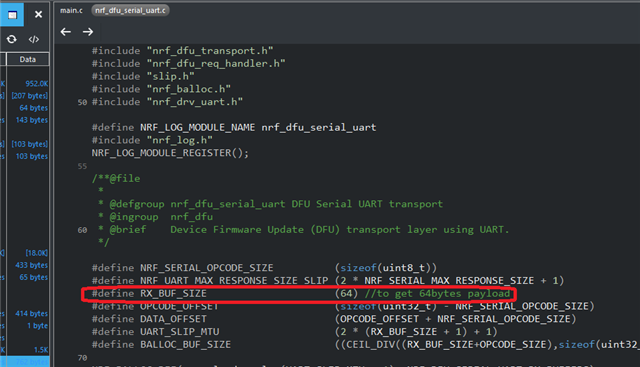
if you use the USB, the size would be changed on both side.

