This post is older than 2 years and might not be relevant anymore
More Info: Consider searching for newer posts

Thread Network duplicating or not persisting Raspberry Pi Border Router

Hello,

I built a network of 3 parts.  Each has a PCA10059 nRF52840 dongle.

Raspberry Pi 3B+ Border Router using the image from 4.1 SDK.  This has the NCP

2X Full Thread devices made with the .hex image from the SDK.

The devices were commissioned/joined using the ThreadGroup Android App.


This network worked yesterday to the extent I could ping an ipv6 address on the web and get a response.  There was 1 thread network.

today I have power cycled the Raspberry Pi and also have restarted the 2 Devices.

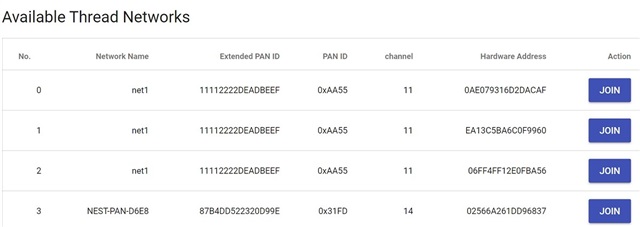
in the OT Border Router gui I now see 2 Thread networks where there was 1 before and also the ping does not appear to work to the web.  One of the FTD has the state Leader and the other has the state Router.  This seems wrong because it seems the Border Router should be the leader?

I also have a Nest Connect Thread network running and I can see that in the Web gui but I don't think that is related because I saw this same behavior before I got that device.  This is a fresh installation where I am re-doing the steps because this problem happened before and I started from the beginning again.


What steps can I take to troubleshoot this?  How can I identify a network as being totally unique?  it isn't the name.

  • using the nRF52840 dongle PCA10059 would I need to re-flash the firmware each time I load a new network configuration with form in the OT Border router interface?

    Does writing the pre-compiled .hex into the dongle also erase any network information and configurations that have been written to the dongle?  I cannot fully erase the dongle because of the bootloader.

  • Hi,

    Are the FTD devices running the CLI firmware? Can you post the output of "panid", "channel", "masterkey", "ipaddr", and "router table" commands?

    If you can also post the output from "sudo wpanctl getprop" command on the Border router, that would be useful.

    Regarding the nRF52840 Dongles, the network data stored in flash is not erased when you program a new application. You can use this hex-file to erase most of the flash between MBR and Bootloader (apart from the first page where application is stored, but this is almost always flashed by next application anyway).

    I believe that the border router will use the settings stored in the NCP flash if it exist, so If you modify the settings after first run, the changes may not apply until you erase the flash.

    Best regards,
    Jørgen

  • yes I am using cli programs on the pca10059 dongle.  Thank you for the link to the .hex file.
    I have used that 2 times. so 4 total writes to the dongle.

    when I connect and open the serial terminal networkname and panid still match my information so the .hex file is not erasing those contents.  there is a factoryreset command that seems to erase at least those values so I will rebuild my network today and try all these solutions.  it will take another day for this and I can post my outcome - thanks!

    the flash program for erasing from the provided link is:
    flasherase_pca10059.hex

    Address Range 0x00001000 - 0x0000161F
    size 1568 bytes

    did I grab the correct file?

  • The CLI example has default values for these parameters that is written to flash the first time "thread start" command is executed.

    Yes, it is the correct hex-file. Programming the hex-file will not erase the flash on its own, but the hex-file contains an application that erase the flash pages from code. You need to wait until the LED lights up as described in the thread, before programming a new application again. By default, the CLI example for PCA10059 stores OT network data from address 0xDC000 and has a length of 0x4000. The hex-file erases all pages between 0x2000 and 0xE0000, which includes the OT data.

  • I was careful to erase 4 pca10059 with the erase hex file and wait 15 seconds for the light to turn on.  then flashed again with the FTD CLI app.  for 3 and NCP for the last dongle to go along with the RPi3B+

    pi@br1:~ $ sudo wpanctl status
    wpan0 => [
    "NCP:State" => "associated"
    "Daemon:Enabled" => true
    "NCP:Version" => "OPENTHREAD/20191113-00534-gc6a258e3; NRF52840; Apr 5 2020 21:51:18"
    "Daemon:Version" => "0.08.00d (; Apr 21 2020 19:11:43)"
    "Config:NCP:DriverName" => "spinel"
    "NCP:HardwareAddress" => [F4CE36AD654E65EC]
    "NCP:Channel" => 11
    "Network:NodeType" => "leader"
    "Network:Name" => "net1"
    "Network:XPANID" => 0x11112222DEADBEEF
    "Network:PANID" => 0xAA55
    "IPv6:LinkLocalAddress" => "fe80::8863:b4d1:3922:8cf9"
    "IPv6:MeshLocalAddress" => "fd11:1122:22de:0:5bd9:35e6:5f38:d517"
    "IPv6:MeshLocalPrefix" => "fd11:1122:22de::/64"
    "com.nestlabs.internal:Network:AllowingJoin" => false
    ]

    > panid
    0xaa55
    Done
    >
    > channel
    11
    Done
    >
    > masterkey
    00112233445566778899aabbccddeeff
    Done
    >
    > ipaddr
    fd11:1122:22de:0:0:ff:fe00:400
    fd11:22:0:0:d4c:aec5:c31b:2c03
    fd11:1122:22de:0:1dea:9468:73ec:4e69
    fe80:0:0:0:8e0:7931:6d2d:acaf
    Done
    >
    > router table
    | ID | RLOC16 | Next Hop | Path Cost | LQ In | LQ Out | Age | Extended MAC |
    +----+--------+----------+-----------+-------+--------+-----+------------------+
    | 1 | 0x0400 | 63 | 0 | 0 | 0 | 0 | 0000000000000000 |
    | 4 | 0x1000 | 11 | 1 | 3 | 3 | 0 | ea13c5ba6c0f9960 |
    | 11 | 0x2c00 | 4 | 1 | 3 | 3 | 29 | 8a63b4d139228cf9 |

    Done

    I used a different passphrase for the joiner on the 2nd device and then became suspicious it caused my apparent duplicate network so I unplugged that and grabbed a different fresh pca10059 ( I have 4 total, so NCP plus 3 potential FTD)

    I still had 2 networks and here is the other set of info

    > panid
    0xaa55
    Done
    > channel
    11
    Done
    > masterkey
    00112233445566778899aabbccddeeff
    Done
    > ipaddr
    fd11:1122:22de:0:0:ff:fe00:1000
    fd11:22:0:0:163:d2b2:1ab6:22c
    fd11:1122:22de:0:cf55:9c4b:3300:fb08
    fe80:0:0:0:e813:c5ba:6c0f:9960
    Done
    > router table
    | ID | RLOC16 | Next Hop | Path Cost | LQ In | LQ Out | Age | Extended MAC |
    +----+--------+----------+-----------+-------+--------+-----+------------------+
    | 1 | 0x0400 | 11 | 1 | 3 | 3 | 24 | 0ae079316d2dacaf |
    | 4 | 0x1000 | 63 | 0 | 0 | 0 | 0 | 0000000000000000 |
    | 11 | 0x2c00 | 1 | 1 | 3 | 3 | 13 | 8a63b4d139228cf9 |

    Done

    and there were 2 networks plus the NEST consumer product showing in the interface.

    I powered up the other 3rd device that I had and ifconfig up and thread start like usual.

    now I have 3 networks? plus the NEST

    > router table
    | ID | RLOC16 | Next Hop | Path Cost | LQ In | LQ Out | Age | Extended MAC |
    +----+--------+----------+-----------+-------+--------+-----+------------------+
    | 1 | 0x0400 | 4 | 1 | 3 | 3 | 14 | 0ae079316d2dacaf |
    | 4 | 0x1000 | 11 | 1 | 3 | 3 | 11 | ea13c5ba6c0f9960 |
    | 11 | 0x2c00 | 4 | 1 | 3 | 3 | 6 | 8a63b4d139228cf9 |
    | 56 | 0xe000 | 63 | 0 | 0 | 0 | 0 | 06ff4ff12e0fba56 |

    Done

    > router table
    | ID | RLOC16 | Next Hop | Path Cost | LQ In | LQ Out | Age | Extended MAC |
    +----+--------+----------+-----------+-------+--------+-----+------------------+
    | 1 | 0x0400 | 63 | 0 | 0 | 0 | 0 | 0000000000000000 |
    | 4 | 0x1000 | 11 | 1 | 3 | 3 | 25 | ea13c5ba6c0f9960 |
    | 11 | 0x2c00 | 4 | 1 | 3 | 3 | 19 | 8a63b4d139228cf9 |
    | 56 | 0xe000 | 4 | 1 | 3 | 3 | 20 | 06ff4ff12e0fba56 |

    > router table
    | ID | RLOC16 | Next Hop | Path Cost | LQ In | LQ Out | Age | Extended MAC |
    +----+--------+----------+-----------+-------+--------+-----+------------------+
    | 1 | 0x0400 | 11 | 1 | 3 | 3 | 12 | 0ae079316d2dacaf |
    | 4 | 0x1000 | 63 | 0 | 0 | 0 | 0 | 0000000000000000 |
    | 11 | 0x2c00 | 1 | 1 | 3 | 3 | 13 | 8a63b4d139228cf9 |
    | 56 | 0xe000 | 11 | 1 | 3 | 3 | 9 | 06ff4ff12e0fba56 |

    Done

    I am using the ThreadGroup Android APP from the Google Play store.  I am putting my pc and the phone onto the AP of the Raspberry Pi router.  I don't prefer this but if I use the ethernet interface of the Raspberry Pi the network connection is so slow as to be virtually unusable.

Related