This post is older than 2 years and might not be relevant anymore
More Info: Consider searching for newer posts

radio_test example (hex files)

Hi,

We are working on a new product with "nRF52832" IC. We want to test our design RF antenna (PCB trace Antenna) performance. For RF test we found an example code and .hex files in the SDK-examples folder.
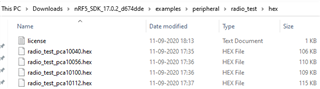
We used these hex files to test the "nRF52832" RF, but there is no response from the module. We don't see any debug on putty when power ON when we send commands over UART(serial comm). We also used the hex file after compiling the code, even though it is not working for us.

We followed the below documentation for testing the RF.
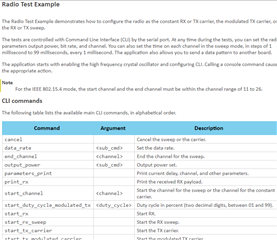
Please help us on how to move further or please share the hex file (RF test code) that works for RF testing.

  • Hello,

    I presume you have made your own hardware here, in that case you should check that the default pins are the ones you are using also, if not you may need to re-compile the project with your specific settings:

    static void cli_init(void)
    {
        ret_code_t ret;
    
        nrf_drv_uart_config_t uart_config = NRF_DRV_UART_DEFAULT_CONFIG;
    
        uart_config.pseltxd = TX_PIN_NUMBER;
        uart_config.pselrxd = RX_PIN_NUMBER;
        uart_config.hwfc    = NRF_UART_HWFC_DISABLED;
        ret                 = nrf_cli_init(&m_cli_uart, &uart_config, true, true, NRF_LOG_SEVERITY_INFO);
        APP_ERROR_CHECK(ret);
    }

    For the nRF52832 I suspect you are by default using the pca10040 project (nRF52-DK), in which case these are the pins that by default are used:

    #define RX_PIN_NUMBER 8
    #define TX_PIN_NUMBER 6

    Also, by default you can see there is no HWFC (in other words there is no RTS and CTS pins).

    The default baudrate is 115200, this can also be changed in UART_DEFAULT_CONFIG_BAUDRATE in sdk_config.h

    Each time you reset or power on the module you should see a "Radio test example started." in the terminal window, you can connect a logic analyzer to double check you have not mixed RX and TX pins, and that the voltage is correct.

    Hope that helps,
    Kenneth

Related