Hi ,
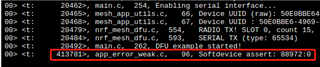
We are going to update our mesh software via DFU, follow the step of mesh 5.0 SDK DFU guide. we success build bootlader , data page, and dfu demo app (Set NRF_SDH_CLOCK_LF_SRC in sdk_config.h to 0 and NRF_SDH_CLOCK_LF_RC_CTIV = 16 since a softdevice assert error) . after flashing all hex into device and try to DFU but no any response from device
nrfutil --verbose dfu serial -pkg dfu_test.zip -p COM20 -b 115200 -fc --mesh
following is the print back information of terminal
Upgrading target on COM20 with DFU package D:\work\TianHuan\meshDfu\dfu_test\dfu_test.zip. Flow control is enabled.
Flushing com-port...
Opened com-port
Starting DFU upgrade of type 4, SoftDevice size: 0, bootloader size: 0, application size: 133372
Sending DFU start packet, afterwards we wait for the flash on target to be initialized before continuing.
1: PC -> target: 0502aabbccdd
2: PC -> target: 0502aabbccdd
3: PC -> target: 0502aabbccdd
4: PC -> target: 0502aabbccdd
5: PC -> target: 0502aabbccdd
6: PC -> target: 0502aabbccdd
7: PC -> target: 0502aabbccdd
8: PC -> target: 0502aabbccdd
9: PC -> target: 0502aabbccdd
10: PC -> target: 0502aabbccdd


Failed to upgrade target. Error is: Failed to establish connection

Possible causes:
- bootloader, SoftDevice or application on target does not match the requirements in the DFU package.
- baud rate or flow control is not the same as in the target bootloader.
- target is not in DFU mode. If using the SDK examples, press Button 4 and RESET and release both to enter DFU mode.
- if the error is ERROR_BUSY at the beginning of the DFU process,increase the value of PAGE_ERASE_TIME_MAX by few milliseconds.
Closing serial port...
Try use bootloader veryfy script
python bootloader_verify.py 69612633 COM20
Reading UICR..                  OK.
Reading Device page..           OK.
<--hung at here, even press ctrl+c. If directly broken hardware serial connection
Reading UICR..                  OK.
Reading Device page..           OK.
Resetting device..              Traceback (most recent call last):
  File "D:\work\TianHuan\synsor\SRC\nordicMesh-v5.0\tools\dfu\bootloader_verify.py", line 176, in <module>
    reset_device(sys.argv[1], sys.argv[2])
  File "D:\work\TianHuan\synsor\SRC\nordicMesh-v5.0\tools\dfu\bootloader_verify.py", line 125, in reset_device
    response = read_serial_event(s)
  File "D:\work\TianHuan\synsor\SRC\nordicMesh-v5.0\tools\dfu\bootloader_verify.py", line 40, in read_serial_event
    length = s.read()
  File "C:\Users\yugr_\AppData\Local\Programs\Python\Python39\lib\site-packages\serial\serialwin32.py", line 288, in read
    result_ok = win32.GetOverlappedResult(
KeyboardInterrupt
^C
I checked both bootloader and DFU demo application, bootloader set serial flowcontrol =false, but dfu demo set true. I also try remove -fc paramter and got same result.
So how to debugging this serail communication issue?
Yu Guorong.