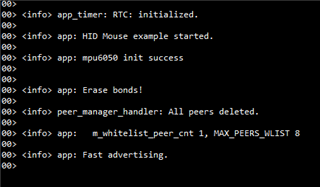
Hello, I use the internal crystal, the application in my board runs normally and it shows the board is in fast advertising state. However, I can't find bluetooth signal through my mobile phone, what should I do?

Hello, I use the internal crystal, the application in my board runs normally and it shows the board is in fast advertising state. However, I can't find bluetooth signal through my mobile phone, what should I do?
Hi
Can you provide some more details regarding your mobile device. Are you using a mobile app for scanning for BLE devices or the "default" Bluetooth settings? I would suggest using our nRFConnect app for Android for scanning, and making sure that the location services are enabled on the app (no matter which one you're using really).
Have you made any other changes to the HID mouse example other than switching which LF crystal you're using. Are you using a custom board as well or one of our Development Kits? Iwould suggest making sure that your example runs on a DK before moving to a custom board, as that makes it easier to narrow down where the issue is (HW or SW).
Best regards,
Simon
Thanks for your help! I am using "default" Bluetooth settings to search at first, however, when I change it into nRFConnect app for Android, I can't find my device either(the location sevices are enabled).
I have changed the HID example, and it runs well on DK, I can search the bluetooth signal, however, when I runs it on my boards, I can't search it anymore, so I think it is a HW issue.
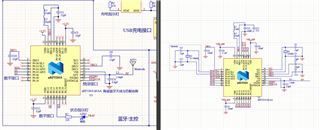
the schematic of my board is on the left, and the official schematic is on the right.
Thanks for your help! I am using "default" Bluetooth settings to search at first, however, when I change it into nRFConnect app for Android, I can't find my device either(the location sevices are enabled).
I have changed the HID example, and it runs well on DK, I can search the bluetooth signal, however, when I runs it on my boards, I can't search it anymore, so I think it is a HW issue.
the schematic of my board is on the left, and the official schematic is on the right.