This post is older than 2 years and might not be relevant anymore
More Info: Consider searching for newer posts

NRF52832DK flash programming + battery questions

Hello,

I am trying to test nRF52832DK with standalone environment.

Since now, I am testing with segger embedded studio environment(with debugging)

So, I am now testing with flash program and battery.

However, the program is not running without SES.

I tried some of method as below.

1) download program like below
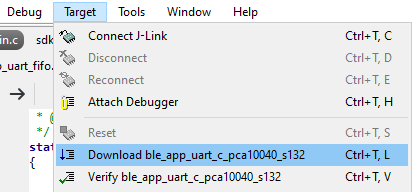
2) download file(with .elf file format)

3) nRF connect program

Add HEX file and write program

for me, the three method is not working I think.

Is any flash programming method ? (or I doing something wrong?)

When I am testing flash environment, the debugging is not possible, so its more hard to find the problem(or present state).

The second question is nRF52832 DK battery.

I found the documents, but I can't find any Jumper or H/W setting for using battery.

But when I connect battery, the power is not transfer I think.

(other power, i.e. USB cable, external power line is not connected)

Should I check something for these problem?

Thank you for reading my questions.

Best Regards,

Yclee.

Parents
  • Hi Yclee

    I would suggest you Erase the kit before programming. 

    1) download program like below

    If you erase the DK before downloading the images, you could observe that the BSP_INDICATE_SCANNING state is indicated on the DK. You will see from the segger log that it loads two images.  

    Downloading ‘s132_nrf52_7.2.0_softdevice.hex’ to J-Link

    Downloading ‘ble_app_uart_c_pca10040_s132.elf’ to J-Link

    2) download file(with .elf file format)

    Segger only downloaded ‘ble_app_uart_c_pca10040_s132.elf’ to DK wthout sfotdevice image. You also need to porgram softdevice image under nRF5_SDK\components\softdevice\s132\hex for the ble application. 

    3) nRF connect program

    You need to add ble_app_uart_c_pca10040_s132 and sfotdevice image to look like this:


    I found the documents, but I can't find any Jumper or H/W setting for using battery.

     See DK Power supply doc.

    -Amanda H.


Reply
  • Hi Yclee

    I would suggest you Erase the kit before programming. 

    1) download program like below

    If you erase the DK before downloading the images, you could observe that the BSP_INDICATE_SCANNING state is indicated on the DK. You will see from the segger log that it loads two images.  

    Downloading ‘s132_nrf52_7.2.0_softdevice.hex’ to J-Link

    Downloading ‘ble_app_uart_c_pca10040_s132.elf’ to J-Link

    2) download file(with .elf file format)

    Segger only downloaded ‘ble_app_uart_c_pca10040_s132.elf’ to DK wthout sfotdevice image. You also need to porgram softdevice image under nRF5_SDK\components\softdevice\s132\hex for the ble application. 

    3) nRF connect program

    You need to add ble_app_uart_c_pca10040_s132 and sfotdevice image to look like this:


    I found the documents, but I can't find any Jumper or H/W setting for using battery.

     See DK Power supply doc.

    -Amanda H.


Children
Related