This post is older than 2 years and might not be relevant anymore
More Info: Consider searching for newer posts

BLE Read-Write using nrf connect application

Hello,

i am using "ble_app_uart" example code in nrf SDK to connect to bluetooth and to read-write the data after connection through nrf connect application.

write part: (write data to nrf52832 from nrf connect application)

             after connection if i send any data through nrf connect application in firmware  "BLE_GATTS_EVT_WRITE:" event is generating and  i am able receicve the data.

read part: ( read data from nrf52832 using nrf connect application)

in example code tx characteristic is initialized as notify, but i want  data read from nrf connect app so i changed tx characteristic to read  by modifiying code as below.
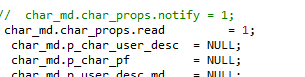
 after modification from nrf connect app i am trying to read data but no event is generating in firmware 
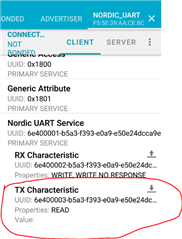
where i am doing wrong? am i using correct example code? what other changes i need to make in "ble_app_uart" example code to read and write data from nrf connect application?

my requirement is:

                         1) to connect to nrf52832 from  nrf connect application.

                          2)when nrf connect send wite i want to receive data(working correctly this part)

                         3)when nrf connect send read i want to replay some data ( not working this part)

thanks

varun.

  • Hi,

    my requirement is:

                             1) to connect to nrf52832 from  nrf connect application.

                              2)when nrf connect send wite i want to receive data(working correctly this part)

                             3)when nrf connect send read i want to replay some data ( not working this part)

     Try to enable both notification and read properties for the TX characteristic.

    Snippet:

        // Add the TX Characteristic.
        /**@snippet [Adding proprietary characteristic to the SoftDevice] */
        memset(&add_char_params, 0, sizeof(add_char_params));
        add_char_params.uuid              = BLE_UUID_NUS_TX_CHARACTERISTIC;
        add_char_params.uuid_type         = p_nus->uuid_type;
        add_char_params.max_len           = BLE_NUS_MAX_TX_CHAR_LEN;
        add_char_params.init_len          = sizeof(uint8_t);
        add_char_params.is_var_len        = true;
        add_char_params.char_props.notify = 1;
        add_char_params.char_props.read   = 1;
    
        add_char_params.read_access       = SEC_OPEN;
        add_char_params.write_access      = SEC_OPEN;
        add_char_params.cccd_write_access = SEC_OPEN;
    
        return characteristic_add(p_nus->service_handle, &add_char_params, &p_nus->tx_handles);
        /**@snippet [Adding proprietary characteristic to the SoftDevice] */

Related