
Hello,
How do disable code optimization in SES Nordic Edition when using nRF Connect SDK? I can't find "Options - Code Generation - Optimization Level" as when using nRF5 SDK.
Best regards,
Lars

Hello,
How do disable code optimization in SES Nordic Edition when using nRF Connect SDK? I can't find "Options - Code Generation - Optimization Level" as when using nRF5 SDK.
Best regards,
Lars
Hi Lars,
This is done using Kconfig configurations. Have a look at the following alternatives from the Kconfig Reference:
You can condigure these in prj.conf or using Project --> Configure nRF Connect SDK project in SES.
The KConfig Reference is available found in the drop-down menu in the bottom right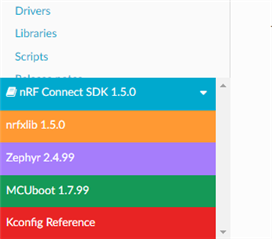
Kind regards,
Øyvind
Hi Lars,
This is done using Kconfig configurations. Have a look at the following alternatives from the Kconfig Reference:
You can condigure these in prj.conf or using Project --> Configure nRF Connect SDK project in SES.
The KConfig Reference is available found in the drop-down menu in the bottom right
Kind regards,
Øyvind
Hi Øyvind,
And thanks for your fast response! I can't find the same menu as you show in the picture. I selected "Configure nRF Connect SDK Project...", and came to this window: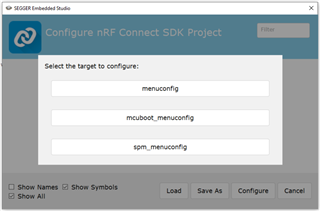
I click menuconfig, and in the search box at the upper right I type "optimization". Then I get the list shown below: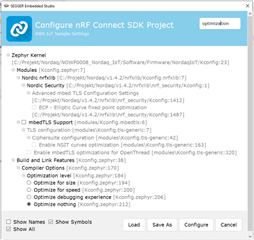
So it seems anyway that I am able to adjust the optimization. I select "Optimize nothing", and click "Configure". After recompiling and debugging I get into real trouble. The last row of code that works is this:

Then I come to file fault_s.S. So the program starts over and over again. As you can see I have started my development from the aws_iot-example.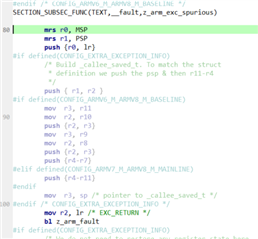
By reselecting "Optimize for size", things work as before. Am I doing something wrong?
In the picture you show it seems you run nRF Connect V1.5.0. Where do I find the menu shown in the picture? I thought it would pop up when selecting "Configure nRF Connect SDK Project...". I run V1.4.2, so I installed V1.5.0 instead. But then I got a lot of compilation errors:

Am I doing something wrong?
Anyway, when selecting "Configure nRF Connect SDK Project..." in V1.5.0 it looks the same as in V1.4.2, no colourful menu pops up.
Best regards,
Lars
Lars,
I'm sorry, the picture of the menu is from the documentation. I forgot the add a link and specify that  Click here to go to our NCS documentation and then you'll find the drop down (colorful) menu in the bottom left.
Lars M said:I click menuconfig, and in the search box at the upper right I type "optimization". Then I get the list shown below:
This is correct. The four alternatives in the bottom are the same as I linked to.
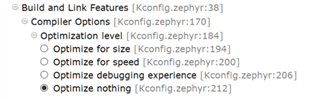
These are set either using menuconfig or added to prj.conf in your project folder. If doing the latter, you will need to reload the project in SES or run Project --> Run CMake.
Lars M said:Am I doing something wrong?
I will need to reproduce the issue here. What changes have you done to the aws_iot sample? Are you able to test with the default sample (no changes added) from v1.5.0?
Kind regards,
Øyvind
Hi Øyvind,
Sorry for the menu-issue, I should have understood where to find the colourful menu :-)
I have kept everythng from the aws_iot-example that has to do with connection. I use nRF9160DK with a few circuits added. In main() I initialize my devices, and then continue with what's in main from the aws_iot.
I have now tested the bare aws_iot-example, both in V1.5.0 and in V1.4.2. Both work fine in their respective version. But when I look in the beginnig of main.c there are differences in the include-part. In V1.5.0 a part of the includes looks like this:
#if defined(CONFIG_NRF_MODEM_LIB)
#include <modem/lte_lc.h>
#include <modem/nrf_modem_lib.h>
#include <modem/at_cmd.h>
#include <modem/at_notif.h>
#include <modem/modem_info.h>
#include <nrf_modem.h>
#endif
In V1.4.2 it instead looks like this:
#if defined(CONFIG_BSD_LIB)
#include <modem/lte_lc.h>
#include <modem/bsdlib.h>
#include <modem/at_cmd.h>
#include <modem/at_notif.h>
#include <modem/modem_info.h>
#include <bsd.h>
#endif
When I open my project in V1.5.0 that include-part is greyed-out. The things I get compile-errors on are at least in modem_info, which seems not to be included when running V1.5.0. Do you agree?
So, for start using V1.5.0, should I just replace this part of the includes? Are there more things I need to update?
I have tested to "Optimize debugging experience", but I get the same problem as with "Optimize nothing".
Best regards,
Lars
Hi Lars,
The bsdlib has been renamed in v1.5.0. From the release notes:
BSD library has been renamed to nrf_modem (Modem library) and nrf_modem_lib (glue).
Updated to version 1.0.1. See the Changelog for detailed information.
This means that you need to verify that you have renamed all corresponding functions.
Sounds like the issue is with the circuits that you have added, if you are not seeing the same issues using default projects.
-Øyvind
Hi Øyvind,
I guess I was unclear, but I kept the include-part that works in V1.4.2 when running V1.5.0. So that was the problem. Now I have updated that part, and also a call to a function that changed names. And now I have my custom project working in V1.5.0 :-)
So now we have eliminated some issues and questions. "Only" the optimization issue is left.
Best regards,
Lars

