I'm using the nRF5340 board, nRF Connect SDK v1.5.0 and the nRF Connect app.
I am also using the example code "beacon" and all the data with integer format that I transmit to the app is arriving corrupted, for example 0x04, etc.
Before writing here I already used many resources and none works, try to convert to string, to char and check the types.h library.
I'm coming to think that the problem is the Android app, because this action is very easy to do with App Inventor, or with Android Studio.
If someone has the solution, I ask you to share it with everyone.
Is "0x04" what the data looks like before you send it, or when you receive it? We would need to know what it looks like in both ends, in order to have any idea what it might be.
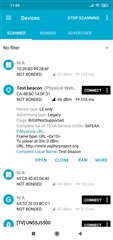
Can you share the lines of code where you set the data? And a screenshot from nRF Connect?
Is "0x04" what the data looks like before you send it, or when you receive it? We would need to know what it looks like in both ends, in order to have any idea what it might be.
Can you share the lines of code where you set the data? And a screenshot from nRF Connect?
Thanks for your interest in this issue. Below I describe a summary:
1. I use the example code "beacon" (...\ncs\v1.5.0\zephyr\samples\bluetooth\ibeacon) because I want to send the data from an analog sensor to the Connect app, and first at all I want to simulate the sending of data in integer format. Below I show you the "main.c" code and a screenshot without making changes:
#include <zephyr/types.h>
#include <stddef.h>
#include <sys/printk.h>
#include <sys/util.h>

#include <bluetooth/bluetooth.h>
#include <bluetooth/hci.h>

#define DEVICE_NAME CONFIG_BT_DEVICE_NAME
#define DEVICE_NAME_LEN (sizeof(DEVICE_NAME) - 1)

/*
* Set Advertisement data. Based on the Eddystone specification:
* https://github.com/google/eddystone/blob/master/protocol-specification.md
* https://github.com/google/eddystone/tree/master/eddystone-url
*/
static const struct bt_data ad[] = {
BT_DATA_BYTES(BT_DATA_FLAGS, BT_LE_AD_NO_BREDR),
BT_DATA_BYTES(BT_DATA_UUID16_ALL, 0xaa, 0xfe),
BT_DATA_BYTES(BT_DATA_SVC_DATA16,
0xaa, 0xfe, /* Eddystone UUID */
0x10, /* Eddystone-URL frame type */
0x00, /* Calibrated Tx power at 0m */
0x00, /* URL Scheme Prefix http://www. */
'z', 'e', 'p', 'h', 'y', 'r',
'p', 'r', 'o', 'j', 'e', 'c', 't',
0x08) /* .org */
};

/* Set Scan Response data */
static const struct bt_data sd[] = {
BT_DATA(BT_DATA_NAME_COMPLETE, DEVICE_NAME, DEVICE_NAME_LEN),
};

static void bt_ready(int err)
{
char addr_s[BT_ADDR_LE_STR_LEN];
bt_addr_le_t addr = {0};
size_t count = 1;
if (err) {
printk("Bluetooth init failed (err %d)\n", err);
return;
}

printk("Bluetooth initialized\n");

/* Start advertising */
err = bt_le_adv_start(BT_LE_ADV_NCONN_IDENTITY, ad, ARRAY_SIZE(ad),
sd, ARRAY_SIZE(sd));
if (err) {
printk("Advertising failed to start (err %d)\n", err);
return;
}
/* For connectable advertising you would use
* bt_le_oob_get_local(). For non-connectable non-identity
* advertising an non-resolvable private address is used;
* there is no API to retrieve that.
*/
bt_id_get(&addr, &count);
bt_addr_le_to_str(&addr, addr_s, sizeof(addr_s));
printk("Beacon started, advertising as %s\n", addr_s);
}

void main(void)
{
int err;
printk("Starting Beacon Demo\n");
/* Initialize the Bluetooth Subsystem */
err = bt_enable(bt_ready);
if (err) {
printk("Bluetooth init failed (err %d)\n", err);
}
}
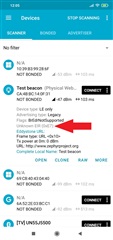
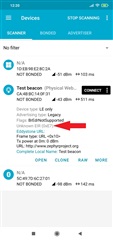
2.- Now I make a small change to the code "main.c" to see the integer value: 999, and I see the 0xE7 in the app.
4.- Today I'm working with strings using "sprintf". The code below compiles fine, but I still don't know how to add the string "buffer" to the data of "static const struct bt_data ad []":
int test()
{
char buffer[50];
int a = 10, b = 20, c;
c = a + b;
sprintf(buffer, "Sum of %d and %d is %d", a, b, c);

// The string "sum of 10 and 20 is 30" is stored
// into buffer instead of printing on stdout

return 0;
}
I feel like I'm close to the solution, and I'm just trying ideas and none of them satisfy me ... Anything on your mind?