

Hello,
We are about to release a Firmware update for our vibration sensors and we are now testing the consumption of the new firmware.
Our sensor is a nRF51822 + Accelerometer + CR2477.
On the previous firmware version we were using TWI to communicate with the Accelerometer.
O the new version we changed to SPI for a faster buffer reading and therefore, lower consumption (at least in theory).
Our development is currently happening with all the engineers working at home, so everybody has the necessary hardware to develop (on this case nRF52DK + PPK I).
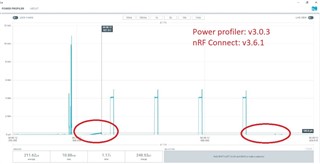
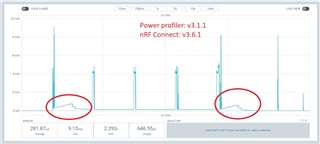
The problem is that we are getting very different results with the same DKs, PPKs, hardware and Firmware. The only difference between both setups is the "nRFconnect for desktop" and "power profiler".
We are getting a HUGE difference between both setups. Which rises a few big questions/concerns:
- Are the new software versions more or less reliable?
- Should we trust on either of them, even with such a big difference between updates?
- If we are terribly wrong about our interpretation of facts, can you help us with a solution for the awkward results we are getting?
- Can we roll back to previous versions of the softwares?
The following images shows the difference of the readings on both setups with the same HW and FW.
Thanks a lot!

