This post is older than 2 years and might not be relevant anymore
More Info: Consider searching for newer posts

Controlling another LED by adding a new characteristic to ble_app_blinky project in ble_peripheral

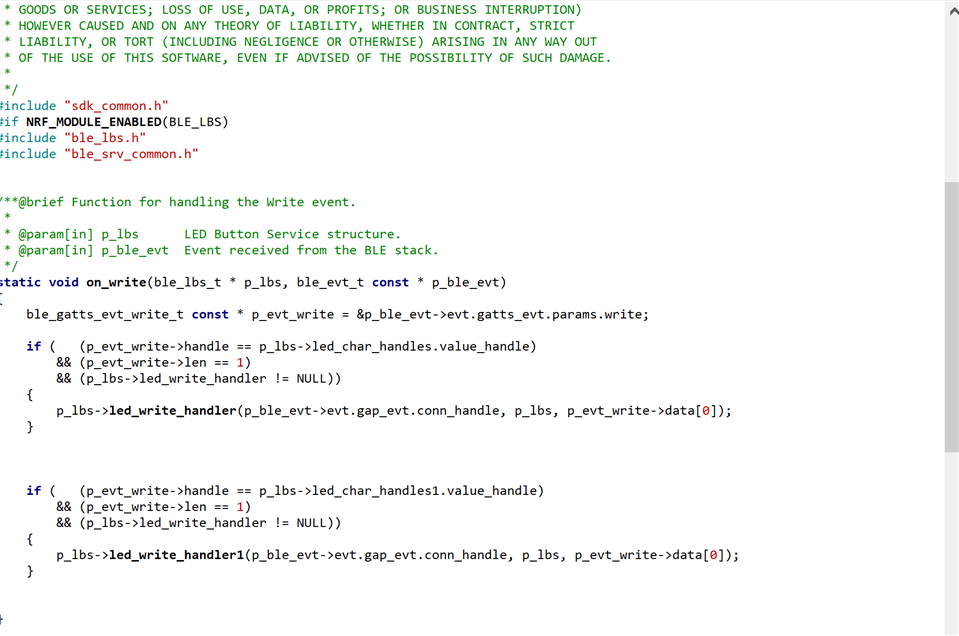
Hello all i want to do a task that is control another LED using ble_app_blinky. In the ble_app_blinky project a characteristic is used to control an onboad LED. I have connected a LED to pin 20 and want to control it. Under the LED Button Service I have added another characteristic. I have written a seperate write handler for it and i am calling it in on_write function. I am new to bluetooth and i need some help with the said task. I am attaching ble_lbs.c and ble_lbs.h file below. I request for a sooner response i am stuck at this problem from long time.

Parents
  • Hello,

    I am new to bluetooth and i need some help with the said task.

    Welcome! :)

    I am attaching ble_lbs.c and ble_lbs.h file below.

    As a general note, I would recommend that you do not make changes directly in the drivers and libraries provided in the SDK, as this might break other examples and will make future development hard for you when you loose track of which drivers and libraries you have made changes to. If you want to re-use / modify a driver or library, you should make a copy of it local to your project code, so that all self-made code required for the project is contained in the project directory.
    Modifying drivers and libraries directly in the SDK will work short-term, or for a single project, but it might very well cause severe headaches down the road - especially if you are to share you project with someone that is already familiar with the SDK that then wont know about all the changes.

    all i want to do a task that is control another LED using ble_app_blinky. In the ble_app_blinky project a characteristic is used to control an onboad LED. I have connected a LED to pin 20 and want to control it.

    As I understand you from your ticket and recent comment, your current issue is with controlling the LED - i.e you have gotten to BLE notification part to work as intended, but the LED is not toggling as expected?

    Are you working with a nRF52 Development Kit, another DK, or a custom board?
    Please ensure that pin 20 is not already in use on the board you are working with. For example on the nRF52 DK pin 20 is already in use as LED4, physically connected through the hardware. If you wish to use this pin for something else, you would have to cut solder bridge 8 (SB8) as described in the documentation.

    Please do not hesitate to ask if any part of my answer is unclear, or if you have any other questions!

    Best regards,
    Karl

  • Thank you for your response and I have made a note of your suggestion that is not to make changes with driver level files. To continue with my problem I wish to know if I am missing out on any part of the steps to control the LED. I am using nrfconnect app for the same purpose. Below i am providing the zip file incase I was unable to explain my problem well. For the pin 20 to be used as a GPIO i just made the LED setting active high in pca10040.h. I could create a new characteristic and the characterisitic is visible once i connect to bluetooth. I have created a seperate write handler for LED that I want to control. 

    ble_app_blinky (2).zip

  • PSirmo said:
    Thank you for your response

    No problem at all, I am happy to help!

    PSirmo said:
    I have made a note of your suggestion that is not to make changes with driver level files.

    I am glad to hear that you found my advice helpful. I am sure this will save you a lot of frustration and headache down the road.

    PSirmo said:
    To continue with my problem I wish to know if I am missing out on any part of the steps to control the LED. I am using nrfconnect app for the same purpose. Below i am providing the zip file incase I was unable to explain my problem well. For the pin 20 to be used as a GPIO i just made the LED setting active high in pca10040.h. I could create a new characteristic and the characterisitic is visible once i connect to bluetooth. I have created a seperate write handler for LED that I want to control. 

    From your earlier description saying "I have connected a LED to pin 20" I get the impression that you are connecting an external LED to your nRF52 DK, and that you are not referring to LED4 which is already present on the board, and wired to pin 20. Could you confirm if this is correct?
    If so, please show me a schematic of how you have connected the LED to pin 20, and tell me whether you have cut solder bridge 8 or not.
    As previously mentioned; the pin 20 is connected to LED4 in the hardware of the nRF52 DK, and you may therefore not use it as a regular GPIO without cutting SB8 first. I mentioned this is my previous comment as well, please acknowledge that you have understood and done this before proceeding to use it as a GPIO.

    The file pca10040.h is also used by the entire SDK. Have you made a copy of this file local to your current project, that you are using - or are you now modifying the one used by the entire SDK? I can not see one in the project you have sent me.
    Modifying this file will likely break other SDK examples for the pca10040.

    This is a prime example of why modifying the SDK files in-place is bad practice; right now you have sent me what you believe to be your entire project folder. If you were only modifying files local to your project, this would be true - but right now I am missing the modified pca10040.h file. If I compile and run the project you have provided me with my unmodified SDK it will work differently for me, potentially wasting a whole lot of both time and debugging on either of our sides.

    Please answer my previous question:

    Karl Ylvisaker said:
    As I understand you from your ticket and recent comment, your current issue is with controlling the LED - i.e you have gotten to BLE notification part to work as intended, but the LED is not toggling as expected?

    Please also know that there is an upcoming national Easter holiday in Norway, and because of this there will be a delay in answers here on DevZone.

    Looking forward to resolving this issue together!

    Best regards,
    Karl

Reply
  • PSirmo said:
    Thank you for your response

    No problem at all, I am happy to help!

    PSirmo said:
    I have made a note of your suggestion that is not to make changes with driver level files.

    I am glad to hear that you found my advice helpful. I am sure this will save you a lot of frustration and headache down the road.

    PSirmo said:
    To continue with my problem I wish to know if I am missing out on any part of the steps to control the LED. I am using nrfconnect app for the same purpose. Below i am providing the zip file incase I was unable to explain my problem well. For the pin 20 to be used as a GPIO i just made the LED setting active high in pca10040.h. I could create a new characteristic and the characterisitic is visible once i connect to bluetooth. I have created a seperate write handler for LED that I want to control. 

    From your earlier description saying "I have connected a LED to pin 20" I get the impression that you are connecting an external LED to your nRF52 DK, and that you are not referring to LED4 which is already present on the board, and wired to pin 20. Could you confirm if this is correct?
    If so, please show me a schematic of how you have connected the LED to pin 20, and tell me whether you have cut solder bridge 8 or not.
    As previously mentioned; the pin 20 is connected to LED4 in the hardware of the nRF52 DK, and you may therefore not use it as a regular GPIO without cutting SB8 first. I mentioned this is my previous comment as well, please acknowledge that you have understood and done this before proceeding to use it as a GPIO.

    The file pca10040.h is also used by the entire SDK. Have you made a copy of this file local to your current project, that you are using - or are you now modifying the one used by the entire SDK? I can not see one in the project you have sent me.
    Modifying this file will likely break other SDK examples for the pca10040.

    This is a prime example of why modifying the SDK files in-place is bad practice; right now you have sent me what you believe to be your entire project folder. If you were only modifying files local to your project, this would be true - but right now I am missing the modified pca10040.h file. If I compile and run the project you have provided me with my unmodified SDK it will work differently for me, potentially wasting a whole lot of both time and debugging on either of our sides.

    Please answer my previous question:

    Karl Ylvisaker said:
    As I understand you from your ticket and recent comment, your current issue is with controlling the LED - i.e you have gotten to BLE notification part to work as intended, but the LED is not toggling as expected?

    Please also know that there is an upcoming national Easter holiday in Norway, and because of this there will be a delay in answers here on DevZone.

    Looking forward to resolving this issue together!

    Best regards,
    Karl

Children
No Data
Related