This post is older than 2 years and might not be relevant anymore
More Info: Consider searching for newer posts

nRF Power Profiler Kit COM (SW3) switch - there's no switch.

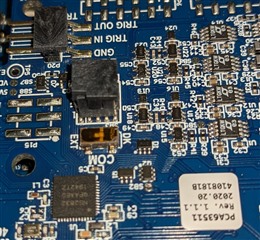
My understanding is that to re-flash the DK when the PPK is mounted, I need to move the COM switch from DK to EXT.

I can see the location of COM and it appears on one side is DK and on the other side is EXT, but the component at that location is not obviously a switch. I see a rectangular piece, the top is transparent and dark amber in colour. I don't see a way to manipulate this to switch from DK to EXT.

Am I missing something? If this is no longer a switch, how do I flash new code without removing the PPK and shorting the current measurement pins?
Parents
  • That is the switch, remove the orange plastic cover that is there to protect the switch during assembly (needle or scalpel works nicely) and you can manipulate it. You can see now that the white dot is on the EXT side, if you move it to the DK side there won't be a white line. I recommend to use a thin probe or needle to move the switch as it is quite small.

Reply
  • That is the switch, remove the orange plastic cover that is there to protect the switch during assembly (needle or scalpel works nicely) and you can manipulate it. You can see now that the white dot is on the EXT side, if you move it to the DK side there won't be a white line. I recommend to use a thin probe or needle to move the switch as it is quite small.

Children
No Data
Related