

Trying to read the device identifier register on network core returns all ones -
J-Link>mem32 0x01FF0204, 2
01FF0204 = FFFFFFFF FFFFFFFF
Curious why this is so? Other INFO registers have seemingly valid values
Trying to read the device identifier register on network core returns all ones -
J-Link>mem32 0x01FF0204, 2 01FF0204 = FFFFFFFF FFFFFFFF
Curious why this is so? Other INFO registers have seemingly valid values
Hi,
How do you set up J-Link? Which steps have you taken before typing mem32 0x01FF0204, 2 ?
Which DK version are you using?
Here is how I read FICR on my side, using an nRF5340 DK, hw v0.11.0 and J-Link Commander V6.88a:
Here are my inputs: J-Link>connectDevice>?
Select the "nRF5340_xxAA_NET" from the list:
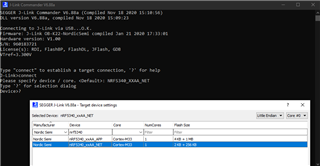
TIF>SSpeed>400J-Link>mem32 0x01FF0204, 201FF0204 = CE7458AE BB6216D6
If I use the base address(0x00FF) for the APP core when connected to the NET core, "Could not read memory" is returned". The same goes if connected to the APP core when using the base address(0x01FF) for the NET core.
Here is the full log from J-Link:
SEGGER J-Link Commander V6.88a (Compiled Nov 18 2020 15:10:56)
DLL version V6.88a, compiled Nov 18 2020 15:09:23

Connecting to J-Link via USB...O.K.
Firmware: J-Link OB-K22-NordicSemi compiled Jan 21 2020 17:33:01
Hardware version: V1.00
S/N: 960183721
License(s): RDI, FlashBP, FlashDL, JFlash, GDB
VTref=3.300V


Type "connect" to establish a target connection, '?' for help
J-Link>connect
Please specify device / core. <Default>: NRF5340_XXAA_NET
Type '?' for selection dialog
Device>?
Please specify target interface:
  J) JTAG (Default)
  S) SWD
  T) cJTAG
TIF>S
Specify target interface speed [kHz]. <Default>: 4000 kHz
Speed>400
Device "NRF5340_XXAA_NET" selected.


Connecting to target via SWD
ConfigTargetSettings() start
ConfigTargetSettings() end
InitTarget() start
InitTarget() end
Found SW-DP with ID 0x6BA02477
DPIDR: 0x6BA02477
AP map detection skipped. Manually configured AP map found.
AP[0]: AHB-AP (IDR: Not set)
AP[1]: AHB-AP (IDR: Not set)
AP[2]: MEM-AP (IDR: Not set)
AP[3]: MEM-AP (IDR: Not set)
AP[1]: Core found
AP[1]: AHB-AP ROM base: 0xE00FE000
CPUID register: 0x410FD214. Implementer code: 0x41 (ARM)
Found Cortex-M33 r0p4, Little endian.
FPUnit: 8 code (BP) slots and 0 literal slots
Security extension: not implemented
CoreSight components:
ROMTbl[0] @ E00FE000
ROMTbl[0][0]: E00FF000, CID: B105100D, PID: 000BB4C9 ROM Table
ROMTbl[1] @ E00FF000
ROMTbl[1][0]: E000E000, CID: B105900D, PID: 000BBD21 Cortex-M33
ROMTbl[1][1]: E0001000, CID: B105900D, PID: 000BBD21 DWT
ROMTbl[1][2]: E0002000, CID: B105900D, PID: 000BBD21 FPB
ROMTbl[1][6]: E0042000, CID: B105900D, PID: 000BBD21 CSS600-CTI
Cortex-M33 identified.
J-Link>mem32 0x01FF0204, 2
01FF0204 = CE7458AE BB6216D6
J-Link>mem32 0x00FF0204, 2
Could not read memory.
J-Link>
Does this deviate from how you do things?
Best regards,
Håkon
Hi,
How do you set up J-Link? Which steps have you taken before typing mem32 0x01FF0204, 2 ?
Which DK version are you using?
Here is how I read FICR on my side, using an nRF5340 DK, hw v0.11.0 and J-Link Commander V6.88a:
Here are my inputs: J-Link>connectDevice>?
Select the "nRF5340_xxAA_NET" from the list:
TIF>SSpeed>400J-Link>mem32 0x01FF0204, 201FF0204 = CE7458AE BB6216D6
If I use the base address(0x00FF) for the APP core when connected to the NET core, "Could not read memory" is returned". The same goes if connected to the APP core when using the base address(0x01FF) for the NET core.
Here is the full log from J-Link:
SEGGER J-Link Commander V6.88a (Compiled Nov 18 2020 15:10:56)
DLL version V6.88a, compiled Nov 18 2020 15:09:23

Connecting to J-Link via USB...O.K.
Firmware: J-Link OB-K22-NordicSemi compiled Jan 21 2020 17:33:01
Hardware version: V1.00
S/N: 960183721
License(s): RDI, FlashBP, FlashDL, JFlash, GDB
VTref=3.300V


Type "connect" to establish a target connection, '?' for help
J-Link>connect
Please specify device / core. <Default>: NRF5340_XXAA_NET
Type '?' for selection dialog
Device>?
Please specify target interface:
  J) JTAG (Default)
  S) SWD
  T) cJTAG
TIF>S
Specify target interface speed [kHz]. <Default>: 4000 kHz
Speed>400
Device "NRF5340_XXAA_NET" selected.


Connecting to target via SWD
ConfigTargetSettings() start
ConfigTargetSettings() end
InitTarget() start
InitTarget() end
Found SW-DP with ID 0x6BA02477
DPIDR: 0x6BA02477
AP map detection skipped. Manually configured AP map found.
AP[0]: AHB-AP (IDR: Not set)
AP[1]: AHB-AP (IDR: Not set)
AP[2]: MEM-AP (IDR: Not set)
AP[3]: MEM-AP (IDR: Not set)
AP[1]: Core found
AP[1]: AHB-AP ROM base: 0xE00FE000
CPUID register: 0x410FD214. Implementer code: 0x41 (ARM)
Found Cortex-M33 r0p4, Little endian.
FPUnit: 8 code (BP) slots and 0 literal slots
Security extension: not implemented
CoreSight components:
ROMTbl[0] @ E00FE000
ROMTbl[0][0]: E00FF000, CID: B105100D, PID: 000BB4C9 ROM Table
ROMTbl[1] @ E00FF000
ROMTbl[1][0]: E000E000, CID: B105900D, PID: 000BBD21 Cortex-M33
ROMTbl[1][1]: E0001000, CID: B105900D, PID: 000BBD21 DWT
ROMTbl[1][2]: E0002000, CID: B105900D, PID: 000BBD21 FPB
ROMTbl[1][6]: E0042000, CID: B105900D, PID: 000BBD21 CSS600-CTI
Cortex-M33 identified.
J-Link>mem32 0x01FF0204, 2
01FF0204 = CE7458AE BB6216D6
J-Link>mem32 0x00FF0204, 2
Could not read memory.
J-Link>
Does this deviate from how you do things?
Best regards,
Håkon
Thanks for looking into this @helsing. Mine is a rev A chip similar to the one found on PDK. Here is a log of my steps -
$ JLinkExe -device NRF5340_XXAA_NET -if swd -speed 4000 -autoconnect 1
SEGGER J-Link Commander V6.88a (Compiled Nov 18 2020 15:09:53)
DLL version V6.88a, compiled Nov 18 2020 15:09:35

Connecting to J-Link via USB...O.K.
Firmware: J-Link OB-K22-NordicSemi compiled Jan 21 2020 17:33:01
Hardware version: V1.00
S/N: 960175337
License(s): RDI, FlashBP, FlashDL, JFlash, GDB
VTref=3.300V
Device "NRF5340_XXAA_NET" selected.


Connecting to target via SWD
ConfigTargetSettings() start
ConfigTargetSettings() end
InitTarget() start
CTRL-AP indicates that the device is secured.
For debugger connection the device needs to be unsecured.
Note: Unsecuring will trigger a mass erase of the internal flash, SRAM and UICR of both the application and the network core.

Executing default behavior previously saved in the registry.
Device will be unsecured now.
InitTarget() end
Found SW-DP with ID 0x6BA02477
DPIDR: 0x6BA02477
AP map detection skipped. Manually configured AP map found.
AP[0]: AHB-AP (IDR: Not set)
AP[1]: AHB-AP (IDR: Not set)
AP[2]: MEM-AP (IDR: Not set)
AP[3]: MEM-AP (IDR: Not set)
AP[1]: Core found
AP[1]: AHB-AP ROM base: 0xE00FF000
CPUID register: 0x410FD214. Implementer code: 0x41 (ARM)
Found Cortex-M33 r0p4, Little endian.
FPUnit: 8 code (BP) slots and 0 literal slots
Security extension: not implemented
CoreSight components:
ROMTbl[0] @ E00FF000
ROMTbl[0][0]: E000E000, CID: B105900D, PID: 000BBD21 Cortex-M33
ROMTbl[0][1]: E0001000, CID: B105900D, PID: 000BBD21 DWT
ROMTbl[0][2]: E0002000, CID: B105900D, PID: 000BBD21 FPB
ROMTbl[0][6]: E0042000, CID: B105900D, PID: 000BBD21 CSS600-CTI
Cortex-M33 identified.
J-Link>mem32 0x01FF0204, 2
01FF0204 = FFFFFFFF FFFFFFFF
J-Link>mem32 0x01FF020c, 1
01FF020C = 00005340
J-Link>mem32 0x01FF0210, 1
01FF0210 = 41414141
Here is the log after running nrfjprog -
$ nrfjprog --memrd 0x01FF0204 --coprocessor CP_NETWORK
0x01FF0204: FFFFFFFF
Thank you for the update.
Could you please check what markings you see on the device? Do you also perhaps have any of the labels from the delivery of the device?
nrfjprog -f NRF53 --coprocessor CP_NETWORK --memrd 0x01FF0204
