Beware that this post is related to an SDK in maintenance mode
More Info: Consider nRF Connect SDK for new designs
This post is older than 2 years and might not be relevant anymore
More Info: Consider searching for newer posts

Nordic SDK & Custom boards

Hi,


can anyone provide any insight into moving beyond a pca10040 development board and creating a project for a custom board? What are the steps that you have to go through?

I am using a design based on a fanstel bt832. 

I take it that you have to modify "boards.h" and add a header file for your own board.

I am using Segger Embedded Studio and nRF5_SDK_15.2.0_9412b96.

Regards,

Steve.

  • Hey Steven,

    I'd recommend one of two options:

    1. Use an example project. You could pick an example project that's very close to what your custom project would look like. For example if you needed a project with I2C, you could start with the twi_scanner project.

    2. Use a template project. I believe there are two template projects in the SDK:
      1. examples > peripheral > template_project
      2. examples > ble_peripheral > ble_app_template

    When you have decided on either (1) or (2), then you'd have to modify the paths to the SDK files in your custom project. You can do that through the Solution Editor in Segger Embedded Studio.

    And yes, you'd also have to create your own board file and add it to the boards.h file. You'd have to remove the BOARD_ PCA10040 macro in  the preprocessor definitions list and create your own macro, effectively enabling your own board definition.

    Hope it helps.

    Timothy

  • Hi Tim,

    thanks for the reply.

    I guess the part I don't understand here is that currently, in SES, "BOARD_PCA10040" is highlighted in boards.h, indicating that this board is enabled in the project. How this is done is not clear to me.


    A search for BOARD_PCA10040 returns no result - I'd assume that somewhere is a #define BOARD_PCA10040?

    A look at the GCC example shows that there is a compiler flag CFLAGS += -DBOARD_PCA10040

    As I am using SES I would expect this to be a config option in PROJECT->OPTIONS, I can't see anything there or anywhere else.

    Confusing.

  • Hi Jorgen,

    the sum total of the wisdom dispensed by nordic on this matter amounts to a single paragraph in the SDK docs at the link you provided:

    Adding support for a custom board

    To add support for a custom board, you must create a custom board support file with the name custom_board.h. This file must be located in a directory in the Include path. You can then select to use the custom board by adding the define statement #define BOARD_CUSTOM.

    The easiest way to create the custom_board.h file is to start with an existing platform definition file (for example pca10040.h) and adapt it to your needs.

    Is that really all there is to say on the matter? Clearly this is not sufficient to inform a user to do something fundamental- to step away from the Nordic dev boards and implement a project for a custom board.

    Sorry, that is not good enough and really very poor customer support, both in the extent of the docs and the care and detail provided in your response - see the previous response from Tim. If it takes a community member to provide detailed support I think that speaks to the attitude of Nordic employees towards their users.

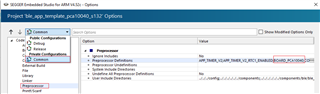
  • The define can be found under preprocessor defines in the "Common" configuration in SES project options:

    To get more familiar with using SES with nRF5 SDK, I recommend you to have a look at this video tutorial playlist.

Related