This post is older than 2 years and might not be relevant anymore
More Info: Consider searching for newer posts

NRF Cloud Client Can't Connect to NRF Cloud with NB-IoT

Hello,

I was recently trying out some samples with the nRF9160 DK and I had run into some issues when trying to run the nRF Cloud Client Application.

I had flashed my device with this sample and had set its configuration to connect to NRF_CLOUD with NB-IoT.

After trying to run the application, I see that the device tries to connect to the server but it eventually times out and never connects. Attached is a picture of the LTE monitor 
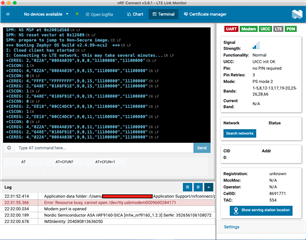
I had however had success getting the nRF9160 DK board to connect to nRF Cloud with the asset tracker firmware, so I know it is possible for my board to connect to nRF Cloud and that my nRF Cloud account has all the correct credentials on the website. 

Would you know why my nRF9160 DK is not connecting to nRF Cloud with the Cloud Client Application? Did I perhaps miss a step or something that I was supposed to do?

Parents
  • Hi,

    There seems to be some problems with the network connection, as you get +CEREG: 2 and +CEREG: 4.

    +CEREG: <n>,<stat>[,[<tac>],[<ci>],[<AcT>][,<cause_type>], [<reject_cause>][,[<Active-Time>],[<Periodic-TAU>]]]]

    <stat>

    • 2 – Not registered, but UE is currently trying to attach or searching an operator to register to.
    • 4 – Unknown (e.g. out of E-UTRAN coverage).

    The reject causes you get are 11, 15 and 19, which can be found in 3GPP TS 24.301 to be:

    Cause #11 – PLMN not allowed

    This EMM cause is sent to the UE if it requests attach or tracking area updating in a PLMN where the UE, by subscription or due to operator determined barring, is not allowed to operate.

    Cause #15 – No suitable cells in tracking area

    This EMM cause is sent to the UE if it requests tracking area updating in a tracking area where the UE, by subscription, is not allowed to operate, but when it should find another allowed tracking area in the same PLMN.

    Cause #19 – ESM failure 

    This EMM cause is sent to the UE when there is a failure in the ESM message contained in the EMM message. 

    When you were able to connect to nRF Cloud with the Asset Tracker application, did you use LTE-M, or did you change the application to use NB-IoT? Have you tried the Cloud Client sample with LTE-M? Are you using the iBasis SIM card that came with the nRF9160 DK, or a SIM card from another operator? Please be aware that operators do not necessarily have both LTE-M and NB-IoT coverage in the same area, and some SIM cards only support one of the network types, so you need to make sure that you have the correct SIM card and that there is coverage in your area. If you are using the iBasis SIM card, you can check out this link to see which countries iBasis has LTE-M and NB-Iot coverage in. If you are using another operator, you can either contact them to ask, or check out this list to see if they support NB-IoT.

    Best regards,

    Marte

Reply
  • Hi,

    There seems to be some problems with the network connection, as you get +CEREG: 2 and +CEREG: 4.

    +CEREG: <n>,<stat>[,[<tac>],[<ci>],[<AcT>][,<cause_type>], [<reject_cause>][,[<Active-Time>],[<Periodic-TAU>]]]]

    <stat>

    • 2 – Not registered, but UE is currently trying to attach or searching an operator to register to.
    • 4 – Unknown (e.g. out of E-UTRAN coverage).

    The reject causes you get are 11, 15 and 19, which can be found in 3GPP TS 24.301 to be:

    Cause #11 – PLMN not allowed

    This EMM cause is sent to the UE if it requests attach or tracking area updating in a PLMN where the UE, by subscription or due to operator determined barring, is not allowed to operate.

    Cause #15 – No suitable cells in tracking area

    This EMM cause is sent to the UE if it requests tracking area updating in a tracking area where the UE, by subscription, is not allowed to operate, but when it should find another allowed tracking area in the same PLMN.

    Cause #19 – ESM failure 

    This EMM cause is sent to the UE when there is a failure in the ESM message contained in the EMM message. 

    When you were able to connect to nRF Cloud with the Asset Tracker application, did you use LTE-M, or did you change the application to use NB-IoT? Have you tried the Cloud Client sample with LTE-M? Are you using the iBasis SIM card that came with the nRF9160 DK, or a SIM card from another operator? Please be aware that operators do not necessarily have both LTE-M and NB-IoT coverage in the same area, and some SIM cards only support one of the network types, so you need to make sure that you have the correct SIM card and that there is coverage in your area. If you are using the iBasis SIM card, you can check out this link to see which countries iBasis has LTE-M and NB-Iot coverage in. If you are using another operator, you can either contact them to ask, or check out this list to see if they support NB-IoT.

    Best regards,

    Marte

Children
  • Hello,

    Thank you so much for your response!

    It seems like the issue is that NB-IoT is not available for the country I am in with the iBasis sim card. When I switched the cloud client application to use LTE-M it seemed to have worked fine.

    As for the asset tracker, I had used the NB-IoT version of the project. However, after rerunning it with the LTE monitor on, I noticed what happened was the NB-IoT joining had timed out and the device then tried rejoining with LTE-M instead. So the reason it was able to connect before was because the device joins with LTE-M after NB-IoT fails.

    I think with this, it explains all the issues I have been having. 

    Again, thank you so much for helping me with this issue!

Related