This post is older than 2 years and might not be relevant anymore
More Info: Consider searching for newer posts

Does the Sleepy End device keep its RX antenna on if polling times are too long?

Hello,

I have been trying to debug a curious behavior leading to higher energy consumption (~17mA) on my Sleepy End Device (Rx is off when idle).

I am using the nRF SDK for Zigbee v4.1, and the device is running both Bluetooth and Zigbee stacks.

I reimplemented zb_nrf52_sleep and zb_wake_up: those are only changing the state of the RNG. When I receive the Zigbee signal 15 (ZB_COMMON_SIGNAL_CAN_SLEEP), I set up a timer (app_timer_start()) to wake up in sleep_tmo milliseconds, during that time, the Zigbee event handler (zboss_main_loop_iteration) is not called.

It works well after the device joined the network (polling times are less than a second) but at some point, the polling time increases to 4254ms. After that, the power consumption is around 17mA. It seemed to me like the RX wasn't turned off and I thought maybe I am missing a packet, so I tried to reactive the RX 500ms earlier than sleep_tmo:

app_timer_start(m_zb_timer, APP_TIMER_TICKS((sleep_tmo > 4000 ? sleep_tmo - 500 : sleep_tmo)), NULL);

The first observation is that I can see there are 2 signals (15) received:

...
13:50:37.063 [0000001765:0:zigbee_manager.c:78] 261 <-- sleep_tmo
13:50:38.047 [0000001766:0:zigbee_manager.c:110] ZB signal (15, status: 0)
13:50:38.052 [0000001766:0:zigbee_manager.c:78] 721
13:50:39.059 [0000001767:0:zigbee_manager.c:110] ZB signal (15, status: 0)
13:50:39.063 [0000001767:0:zigbee_manager.c:78] 4254 <-- sleep_tmo increased
13:50:43.043 [0000001770:1:zigbee_manager.c:110] ZB signal (15, status: 0) <-- first signal, doesn't seem to make the device go back to sleep
13:50:43.051 [0000001771:0:zigbee_manager.c:110] ZB signal (15, status: 0) <-- second signal
13:50:43.056 [0000001771:0:zigbee_manager.c:78] 4992 <-- back to sleep

The second observation is that this time, the power consumption did not increase and I can keep it low (<200uA on average).

It seems like 500ms earlier is the minimum value I can use, otherwise, the trick does not work.

Does someone know how should I deal with "long" polling times?

Best,
Cyril

  • Hello

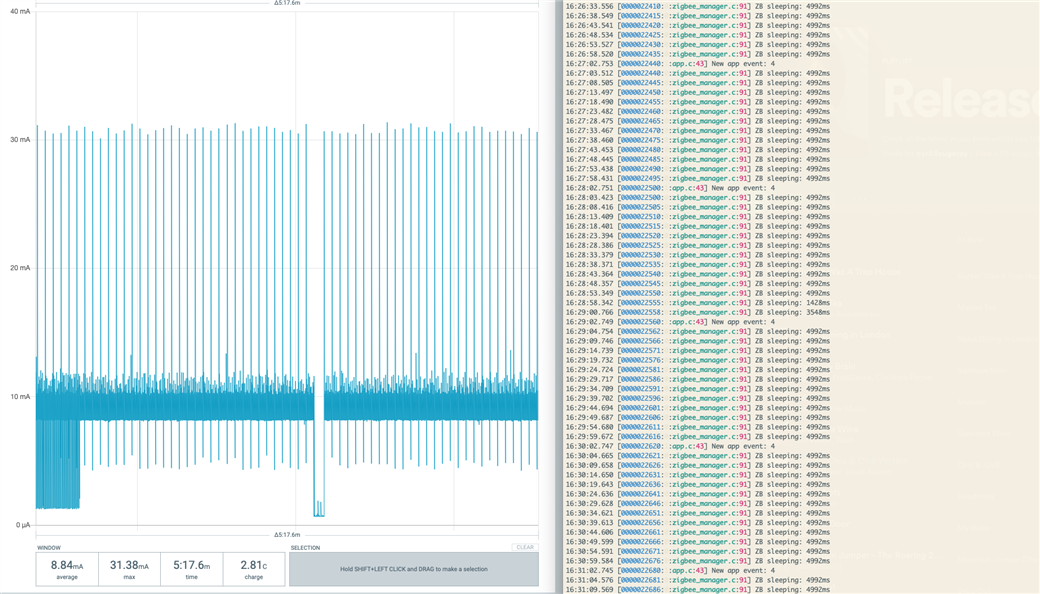
    It's been a while but I still have the issue so here is below the screenshot of the PPK measurements.

    I am setting a polling time of 5 seconds (ZB_MAX_LONG_POLL_INTERVAL_MS 5000)

    Below is the weird behavior I am witnessing: whenever the sleeping time is more than ~4000ms, the RX antenna seems to be left on. (at the beginning, we can see some BLE advertising as well). I am using the UART to print the sleeping time on the right.

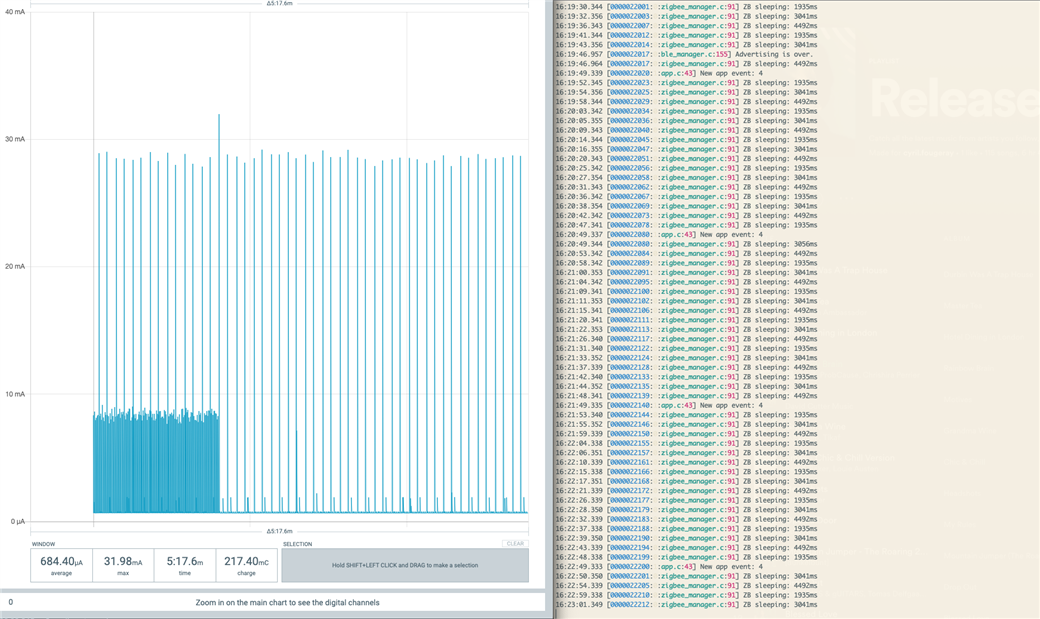
    Then, I apply my dirty fix:

    /// Put everything related to Zigbee in suspend and re-enable ZB queue processing after \c sleep_tmo
    /// This function is called from zb_sleep_now(), see zigbee_default_signal_handler()
    /// Overrides __weak implementation in zb_nrf52_timer.c
    /// This feature is activated if zb_set_rx_on_when_idle(ZB_FALSE) is called.
    /// \param sleep_tmo Time to sleep in ms
    /// \return
    zb_uint32_t
    zb_nrf52_sleep(zb_uint32_t sleep_tmo)
    {
        if (!sleep_tmo)
        {
            return sleep_tmo;
        }
    
        // Previously deinitialise Random generator
        nrf_drv_rng_uninit();
    
        // disable ZB event handling by setting the sleeping flag
        m_zb_sleeping = true;
    
        if (sleep_tmo > 4000)
        {
            sleep_tmo = sleep_tmo - 500;
        }
    
        SC_LOG_INFO("ZB sleeping: %ums", sleep_tmo);
    
        // we are not going to handle ZB events until sleep_tmo, minus 1
        // not sure we need to remove 1
        app_timer_start(m_zb_timer, APP_TIMER_TICKS(sleep_tmo), NULL);
    
        return sleep_tmo;
    }

    Below, is the current consumption with the fix:

    Best,

    Cyril

  • while writing the last comment I thought about the returned value as well and changed only that value (not the timer):

    return sleep_tmo-500;

    And it actually works: current consumption is kept low.

    So the question is how do you use that value?

    I hope this will help you solve that issue.

    Best,

  • Actually, removing 1 also works as a workaround.

    return sleep_tmo-1;

    When removing 500 like in my last comment, I can see that the current is a bit higher during 500ms when getting out of sleep.


    I might not have totally understood the goal of that returned value?

  • Hi Cyril,

    I am not sure I understand your code in your modified version of zb_nrf52_sleep(). You are not calling any code to actually put the device to sleep, as you are not calling zb_osif_wait_for_event().

    The sleep_tmo parameter in the example specifies the allowed sleep duration in milliseconds and is passed to zb_nrf52_sched_sleep() to schedule an RTC timer interrupt for putting the device to sleep for no longer than sleep_tmo.

    Best regards,

    Marjeris

  • Hi

    I am using both BLE and Zigbee along with the app scheduler so I don't use `zb_osif_wait_for_event`, but instead `nrf_pwr_mgmt_run`:

    // Enter main loop.
    while (true)
    {
        zigbee_handle_events();
        app_sched_execute();
        nrf_pwr_mgmt_run();
    }


    With:

    void
    zigbee_handle_events()
    {
        if (!m_zb_sleeping)
        {
            zboss_main_loop_iteration();
        }
    }

    Let me know if there is something wrong.

Related