This post is older than 2 years and might not be relevant anymore
More Info: Consider searching for newer posts

Can't configure to BLE connectable mode in custom application

Hi,

We're trying to simultaneously run BLE Eddystone and connectable mode in our application.
Our device is advertising it's ID but every time I try to connect via BLE from another device to it, I get the following error:
<error> app: ERROR 3735928559 [Unknown error code]

On the separate device connected to nrf Connect Desktop App, I get the following:
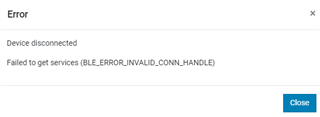
We're using SDK17 and SoftDevice S140.

Any help/lead on this will be much appreciated, thanks a lot!
UK

Parents
  • Hi

    Please provide information as to what file and line of code reports this error. You should see a message similar to: <error> app:  ERROR 3735928559 [Unknown error code] at D:...\sdk\nRF5\components\libraries\twi_mngr\nrf_twi_mngr.c:335 (Just an example with the same error in the past). The assert indicates that a driver was not initialized correctly, but I need to know which function this is in your case. Please make sure you check the return value from this function call to verify that whatever library should be initialized returns an NRF_SUCCESS.

    Best regards,

    Simon

Reply
  • Hi

    Please provide information as to what file and line of code reports this error. You should see a message similar to: <error> app:  ERROR 3735928559 [Unknown error code] at D:...\sdk\nRF5\components\libraries\twi_mngr\nrf_twi_mngr.c:335 (Just an example with the same error in the past). The assert indicates that a driver was not initialized correctly, but I need to know which function this is in your case. Please make sure you check the return value from this function call to verify that whatever library should be initialized returns an NRF_SUCCESS.

    Best regards,

    Simon

Children
No Data
Related