This post is older than 2 years and might not be relevant anymore
More Info: Consider searching for newer posts

Trouble Connecting nRF52840 Dongle (on windows) to nRF52810. Error : "Service discovery failed. Error code 0x10A"

I am trying to send some values from nRF52810 Board to my Laptop. I am using a nRF52840 Bluetooth Dongle to connect the board to my laptop. I am using the "Heart Rate Collector" example as the base, and I have altered the "TARGET_DEV_NAME" constant correctly to the nRF 52810 board, and consequently I am able to establish a connection. 

However, immediately after the connection is established, I always encounter the following error - "Service discovery failed. Error code 0x10A".
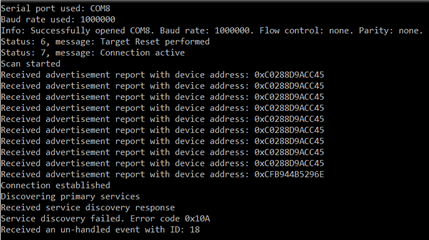
I suspect this might be because I have entered the wrong UUID constants. 

Currently I have entered the UUID constants according to the UART Characteristic UUIDs form the following link : bluetooth-numbers-database/characteristic_uuids.json at master · NordicSemiconductor/bluetooth-numbers-database · GitHub

Could someone please help me correct my mistake, I am extremely new at working with hardware and I am not sure where I am going wrong with UUIDs. 

Thanks a lot.

  • Does it work OK if you use nRF Connect (Desktop or Mobile) ?

  • Yes, it works perfectly well on nRFConnect on android. 

  • I just checked, and it works well with the nRF Connect Desktop also. I think I am just confused what UUIDs to use. I have attached a video of nRF Connect Desktop working, it might provide you with some insight. 

  • There is an example that show-cases the heart rate service in the SDK already, you can find it in

    SDK_folder\examples\ble_peripheral\ble_app_hrs

  • Hi Sigurd, thanks for the reply. I checked it out, but even after seeing the example, I cannot seem to figure out what values to change the UUIDs to in my app. That example does not seem to have any configurable UUID constants, and I am sure that's the only thing I am getting wrong in my code

Related