Dear Nordic,
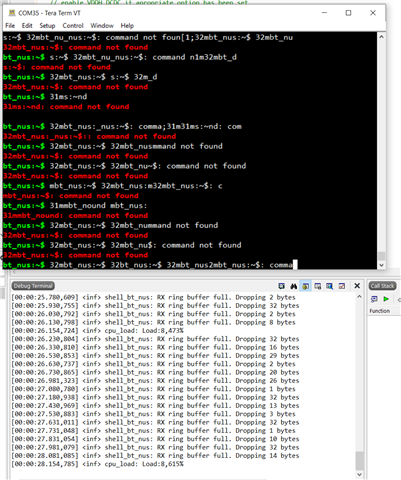
We've faced with the issue on Zephyr Shell NUS module.
The other side is ble_uart_c example at nRF52840DK. (edited)

P.S. Do you have ready to use HEX with BLE_UART_C example compiled for nRF52840Dongle with UART-over-USB emulation?
Dear Nordic,
We've faced with the issue on Zephyr Shell NUS module.

P.S. Do you have ready to use HEX with BLE_UART_C example compiled for nRF52840Dongle with UART-over-USB emulation?
Hi,
Try setting CONFIG_SHELL_BT_NUS_RX_RING_BUFFER_SIZE to 256
I recommend using Putty terminal.
P.S. Do you have ready to use HEX with BLE_UART_C example compiled for nRF52840Dongle with UART-over-USB emulation?
No, I don't think so.
Dear Sigurd,
I've tried:
1. changing both RX and TX Shell NUS ring buffer sizes up to 4096 bytes.
2. turning off shell echo and disabling log output to shell.
3. turning off colorization.
No positive outcome on the issue.
I've added this check and shell enable function call to connection handler, as metioned in shell_bt_nus example, as it can be seen on the first screenshot. It works, bt_nus$ prompt appears.
Ok, so the issue you described initially in this case has now been solved?
Not yet.
Please don't close the ticket until we report (hope this week).
Dear Sigurd,
I've found it works with two devboards (52840 + 5340) one running central_uart and another running shell_bt_nus examples. This issue definately related to some middleware modules of Zephyr that we enable on our board (e.g. USB or others). We'll check that.
Dear Sigurd,
Finally we've made that, the shell works over BT NUS connection. We've checked it with nRF52840DK running BT UART CENTRAL example.
Could you please advice if we have ability to:
1. Speed up NUS transport over BT connection.
2. Make it possible to transfer special symbols (up-arrow, down-arrow, Tab and so on) - it works but after pressing 'Enter' key. E.g. to get command list it should be pressed Tab then Enter. Is there any setting in Shell NUS or NUS layer to send the byte(s) not only after receiving 'Enter' chars, but after some timeout too?
Do you have any suggestions on that?
Dear Sigurd,
Finally we've made that, the shell works over BT NUS connection. We've checked it with nRF52840DK running BT UART CENTRAL example.
Could you please advice if we have ability to:
1. Speed up NUS transport over BT connection.
2. Make it possible to transfer special symbols (up-arrow, down-arrow, Tab and so on) - it works but after pressing 'Enter' key. E.g. to get command list it should be pressed Tab then Enter. Is there any setting in Shell NUS or NUS layer to send the byte(s) not only after receiving 'Enter' chars, but after some timeout too?
Do you have any suggestions on that?
Dmitry Kr said:Finally we've made that, the shell works over BT NUS connection.
Great!
Dmitry Kr said:1. Speed up NUS transport over BT connection.
Lower the connection interval(latency). For higher throughput try CONFIG_BT_CTLR_DATA_LENGTH_MAX=251
The throughput sample show-cases the configuration for max throughput: https://github.com/nrfconnect/sdk-nrf/tree/master/samples/bluetooth/throughput
Dmitry Kr said:2. Make it possible to transfer special symbols (up-arrow, down-arrow, Tab and so on)
Please create a new case for this: https://devzone.nordicsemi.com/support/add
If the original issue in this case(case id 269127) is resolved, then I suggest closing this case(269127).