This post is older than 2 years and might not be relevant anymore
More Info: Consider searching for newer posts

create_nordic_project.py failed (1) - can't seem to open ANY nrf Connect SDK project on SES

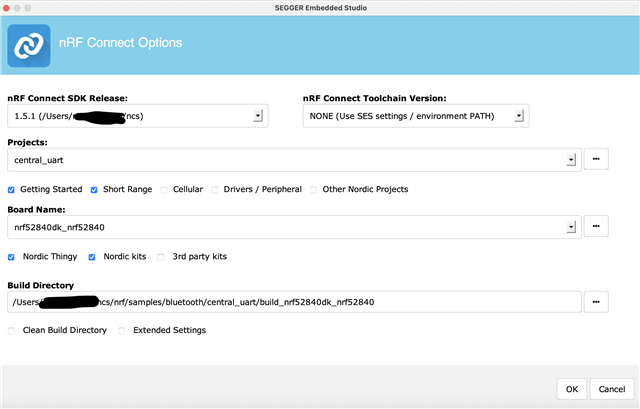
Hello, I have installed (multiple times) the nRF connect SDK via the manual installation guide but I still seem to be unable to open any project. 

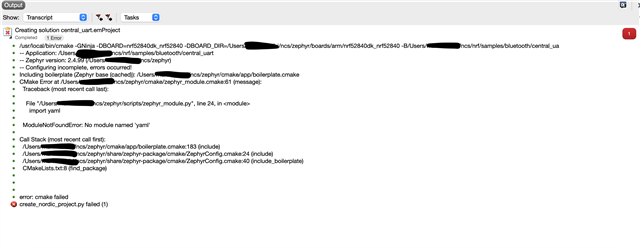
I have tried on MacOS and on Windows 10 and I keep getting the same error create_nordic_project.py failed (1).

I am trying to open the central uart project for the nRF52840 dk board. Here is the description of the error.

Please help! Thanks!
Parents
  • Hi!

    I see from your error that the yaml Python module is missing. Did you install the correct Python Dependencies, as instructed in the getting started guide? It's the following commands:

    pip3 install -r zephyr/scripts/requirements.txt
    pip3 install -r nrf/scripts/requirements.txt
    pip3 install -r bootloader/mcuboot/scripts/requirements.txt


    When the installation failed on Windows, were you using a VPN? There is a known issue with the Toolchain Manager having issues when using a VPN. 

    Best regards,
    Carl Richard

Reply
  • Hi!

    I see from your error that the yaml Python module is missing. Did you install the correct Python Dependencies, as instructed in the getting started guide? It's the following commands:

    pip3 install -r zephyr/scripts/requirements.txt
    pip3 install -r nrf/scripts/requirements.txt
    pip3 install -r bootloader/mcuboot/scripts/requirements.txt


    When the installation failed on Windows, were you using a VPN? There is a known issue with the Toolchain Manager having issues when using a VPN. 

    Best regards,
    Carl Richard

Children
No Data
Related