This post is older than 2 years and might not be relevant anymore
More Info: Consider searching for newer posts

Merging nRF52 blinky into uart for peripheral as well as central role.

I'm merging nRF5_SDK_17.0.2_d674dde\examples\ble_peripheral\ble_app_blinky\pca10040\s132\ses to nRF5_SDK_17.0.2_d674dde\examples\ble_peripheral\ble_app_uart\pca10040\s132\ses, but getting error. Also, I want to merge nRF5_SDK_17.0.2_d674dde\examples\ble_central\ble_app_blinky_c\pca10056\s140\ses to nRF5_SDK_17.0.2_d674dde\examples\ble_central\ble_app_uart_c\pca10056\s140\ses. Can anybody help me? or If their already merged then it will be benefit.

Please find below error screenshot,
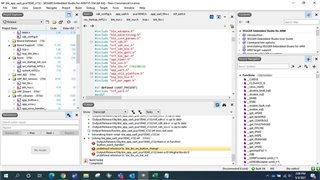
  • Hi,

    If it's working at your side, Can you resend me that sdk?

    Here are the project files.

    8637.ble_app_uart_c.rar

    0743.ble_app_uart.rar

  • Hi,

    Thanks, will check and get back to you.

    Regards,

    Megha Choudhari

  • Hi,

    I have tested files sent by you. In that from central board when key pressed, LED gets turn ON from peripheral board. But we need viceversa.

    Can you help to figureout this.

    Waiting for your reply.

    Thanks & Regards,

    Megha Choudhari

  • Hi 

    Waiting for reply.

    Regards,

    Megha Choudhari

  • Hi,

    1. Peripheral & Central side, build & test again. Both works fine. Means while pressing button1 from Peripheral, LED 3 from Central blinks.

    2. After that added data send from Peripheral logic in main.c,


    /**@brief Function for handling events from the button handler module.

    *

    * @param[in] pin_no        The pin that the event applies to.

    * @param[in] button_action The button action (press/release).

    */

    static void button_event_handler(uint8_t pin_no, uint8_t button_action)

    {

            ret_code_t err_code;


            switch (pin_no)

            {

            case LEDBUTTON_BUTTON:

                    NRF_LOG_INFO("Send button0 state change.");

                    err_code = ble_lbs_on_button_change(m_conn_handle, &m_lbs, button_action);

                    if (err_code != NRF_SUCCESS &&

                        err_code != BLE_ERROR_INVALID_CONN_HANDLE &&

                        err_code != NRF_ERROR_INVALID_STATE &&

                        err_code != BLE_ERROR_GATTS_SYS_ATTR_MISSING)

                    {

                            APP_ERROR_CHECK(err_code);

                    }

                    if (m_conn_handle != BLE_CONN_HANDLE_INVALID)

                    {

                         err_code = ble_nus_data_send(&m_nus, "BT0PRES\r\n",9, m_conn_handle);


                    }

                    break;

             default:

                    APP_ERROR_HANDLER(pin_no);

                    break;

            }

    }

    3. Build & test again. Able to get data also on Central while pressing Button1 from Peripheral.

    4. Now to add second button done below changes in main.c, 

    Peripheral:


    #define LEDBUTTON_BUTTON1               BSP_BUTTON_1


    /**@brief Function for initializing the button handler module.

    */

    static void buttons_init(void)

    {

            ret_code_t err_code;


            //The array must be static because a pointer to it will be saved in the button handler module.

            static app_button_cfg_t buttons[] =

            {

                    {LEDBUTTON_BUTTON, false, BUTTON_PULL, button_event_handler},

                    {LEDBUTTON_BUTTON1, false, BUTTON_PULL, button_event_handler}

            };


            err_code = app_button_init(buttons, ARRAY_SIZE(buttons),

                                       BUTTON_DETECTION_DELAY);

            APP_ERROR_CHECK(err_code);

    }

    /**@brief Function for handling events from the button handler module.

    *

    * @param[in] pin_no        The pin that the event applies to.

    * @param[in] button_action The button action (press/release).

    */

    static void button_event_handler(uint8_t pin_no, uint8_t button_action)

    {

            ret_code_t err_code;


            switch (pin_no)

            {

            case LEDBUTTON_BUTTON:

                    NRF_LOG_INFO("Send button0 state change.");

                    err_code = ble_lbs_on_button_change(m_conn_handle, &m_lbs, button_action);

                    if (err_code != NRF_SUCCESS &&

                        err_code != BLE_ERROR_INVALID_CONN_HANDLE &&

                        err_code != NRF_ERROR_INVALID_STATE &&

                        err_code != BLE_ERROR_GATTS_SYS_ATTR_MISSING)

                    {

                            APP_ERROR_CHECK(err_code);

                    }

                    if (m_conn_handle != BLE_CONN_HANDLE_INVALID)

                    {

                         err_code = ble_nus_data_send(&m_nus, "BT0PRES\r\n",9, m_conn_handle);


                    }

                    break;

             case LEDBUTTON_BUTTON1:

                    NRF_LOG_INFO("Send button1 state change.");

                    err_code = ble_lbs_on_button_change(m_conn_handle, &m_lbs, button_action);

                    if (err_code != NRF_SUCCESS &&

                        err_code != BLE_ERROR_INVALID_CONN_HANDLE &&

                        err_code != NRF_ERROR_INVALID_STATE &&

                        err_code != BLE_ERROR_GATTS_SYS_ATTR_MISSING)

                    {

                            APP_ERROR_CHECK(err_code);

                    }

                    if (m_conn_handle != BLE_CONN_HANDLE_INVALID)

                    {

                         err_code = ble_nus_data_send(&m_nus, "BT1PRES\r\n",9, m_conn_handle);


                    }

                    break;

            default:

                    APP_ERROR_HANDLER(pin_no);

                    break;

            }

    }


    Central:


    #define LEDBUTTON_LED1                 BSP_BOARD_LED_3


    /**@brief Handles events coming from the LED Button central module.

    */

    static void lbs_c_evt_handler(ble_lbs_c_t * p_lbs_c, ble_lbs_c_evt_t * p_lbs_c_evt)

    {

            switch (p_lbs_c_evt->evt_type)

            {

            case BLE_LBS_C_EVT_DISCOVERY_COMPLETE:

            {

                    ret_code_t err_code;


                    err_code = ble_lbs_c_handles_assign(&m_ble_lbs_c,

                                                        p_lbs_c_evt->conn_handle,

                                                        &p_lbs_c_evt->params.peer_db);

                    NRF_LOG_INFO("LED Button service discovered on conn_handle 0x%x.", p_lbs_c_evt->conn_handle);


                    err_code = app_button_enable();

                    APP_ERROR_CHECK(err_code);


                    // LED Button service discovered. Enable notification of Button.

                   err_code = ble_lbs_c_button_notif_enable(p_lbs_c);

                    APP_ERROR_CHECK(err_code);

            } break; // BLE_LBS_C_EVT_DISCOVERY_COMPLETE


            case BLE_LBS_C_EVT_BUTTON_NOTIFICATION:

            {

                    NRF_LOG_INFO("Button state changed on peer to 0x%x.", p_lbs_c_evt->params.button.button_state);

                    if (p_lbs_c_evt->params.button.button_state)

                    {

                            bsp_board_led_on(LEDBUTTON_LED);

                    }

                    else

                    {

                            bsp_board_led_off(LEDBUTTON_LED);

                    }

            } break; // BLE_LBS_C_EVT_BUTTON_NOTIFICATION


            case BLE_LBS_C_EVT_BUTTON1_NOTIFICATION:

            {

                    NRF_LOG_INFO("Button state changed on peer to 0x%x.", p_lbs_c_evt->params.button.button_state);

                    if (p_lbs_c_evt->params.button.button_state)

                    {

                            bsp_board_led_on(LEDBUTTON_LED1);

                    }

                    else

                    {

                            bsp_board_led_off(LEDBUTTON_LED1);

                    }

            } break; // BLE_LBS_C_EVT_BUTTON_NOTIFICATION


            default:

                    // No implementation needed.

                    break;

            }

    }

    5. Build & test again, observe that even though pressing second button from Peripheral & LED3 blinks from Central. Beside this LED4 from Central should glow.

    For this debug into code, found that

    Central:

    ble_lbs_c.c


    static void on_hvx(ble_lbs_c_t * p_ble_lbs_c, ble_evt_t const * p_ble_evt)

    {

        // Check if the event is on the link for this instance.

        if (p_ble_lbs_c->conn_handle != p_ble_evt->evt.gattc_evt.conn_handle)

        {

            return;

        }

        // Check if this is a Button notification.

        if (p_ble_evt->evt.gattc_evt.params.hvx.handle == p_ble_lbs_c->peer_lbs_db.button_handle)

        {

            if (p_ble_evt->evt.gattc_evt.params.hvx.len == 1)

            {

                ble_lbs_c_evt_t ble_lbs_c_evt;


                ble_lbs_c_evt.evt_type                   = BLE_LBS_C_EVT_BUTTON_NOTIFICATION;

                ble_lbs_c_evt.conn_handle                = p_ble_lbs_c->conn_handle;

                ble_lbs_c_evt.params.button.button_state = p_ble_evt->evt.gattc_evt.params.hvx.data[0];

                p_ble_lbs_c->evt_handler(p_ble_lbs_c, &ble_lbs_c_evt);

            }

        }

    }


    In this function BLE_LBS_C_EVT_BUTTON_NOTIFICATION is assigned. So that it always executes only this case.                               

    How to add second here i.e. BLE_LBS_C_EVT_BUTTON1_NOTIFICATION, so that both Button functionality work on individual buttons.

    Used SDK 17.0.2

    Peripheral : 

    nRF5_SDK_17.0.2_d674dde\examples\ble_peripheral

    link-  https://smetgroup-my.sharepoint.com/:u:/g/personal/megha_choudhari_mysmindia_com/EcAgxjSaa4ZDgGUaAkc4RccBnUajSAo8G8iTqsJl28f4gg?e=LFDyaN

    Central :

    nRF5_SDK_17.0.2_d674dde\examples\ble_central

    link- https://smetgroup-my.sharepoint.com/:u:/g/personal/megha_choudhari_mysmindia_com/EfN0RUjYB-lCuHd5gFP7DI8BwoppdFW30F8N349diTKU2Q?e=hgkbvx

    Almost is it done, kindly help here.

    Looking for your reply.

    Regards,

    Megha Choudhari

Related