This post is older than 2 years and might not be relevant anymore
More Info: Consider searching for newer posts

Direction_finding_connectionless_tx Error

Good afternoon,

I have started to work with the Direction_finding_connectionless_tx software from Zefyr that you published a few days ago. My intention is to load the AOA mode on a self-designed board that integrates the BL653 module with the nrf52833.

When I load the code I get an error in the function "err = bt_df_set_adv_cte_tx_param(adv_set, &cte_params);", I get the error: "00> Update CTE params...Failed: -35."

I was not able to find the error. Could it be because the software is not suitable for a different platform than nrf52833-DK, or it could be a configuration error?

Thank you very much for your attention.

JP.

  • Hi

    To update to the master branch you need to follow the "Installing the nRFConnect SDK manually" guide and check out the latest state of development with the following command:

    west init -m https://github.com/nrfconnect/sdk-nrf --mr master

    During testing on my end, I had no issues with detecting the advertising device when using a DK, so there might be some board configurations required to use the board you have. I don't think there are any other defines that need to be modified to get it up and running.

    Best regards,

    Simon 

     
  • Thank you very much for your reply but I have not been able to solve the problem yet.

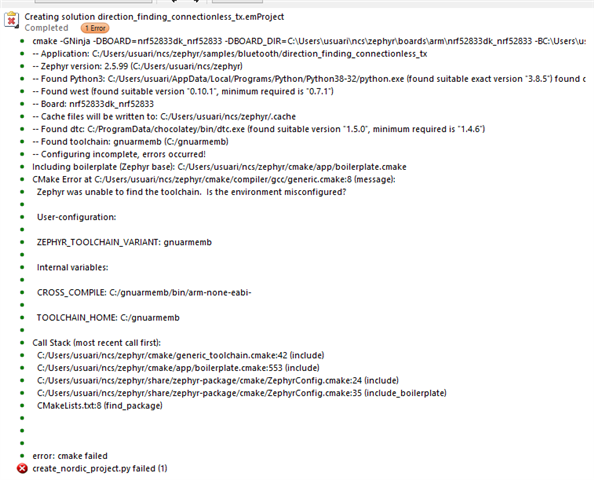
    I have been able to download and use the latest version and I keep getting the same error, I have followed the installation process of the SDK version and I can't find the error. I have tried to complete the project with the nrf52833dk_nrf52833 board and I get the attached errors. Could it be a configuration error of the Segger embedded Studio? how should it be configured?

    Thank you very much for your attention.

    JP.

    .

  • Hi Quim123,

    you may change to a clean environment ( new computer or reformat ) for those command setup, as i had met this issue before. It seems that python command is not yet complete.

  • Hi again

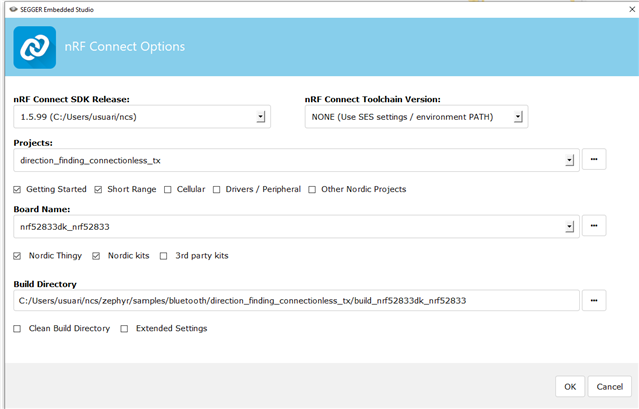
    It seems like you haven't chosen an nRFConnect Toolchain version, and that you use the SES settings/environment path. Have you set up the toolchain as explained in step 7 (Set up the build environment in SES) of the getting started guide?

    Here is the .hex file of the application built on our side to make the application run as expected. It should be sufficient to flash it onto an nRF52833 DK using the nRFConnect programmer app for instance:

    6864.zephyr.hex

    Best regards,

    Simon

  • Hi

    I'm doing the same thing as you, trying to make the sample works on my custom board but i do have the antenna matrix of Nordic aswell. Your topic help me, and i have a hint of a answer for Quim123 and Zack_Lee. 

    The OVERLAY_CONFIG is an additionnal configuration for building the app, and just like you i've been struggling to set it right. The working method i found is to put 

    SET(OVERLAY_CONFIG "overlay-aoa.conf")
    in CMakeList.txt before any other command. I recommand you to erase the 
    OVERLAY_CONFIG =y
      in overlay-aoa.conf, if not i'm not totally it'll build.

    I hope it helps

    Nathan

Related