This post is older than 2 years and might not be relevant anymore
More Info: Consider searching for newer posts

How to stream accelerometer to Jlink VCOMport?

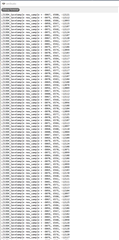
My accelerometer readings appear in my segger embedded studio "Debug Terminal" window.

It looks like this.
I want to stream the data via COM port to this "serial oscilloscope" https://x-io.co.uk/serial-oscilloscope/

I have enabled VCOM in the J-LINK configurator. It's connected with SWD. I have connected pins 5 and 17 on the jlink port to loop back TX and RX.

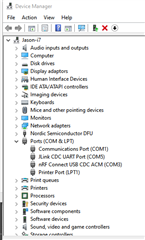
My VCOM shows as COM5  in my device Manager
How do I send text to the COM port?

I've tried using  

  printf("LIS3DH_SaveSample new_sample = %d, %d, %d\n", new_X, new_Y, new_Z);
NRF_LOG_INFO("LIS3DH_SaveSample new_sample = %d, %d, %d\n", new_X, new_Y, new_Z);

but nothing appears at the COM port. I only see the output in the debug Terminal

Parents Reply
  • Jason said:

    I have attached my sdk_config.h to try to save time.

    Jason said:

    OK I have now set UART_CONFIG_LOG_ENABLED to 1 and I try to log using  

     I see now that the correct config was NRF_LOG_BACKEND_UART_ENABLED, so change NRF_LOG_BACKEND_UART_ENABLED to 1, and set NRF_LOG_BACKEND_UART_TX_PIN to the pin your using for UART TX

    Snippet:

    // <e> NRF_LOG_BACKEND_UART_ENABLED - nrf_log_backend_uart - Log UART backend
    //==========================================================
    #ifndef NRF_LOG_BACKEND_UART_ENABLED
    #define NRF_LOG_BACKEND_UART_ENABLED 1
    #endif
    // <o> NRF_LOG_BACKEND_UART_TX_PIN - UART TX pin 
    #ifndef NRF_LOG_BACKEND_UART_TX_PIN
    #define NRF_LOG_BACKEND_UART_TX_PIN 31
    #endif


Children
Related