This post is older than 2 years and might not be relevant anymore
More Info: Consider searching for newer posts

Heart Rate collector example - how is it suppose to work?

Hi, 

i'm running the Heart Rate collector example and have a question. What is the expected behaviour? From the description on the infocenter I read that it should print out the HR reading from the connected HRM. And while it does so the first time I run it on a fresh dongle, it doesn't do it the next time or any other time for that matter. I cannot figure out the difference and don't know what is going on. The following runs only print out the following info on the log:

00> <info> app_timer: RTC: initialized.
00> 
00> <info> app: Heart Rate collector example started.
00> 
00> <info> app: Starting scan.
00> 
00> <info> peer_manager_handler: Peer data updated in flash: peer_id: 0, data_id: Peer rank, action: Update, no change
00> 
00> <info> app: Connected.
00> 
00> <info> app: GATT ATT MTU on connection 0x0 changed to 23.
00> 
00> <info> peer_manager_handler: Connection secured: role: Central, conn_handle: 0, procedure: Encryption
00> 
00> <info> peer_manager_handler: Peer data updated in flash: peer_id: 0, data_id: Peer rank, action: Update, no change
00> 
00> <info> app: Data length for connection 0x0 updated to 27.
00> 
00> <info> peer_manager_handler: Connection secured: role: Central, conn_handle: 0, procedure: Encryption
00> 
00> <info> peer_manager_handler: Peer data updated in flash: peer_id: 0, data_id: Peer rank, action: Update, no change
00> 
00> <info> app: Battery Level Read as 85 %.

PS: I use the NRF52 dongle together with a j-link debugger and I'm displyaing the logs via RTT. I use the example from the SDK 17.0.2, with SD 340.

Parents
  • Hi Lukasz, 

    The Heartrate collector should send a write command to enable notification to receive HRM data update. 
    We need to figure out if it's the peripheral didn't send the notification or it's the central didn't send the write command or didn't display the HRM update. 

    The best way to debug this is to use a sniffer and capture what happened over the air. 
    You can also debug the peripheral to check if it receive the write command to enable CCCD and if it send the notification after connection or not. 

Reply
  • Hi Lukasz, 

    The Heartrate collector should send a write command to enable notification to receive HRM data update. 
    We need to figure out if it's the peripheral didn't send the notification or it's the central didn't send the write command or didn't display the HRM update. 

    The best way to debug this is to use a sniffer and capture what happened over the air. 
    You can also debug the peripheral to check if it receive the write command to enable CCCD and if it send the notification after connection or not. 

Children
  • I'm 99.9% sure it's the central that is failing, since my peripheral is an actual BT HRM from Garmin :) + I can enable the notifications on it by using the NRF Connect BLE.

  • There could be an incompatibility issue here. Please try capture a sniffer trace. 

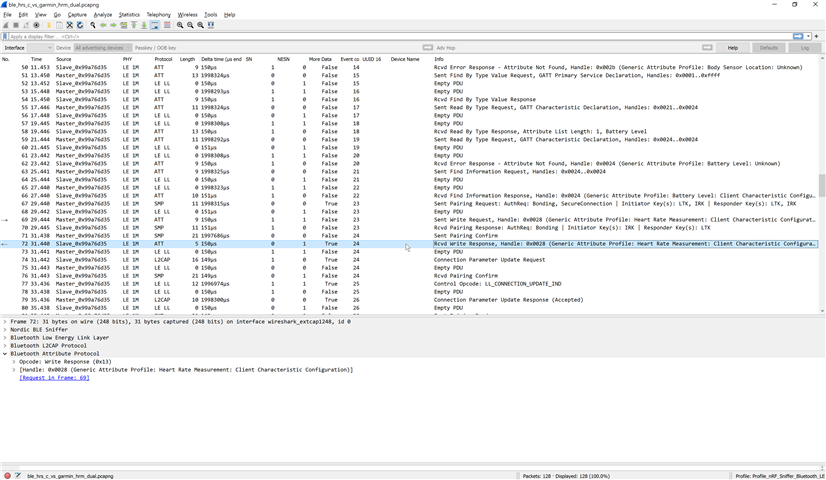
  • Ok. After hard time finding how to run the sniffer, I managed to run in and this is what I get. The app sends the write request and the hrm receives it, but ther is no response. Maybe there is a problem with order of messages? Please take a look (attached file from wireshark). I'm also attaching the debug log from from the app.

    00> <info> app_timer: RTC: initialized.
    00> 
    00> <debug> nrf_sdh: State request: 0x00000000
    00> 
    00> <debug> nrf_sdh: Notify observer 0x00049B6C => ready
    00> 
    00> <debug> nrf_sdh: State change: 0x00000000
    00> 
    00> <debug> nrf_sdh: State change: 0x00000001
    00> 
    00> <debug> nrf_sdh_ble: RAM starts at 0x20004100
    00> 
    00> <debug> nrf_ble_lesc: Initialized nrf_crypto.
    00> 
    00> <debug> nrf_ble_lesc: Initialized nrf_ble_lesc.
    00> 
    00> <debug> nrf_ble_lesc: Generating ECC key pair
    00> 
    00> <debug> ble_scan: Added filter on UUID 180D
    00> 
    00> <info> app: Erase bonds!
    00> 
    00> ully
    00> 
    00> <debug> nrf_sdh_ble: BLE event: 0x10.
    00> 
    00> <debug> nrf_ble_gatt: Requesting to update ATT MTU to 247 bytes on connection 0x0.
    00> 
    00> <debug> nrf_ble_gatt: Updating data length to 251 on connection 0x0.
    00> 
    00> <info> app: Connected.
    00> 
    00> <debug> nrf_ble_gq: Registering connection handle: 0x0000
    00> 
    00> <debug> ble_db_disc: Starting discovery of service with UUID 0x180D on connection handle 0x0.
    00> 
    00> <debug> nrf_ble_gq: Adding item to the request queue
    00> 
    00> <debug> nrf_ble_gq: GATTC Primary Services Discovery Request
    00> 
    00> <debug> nrf_ble_gq: SD is currently busy. The GATT request procedure will be attempted                       again later.
    00> 
    00> <debug> nrf_ble_gq: Processing the request queue...
    00> 
    00> <debug> nrf_ble_gq: GATTC Primary Service Discovery Request
    00> 
    00> <debug> nrf_ble_gq: SD is currently busy. The GATT request procedure will be attempted                           again later.
    00> 
    00> <debug> nrf_sdh_ble: BLE event: 0x1F.
    00> 
    00> <debug> nrf_sdh_ble: BLE event: 0x3A.
    00> 
    00> <debug> nrf_ble_gq: Processing the request queue...
    00> 
    00> <debug> nrf_ble_gq: GATTC Primary Service Discovery Request
    00> 
    00> <debug> nrf_ble_gq: SD GATT procedure (2) succeeded on connection handle: 0.
    00> 
    00> <debug> nrf_ble_gatt: ATT MTU updated to 23 bytes on connection 0x0 (response).
    00> 
    00> <info> app: GATT ATT MTU on connection 0x0 changed to 23.
    00> 
    00> <debug> nrf_sdh_ble: BLE event: 0x24.
    00> 
    00> <debug> nrf_ble_gatt: Data length updated to 27 on connection 0x0.
    00> 
    00> <debug> nrf_ble_gatt: max_rx_octets: 27
    00> 
    00> <debug> nrf_ble_gatt: max_tx_octets: 27
    00> 
    00> <debug> nrf_ble_gatt: max_rx_time: 328
    00> 
    00> <debug> nrf_ble_gatt: max_tx_time: 328
    00> 
    00> <info> app: Data length for connection 0x0 updated to 27.
    00> 
    00> <debug> nrf_sdh_ble: BLE event: 0x30.
    00> 
    00> <debug> nrf_ble_gq: Processing the request queue...
    00> 
    00> <debug> ble_db_disc: Found service UUID 0x180D.
    00> 
    00> <debug> nrf_ble_gq: Adding item to the request queue
    00> 
    00> <debug> nrf_ble_gq: GATTC Characteristic Discovery Request
    00> 
    00> <debug> nrf_ble_gq: SD GATT procedure (3) succeeded on connection handle: 0.
    00> 
    00> <debug> nrf_sdh_ble: BLE event: 0x32.
    00> 
    00> <debug> nrf_ble_gq: Processing the request queue...
    00> 
    00> <debug> nrf_ble_gq: Adding item to the request queue
    00> 
    00> <debug> nrf_ble_gq: GATTC Characteristic Discovery Request
    00> 
    00> <debug> nrf_ble_gq: SD GATT procedure (3) succeeded on connection handle: 0.
    00> 
    00> <debug> nrf_sdh_ble: BLE event: 0x12.
    00> 
    00> <debug> nrf_sdh_ble: BLE event: 0x32.
    00> 
    00> <debug> nrf_ble_gq: Processing the request queue...
    00> 
    00> <debug> nrf_ble_gq: Adding item to the request queue
    00> 
    00> <debug> nrf_ble_gq: GATTC Characteristic Descriptor Request
    00> 
    00> <debug> nrf_ble_gq: SD GATT procedure (4) succeeded on connection handle: 0.
    00> 
    00> <debug> nrf_sdh_ble: BLE event: 0x33.
    00> 
    00> <debug> nrf_ble_gq: Processing the request queue...
    00> 
    00> <debug> nrf_ble_gq: Adding item to the request queue
    00> 
    00> <debug> nrf_ble_gq: GATTC Characteristic Descriptor Request
    00> 
    00> <debug> nrf_ble_gq: SD GATT procedure (4) succeeded on connection handle: 0.
    00> 
    00> <debug> nrf_sdh_ble: BLE event: 0x33.
    00> 
    00> <debug> nrf_ble_gq: Processing the request queue...
    00> 
    00> <debug> ble_db_disc: Discovery of service with UUID 0x180D completed with success on connection handle 0x0.
    00> 
    00> <debug> ble_db_disc: Starting discovery of service with UUID 0x180F on connection handle 0x0.
    00> 
    00> <debug> nrf_ble_gq: Adding item to the request queue
    00> 
    00> <debug> nrf_ble_gq: GATTC Primary Services Discovery Request
    00> 
    00> <debug> nrf_ble_gq: SD GATT procedure (2) succeeded on connection handle: 0.
    00> 
    00> <debug> nrf_sdh_ble: BLE event: 0x30.
    00> 
    00> <debug> nrf_ble_gq: Processing the request queue...
    00> 
    00> <debug> ble_db_disc: Found service UUID 0x180F.
    00> 
    00> <debug> nrf_ble_gq: Adding item to the request queue
    00> 
    00> <debug> nrf_ble_gq: GATTC Characteristic Discovery Request
    00> 
    00> <debug> nrf_ble_gq: SD GATT procedure (3) succeeded on connection handle: 0.
    00> 
    00> <debug> nrf_sdh_ble: BLE event: 0x32.
    00> 
    00> <debug> nrf_ble_gq: Processing the request queue...
    00> 
    00> <debug> nrf_ble_gq: Adding item to the request queue
    00> 
    00> <debug> nrf_ble_gq: GATTC Characteristic Discovery Request
    00> 
    00> <debug> nrf_ble_gq: SD GATT procedure (3) succeeded on connection handle: 0.
    00> 
    00> <debug> nrf_sdh_ble: BLE event: 0x32.
    00> 
    00> <debug> nrf_ble_gq: Processing the request queue...
    00> 
    00> <debug> nrf_ble_gq: Adding item to the request queue
    00> 
    00> <debug> nrf_ble_gq: GATTC Characteristic Descriptor Request
    00> 
    00> <debug> nrf_ble_gq: SD GATT procedure (4) succeeded on connection handle: 0.
    00> 
    00> <debug> nrf_sdh_ble: BLE event: 0x33.
    00> 
    00> <debug> nrf_ble_gq: Processing the request queue...
    00> 
    00> <debug> ble_db_disc: Discovery of service with UUID 0x180F completed with success on connection handle 0x0.
    00> 
    00> <debug> ble_hrs_c: Heart Rate Service discovered at peer.
    00> 
    00> <debug> app: Heart rate service discovered.
    00> 
    00> <debug> ble_hrs_c: Configuring CCCD. CCCD Handle = 40, Connection Handle = 0
    00> 
    00> <debug> nrf_ble_gq: Adding item to the request queue
    00> 
    00> <debug> nrf_ble_gq: GATTC Write Request
    00> 
    00> <debug> nrf_ble_gq: SD GATT procedure (1) succeeded on connectio<debug> nrf_sdh_ble: BLE event: 0x13.
    00> 
    00> <debug> app: BLE_GAP_EVT_SEC_PARAMS_REQUEST
    00> 
    00> <debug> nrf_sdh_ble: BLE event: 0x38.
    00> 
    00> <debug> nrf_ble_gq: Processing the request queue...
    00> 
    00> <debug> nrf_sdh_ble: BLE event: 0x1F.
    00> 
    00> <debug> nrf_sdh_ble: BLE event: 0x12.
    00> 
    00> <debug> nrf_sdh_ble: BLE event: 0x1A.
    00> 
    00> <debug> nrf_sdh_ble: BLE event: 0x19.
    00> 
    00> <info> peer_manager_handler: Connection secured: role: Central, conn_handle: 0, procedure: Bonding
    00> 
    00> <info> app: BLE_GAP_EVT_AUTH_STATUS: status=0x0 bond=0x1 lv4: 0 kdist_own:0x2 kdist_peer:0x1
    00> 
    00> <debug> nrf_sdh_soc: SoC event: 0x2.
    00> 
    00> <debug> nrf_sdh_soc: SoC event: 0x2.
    00> 
    00> <debug> nrf_sdh_soc: SoC event: 0x2.
    00> 
    00> <debug> nrf_sdh_soc: SoC event: 0x2.
    00> 
    00> <info> peer_manager_handler: Peer data updated in flash: peer_id: 0, data_id: Bonding data, action: Update
    00> 
    00> <debug> nrf_sdh_soc: SoC event: 0x2.
    00> 
    00> <debug> nrf_sdh_soc: SoC event: 0x2.
    00> 
    00> <debug> nrf_sdh_soc: SoC event: 0x2.
    00> 
    00> <debug> nrf_sdh_soc: SoC event: 0x2.
    00> 
    00> <info> peer_manager_handler: Peer data updated in flash: peer_id: 0, data_id: Peer rank, action: Update
    00> 
    00> <debug> nrf_sdh_ble: BLE event: 0x35.
    00> 
    00> <debug> nrf_ble_gq: Processing the request queue...
    00> 
    00> <debug> nrf_sdh_ble: BLE event: 0x36.
    00> 
    00> <debug> nrf_ble_gq: Processing the request queue...
    00> 
    00> <debug> nrf_sdh_soc: SoC event: 0x2.
    00> 
    00> <debug> nrf_sdh_soc: SoC event: 0x2.
    00> 
    00> <debug> nrf_sdh_soc: SoC event: 0x2.
    00> 
    00> <debug> nrf_sdh_soc: SoC event: 0x2.
    00> 
    00> <info> peer_manager_handler: Peer data updated in flash: peer_id: 0, data_id: Central address resolution, action: Update
    00> 

    ble_hrs_c_vs_garmin_hrm_dual.pcapng

  • Nobody can help me? Pretty please? Slight smile

    The only difference that I can spot, between a succesful notofication enable (done via nrf connect) and an unsuccesfull (done by hrs_c app) is the service UUID that is being used. BLE_HRS_C uses Generic Attribute Profile (0x1801):

    while NRF connect uses simply Heard Rate (0x180d):

    For the moment I have no idea why the app choses this uuid. Where / how do I change that?

  • Hi Lukasz, 

    Sorry for late response it was our public holiday on Monday. 

    Could you please send the sniffer trace when you use the nRF Connect app to connect to the Heart Rate Monitor ? 


    dragilla said:
    The app sends the write request and the hrm receives it, but ther is no response.

    Could you explain this ? I can see there is a write response in the screenshot you showed.  
    I suspect that there could be an issue on when you send the write request to the CCCD to enable notification. You may need to wait until it bonded before you enable notification. 

Related

