This post is older than 2 years and might not be relevant anymore
More Info: Consider searching for newer posts

open nRF connect SDK project failed.

Hello.

I am trying the SEGGER Embedded studio's open nRF connect SDK project, but it fails with an error like the one in the image.
How can I make it succeed?
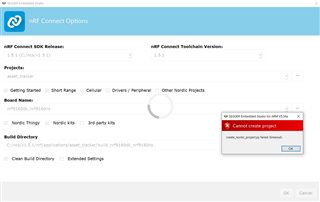
SEGGER Embedded studio is installed with ToolChainManager.

Also, I found "CMakeError.log" in the build file. Is this related to something else?

Compiling the C compiler identification source file "CMakeCCompilerId.c" failed.
Compiler: C:/ncs/v1.5.1/toolchain/opt/bin/arm-none-eabi-gcc.exe 
Build flags: 
Id flags:  

The output was:
1
c:/ncs/v1.5.1/toolchain/opt/bin/../lib/gcc/arm-none-eabi/9.2.1/../../../../arm-none-eabi/bin/ld.exe: c:/ncs/v1.5.1/toolchain/opt/bin/../lib/gcc/arm-none-eabi/9.2.1/../../../../arm-none-eabi/lib\libc.a(lib_a-exit.o): in function `exit':
exit.c:(.text.exit+0x2c): undefined reference to `_exit'
collect2.exe: error: ld returned 1 exit status


Compiling the CXX compiler identification source file "CMakeCXXCompilerId.cpp" failed.
Compiler: C:/ncs/v1.5.1/toolchain/opt/bin/arm-none-eabi-gcc.exe 
Build flags: 
Id flags:  

The output was:
1
c:/ncs/v1.5.1/toolchain/opt/bin/../lib/gcc/arm-none-eabi/9.2.1/../../../../arm-none-eabi/bin/ld.exe: c:/ncs/v1.5.1/toolchain/opt/bin/../lib/gcc/arm-none-eabi/9.2.1/../../../../arm-none-eabi/lib\libc.a(lib_a-exit.o): in function `exit':
exit.c:(.text.exit+0x2c): undefined reference to `_exit'
collect2.exe: error: ld returned 1 exit status


Thank you.

Parents
  • Hi,

    Did you open SES with the Open IDE button in Toolchain Manager, or from somewhere else? If you install NCS with the Toolchain Manager, you must open it from there as well.

    Have you made any changes to the project or NCS? Does this happen with multiple projects or only the Asset Tracker?

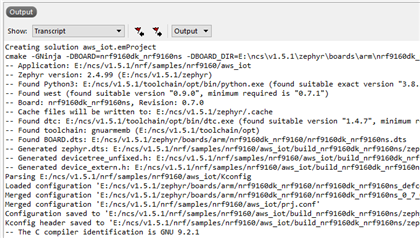
    The output in SES should give you more information about the error. After getting the error, can you copy the output from SES and either attach it here as a .txt file or insert it with Insert > Code? You can find the output in the output terminal of SES, make sure you have selected to show Transcript and Output as shown below:

    Best regards,

    Marte

Reply
  • Hi,

    Did you open SES with the Open IDE button in Toolchain Manager, or from somewhere else? If you install NCS with the Toolchain Manager, you must open it from there as well.

    Have you made any changes to the project or NCS? Does this happen with multiple projects or only the Asset Tracker?

    The output in SES should give you more information about the error. After getting the error, can you copy the output from SES and either attach it here as a .txt file or insert it with Insert > Code? You can find the output in the output terminal of SES, make sure you have selected to show Transcript and Output as shown below:

    Best regards,

    Marte

Children
No Data
Related