This post is older than 2 years and might not be relevant anymore
More Info: Consider searching for newer posts

open nRF connect SDK project failed.

Hello.

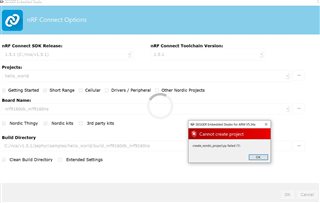
I am trying the SEGGER Embedded studio's open nRF connect SDK project, but it fails with an error like the one in the image.
How can I make it succeed?
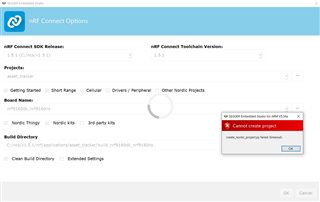
SEGGER Embedded studio is installed with ToolChainManager.

Also, I found "CMakeError.log" in the build file. Is this related to something else?

Compiling the C compiler identification source file "CMakeCCompilerId.c" failed.
Compiler: C:/ncs/v1.5.1/toolchain/opt/bin/arm-none-eabi-gcc.exe 
Build flags: 
Id flags:  

The output was:
1
c:/ncs/v1.5.1/toolchain/opt/bin/../lib/gcc/arm-none-eabi/9.2.1/../../../../arm-none-eabi/bin/ld.exe: c:/ncs/v1.5.1/toolchain/opt/bin/../lib/gcc/arm-none-eabi/9.2.1/../../../../arm-none-eabi/lib\libc.a(lib_a-exit.o): in function `exit':
exit.c:(.text.exit+0x2c): undefined reference to `_exit'
collect2.exe: error: ld returned 1 exit status


Compiling the CXX compiler identification source file "CMakeCXXCompilerId.cpp" failed.
Compiler: C:/ncs/v1.5.1/toolchain/opt/bin/arm-none-eabi-gcc.exe 
Build flags: 
Id flags:  

The output was:
1
c:/ncs/v1.5.1/toolchain/opt/bin/../lib/gcc/arm-none-eabi/9.2.1/../../../../arm-none-eabi/bin/ld.exe: c:/ncs/v1.5.1/toolchain/opt/bin/../lib/gcc/arm-none-eabi/9.2.1/../../../../arm-none-eabi/lib\libc.a(lib_a-exit.o): in function `exit':
exit.c:(.text.exit+0x2c): undefined reference to `_exit'
collect2.exe: error: ld returned 1 exit status


Thank you.

Parents
  • Hi,

    SES is opened from the Open IDE button.

    This problem occurs not only with Asset Tracker, but also with another sample code. The code has not been changed from the sample code.

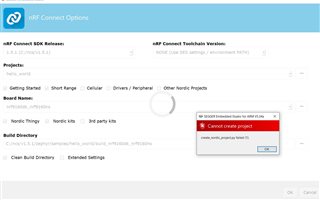
    The hello world project failed to create.
    I have uploaded the capture of the failure and the error output.

    Creating solution hello_world.emProject
    C:/ncs/v1.5.1/toolchain/opt/bin/cmake.exe -GNinja -DBOARD=nrf9160dk_nrf9160ns -DBOARD_DIR=C:\ncs\v1.5.1\zephyr\boards\arm\nrf9160dk_nrf9160 -BC:\ncs\v1.5.1\zephyr\samples\hello_world\build_nrf9160dk_nrf9160ns -SC:\ncs\v1.5.1\zephyr\samples\hello_world -DNCS_TOOLCHAIN_VERSION=1.5.1 -DEXTRA_KCONFIG_TARGETS=menuconfig_ses -DEXTRA_KCONFIG_TARGET_COMMAND_FOR_menuconfig_ses=C:\ncs\v1.5.1\toolchain\segger_embedded_studio/html/configure_nordic_project_menuconfig.py
    -- Application: C:/ncs/v1.5.1/zephyr/samples/hello_world
    -- Zephyr version: 2.4.99 (C:/ncs/v1.5.1/zephyr)
    -- Found Python3: C:/ncs/v1.5.1/toolchain/opt/bin/python.exe (found suitable exact version "3.8.2") found components: Interpreter 
    -- Found west (found suitable version "0.9.0", minimum required is "0.7.1")
    -- Board: nrf9160dk_nrf9160ns, Revision: 0.7.0
    -- Cache files will be written to: C:/ncs/v1.5.1/zephyr/.cache
    -- Found dtc: C:/ncs/v1.5.1/toolchain/opt/bin/dtc.exe (found suitable version "1.4.7", minimum required is "1.4.6")
    -- Found toolchain: gnuarmemb (C:/ncs/v1.5.1/toolchain/opt)
    -- Found BOARD.dts: C:/ncs/v1.5.1/zephyr/boards/arm/nrf9160dk_nrf9160/nrf9160dk_nrf9160ns.dts
    -- Generated zephyr.dts: C:/ncs/v1.5.1/zephyr/samples/hello_world/build_nrf9160dk_nrf9160ns/zephyr/zephyr.dts
    -- Generated devicetree_unfixed.h: C:/ncs/v1.5.1/zephyr/samples/hello_world/build_nrf9160dk_nrf9160ns/zephyr/include/generated/devicetree_unfixed.h
    -- Generated device_extern.h: C:/ncs/v1.5.1/zephyr/samples/hello_world/build_nrf9160dk_nrf9160ns/zephyr/include/generated/device_extern.h
    Parsing C:/ncs/v1.5.1/zephyr/Kconfig
    Loaded configuration 'C:/ncs/v1.5.1/zephyr/boards/arm/nrf9160dk_nrf9160/nrf9160dk_nrf9160ns_defconfig'
    Merged configuration 'C:/ncs/v1.5.1/zephyr/boards/arm/nrf9160dk_nrf9160/nrf9160dk_nrf9160ns_0_7_0.conf'
    Merged configuration 'C:/ncs/v1.5.1/zephyr/samples/hello_world/prj.conf'
    Configuration saved to 'C:/ncs/v1.5.1/zephyr/samples/hello_world/build_nrf9160dk_nrf9160ns/zephyr/.config'
    Kconfig header saved to 'C:/ncs/v1.5.1/zephyr/samples/hello_world/build_nrf9160dk_nrf9160ns/zephyr/include/generated/autoconf.h'
    -- The C compiler identification is GNU 9.2.1
    -- The CXX compiler identification is GNU 9.2.1
    -- The ASM compiler identification is GNU
    -- Found assembler: C:/ncs/v1.5.1/toolchain/opt/bin/arm-none-eabi-gcc.exe
    Including boilerplate (Zephyr base): C:/ncs/v1.5.1/zephyr/cmake/app/boilerplate.cmake
    -- Using NCS Toolchain 1.5.1 for building. (C:/ncs/v1.5.1/toolchain/cmake)
    
    error: cmake failed
    create_nordic_project.py failed (1)


    By the way,

    I used to be able to create a project in SES, but after changing the settings in menuconfig, I can't create a project anymore.

    Since then, this problem has continued to occur even after reinstalling SES.

    Thank you.

  • Hi,

    Thank you for uploading!

    Unfortunately, it does not seem like the log contains more information about the error, as it only says cmake failed, and not why. Since it fails so early, it is a good chance the problem is related to your path or environment variables in some way. I have some things you can try, please let me know if any of them solves your problem:

    • Make sure the Extra CMake Build Options field is empty when you open the project. You can see this field by selecting Extended Settings, next to Clean Build Directory.
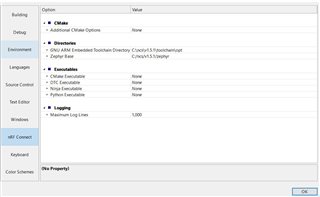
    • Make sure your environment variables are set correctly in SES. In SES go to Tools -> Options -> nRF Connect, and make sure the paths are as follows:
      • GNU ARM Embedded Toolchain Directory: C:\ncs\v1.5.1\toolchain\opt
      • Zephyr Base: C:\ncs\v1.5.1\zephyr
      • If you have anything in Additional CMake Options remove it.
      • If any of the other fields under Executables has something, try removing that as well
    • Try selecting nRF Connect Toolchain Version as "NONE (Use SES settings / environment PATH)" when opening the project. In order to do this, you must make sure that the environment variables are correct, as above.

    Best regards,

    Marte

  • Hi,

    Thank you for doing the research.
    I have checked the three points you gave me.

    ・Nothing was specified in the Extra CMake Build Options.

    ・SES environment variables were correct.

    ・Creating a project with nRF Connect Toolchain Version as NONE failed.

    Thank you.

  • Hi,

    I tried comparing the output of your log with what I get when opening the same project for the same board, and from what I can see, it seems like it does not add the Secure Partition Manager (SPM) in your project. The SPM is necessary in applications where you are to communicate with the modem, and it should be automatically added if you select nrf9160dk_nrf9160ns as build target (with ns at the end for non-secure). However, it does not seem to do so in your case.

    I have been trying to change the settings related to SPM in menuconfig to see if I could reproduce the issue, but I was unable to get an error. However, it is strange that you are getting the error in multiple projects, as the configurations set in menuconfig should be for that specific project. So for example changes made in the Asset Tracker should not affect the Hello World sample. 

    You said earlier that you have tried to uninstall and reinstall SES. Did you only do this with SES, or with the whole NCS v1.5.1 installation? You can try remove the whole installation and reinstall it, to get a clean version of NCS v1.5.1.

    Best regards,

    Marte

  • Hi,

    Thank you for doing the research.

    My PC is Windows 10.
    Initially I installed SES by mistake, following the deprecated Getting Started Assistant instructions.
    Then, the build did not work, so I performed a reinstallation.
    This time, after deleting the old ncs folder, I used Toolchain Manager to install NCS v1.5.1 and SES.

    Thank you.

  • Hi,

    Have you tried installing any of the other versions of NCS to see if you get the same error?

    There might be something in your path in the system environment variables causing this. Could you check if you have Python in your path in the system environment variables, and see if removing this fixes the problem?

    You can also try completely uninstalling and removing nRF Connect for Desktop and the apps installed through there, then reinstalling it again. Make sure you also remove the "nrfconnect" and "nRF Connect" folders in AppData before reinstalling. You will most likely find them in C:/Users/<user_name>/AppData/Roaming.

    You can also install NCS manually by following this guide.

    Best regards,

    Marte

Reply
  • Hi,

    Have you tried installing any of the other versions of NCS to see if you get the same error?

    There might be something in your path in the system environment variables causing this. Could you check if you have Python in your path in the system environment variables, and see if removing this fixes the problem?

    You can also try completely uninstalling and removing nRF Connect for Desktop and the apps installed through there, then reinstalling it again. Make sure you also remove the "nrfconnect" and "nRF Connect" folders in AppData before reinstalling. You will most likely find them in C:/Users/<user_name>/AppData/Roaming.

    You can also install NCS manually by following this guide.

    Best regards,

    Marte

Children
No Data
Related