

Hello.
I am trying the SEGGER Embedded studio's open nRF connect SDK project, but it fails with an error like the one in the image.
How can I make it succeed?
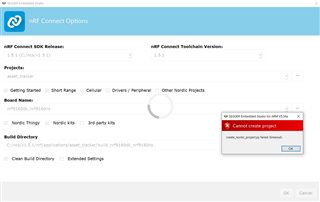
SEGGER Embedded studio is installed with ToolChainManager.
Also, I found "CMakeError.log" in the build file. Is this related to something else?
Compiling the C compiler identification source file "CMakeCCompilerId.c" failed.
Compiler: C:/ncs/v1.5.1/toolchain/opt/bin/arm-none-eabi-gcc.exe
Build flags:
Id flags:

The output was:
1
c:/ncs/v1.5.1/toolchain/opt/bin/../lib/gcc/arm-none-eabi/9.2.1/../../../../arm-none-eabi/bin/ld.exe: c:/ncs/v1.5.1/toolchain/opt/bin/../lib/gcc/arm-none-eabi/9.2.1/../../../../arm-none-eabi/lib\libc.a(lib_a-exit.o): in function `exit':
exit.c:(.text.exit+0x2c): undefined reference to `_exit'
collect2.exe: error: ld returned 1 exit status


Compiling the CXX compiler identification source file "CMakeCXXCompilerId.cpp" failed.
Compiler: C:/ncs/v1.5.1/toolchain/opt/bin/arm-none-eabi-gcc.exe
Build flags:
Id flags:

The output was:
1
c:/ncs/v1.5.1/toolchain/opt/bin/../lib/gcc/arm-none-eabi/9.2.1/../../../../arm-none-eabi/bin/ld.exe: c:/ncs/v1.5.1/toolchain/opt/bin/../lib/gcc/arm-none-eabi/9.2.1/../../../../arm-none-eabi/lib\libc.a(lib_a-exit.o): in function `exit':
exit.c:(.text.exit+0x2c): undefined reference to `_exit'
collect2.exe: error: ld returned 1 exit status
Thank you.

