This post is older than 2 years and might not be relevant anymore
More Info: Consider searching for newer posts

Android BLE library - autoconnect

We have developed an Android application for a customer (Ibiza) which makes use of nRF's Android-BLE-Library (https://github.com/NordicSemiconductor/Android-BLE-Library). The app is based off the Android-nRF-Blinky app (https://github.com/NordicSemiconductor/Android-nRF-Blinky). Everything is working great so far, and our customer is happy.

One of the features in the app is that it auto-reconnects to the device when it sees it advertising. This works about 60-70% of the time. There are times where it doesn't auto-connect and the user has to manually connect.

We would like to see what could be done to increase the reliability of the Android app auto-reconnecting to the device, to make that number closer to 90-100%. Would you be able to provide any insight on this? We would appreciate support to help us understand how to get the desired functionality of reliable re-connections every time the device advertises (nrf52840, using Zephyr/NCS).

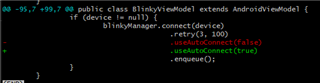
Right now it looks like the only setting we have is whether or not we enable auto connection (see diff snippet below):
Thanks in advance,

Vignesh

Parents
  • I can request our Android expert to take a look at it if you can make this case public (in private I cannot share full details with him)

  • Vignesh, I have some insights from the developer.

    The auto connect feature on Android is slow, as it is offloaded to ble controller, which may save power and scan only periodicity. There are, or were, also some issues regarding the address type: public or random, when connecting to a device which has not been scanned found at least once done Bluetooth was enabled. As the Mac address in Android API is 48 bits long, the address type is either taken from security record (if an address has been scanned at least once), or assumed public, if it hasn't. But let's say, the device was found during ble scan, and its type is known.

    When the device is in range, it's much better to connect without auto-connect, as it's much faster. It a user want to connect to a device that's out of range using auto-connect, the correct way to do this is too start scanning (preferably using new API with Pending Intent, available in Android 8+), which is battery efficient, and when a device is found than connecting to it using ble library seeing auto-connect to true. Then we may be almost confident the device is in range. The retry at in connect API in ble library doesn't retry in case of timeout, as far as i remember. It just "solves" other connection issues, like error 133 (which occurs before 30 sec after connection attempt) (133 thrown 30 after connection attempt is started should be treated as timeout).

    So, basically, retry won't help in this case, unless connection with auto-connect ends with errors. Instead, i recommend background scanning. Android Scanner Compat library tries to emulate new API with Pending Intent using background service in pre-Oreo (Android 8) devices. It's not that efficient, but should also work. Per-lollypop Android should not scan with large scan window (also can be adjusted in Scanner Compat library).

    Hope this helps.

Reply
  • Vignesh, I have some insights from the developer.

    The auto connect feature on Android is slow, as it is offloaded to ble controller, which may save power and scan only periodicity. There are, or were, also some issues regarding the address type: public or random, when connecting to a device which has not been scanned found at least once done Bluetooth was enabled. As the Mac address in Android API is 48 bits long, the address type is either taken from security record (if an address has been scanned at least once), or assumed public, if it hasn't. But let's say, the device was found during ble scan, and its type is known.

    When the device is in range, it's much better to connect without auto-connect, as it's much faster. It a user want to connect to a device that's out of range using auto-connect, the correct way to do this is too start scanning (preferably using new API with Pending Intent, available in Android 8+), which is battery efficient, and when a device is found than connecting to it using ble library seeing auto-connect to true. Then we may be almost confident the device is in range. The retry at in connect API in ble library doesn't retry in case of timeout, as far as i remember. It just "solves" other connection issues, like error 133 (which occurs before 30 sec after connection attempt) (133 thrown 30 after connection attempt is started should be treated as timeout).

    So, basically, retry won't help in this case, unless connection with auto-connect ends with errors. Instead, i recommend background scanning. Android Scanner Compat library tries to emulate new API with Pending Intent using background service in pre-Oreo (Android 8) devices. It's not that efficient, but should also work. Per-lollypop Android should not scan with large scan window (also can be adjusted in Scanner Compat library).

    Hope this helps.

Children
No Data
Related