This post is older than 2 years and might not be relevant anymore
More Info: Consider searching for newer posts

How to test examples\dfu\secure_bootloader\pca10040_uart_debug

I build the example and download to PCA10040,but there no log print in RTT, and I debug in keil mdk, I found the program does not step into main function.

How to run this example?Does there have any document to describle about usart DFU?

Parents Reply Children
  • thanks for reply, Does the MBR have source code?I want to know exactly what does it do.

    Your suggestion is very good But I have encounter some problem for runing the uasrt dfu example.

    Here's how I do it:

    1.I'm not flash MBR;

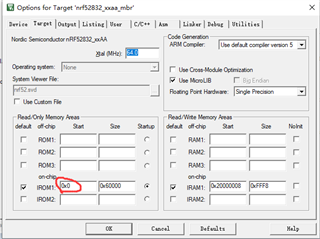
    2.I modify the secure bootloader project IROM1 start addr to 0x00

    3. I have generate key and package as the  <nRF Util v6.1.0 User Guide.pdf>

    4.I Flash the generated package on command 

    nrfutil dfu usb-serial -pkg app_dfu_signed_package.zip -p COM4 -b 115200

    The result:

    <error> nrf_dfu_serial_uart: on_rx_complete, receive error:17

    <info> app: add byte to buffer

    <error> nrf_dfu_serial_uart: on_rx_complete, receive error:17

    <info> app: finished reading packet

    <error> nrf_dfu_serial_uart: on_rx_complete, receive error:17

    <info> app: finished reading packet

    <info> nrf_dfu_serial_uart: Allocated buffer 2000065C

    <debug> nrf_dfu_req_handler: Handle NRF_DFU_OP_OBJECT_WRITE (command)

    <debug> nrf_dfu_req_handler: Request handling complete. Result: 0x1

    <debug> nrf_dfu_req_handler: Handle NRF_DFU_OP_OBJECT_WRITE (command)

    the error code is print at 

    static __INLINE void on_rx_complete(nrf_dfu_serial_t * p_transport, uint8_t * p_data, uint8_t len)
    {
        ret_code_t ret_code = NRF_ERROR_TIMEOUT;
    
        // Check if there is byte to process. Zero length transfer means that RXTO occured.
        if (len)
        {
            ret_code = slip_decode_add_byte(&m_slip, p_data[0]);
        }
    
        (void) nrf_drv_uart_rx(&m_uart, &m_rx_byte, 1);
    
        if (ret_code == NRF_SUCCESS)
        {
            nrf_dfu_serial_on_packet_received(p_transport,
                                             (uint8_t const *)m_slip.p_buffer,
                                             m_slip.current_index);
    
            uint8_t * p_rx_buf = nrf_balloc_alloc(&m_payload_pool);
            if (p_rx_buf == NULL)
            {
                NRF_LOG_ERROR("Failed to allocate buffer");
                return;
            }
            NRF_LOG_INFO("Allocated buffer %x", p_rx_buf);
            // reset the slip decoding
            m_slip.p_buffer      = &p_rx_buf[OPCODE_OFFSET];
            m_slip.current_index = 0;
            m_slip.state         = SLIP_STATE_DECODING;
        }
        else
        {
            NRF_LOG_ERROR("%s, receive error:%d", __func__, ret_code);  // 17 is NRF_ERROR_BUSY
        }
    
    }

    So why there have a NRF_ERROR_BUSY(17) error?

  • Please do use the MBR. The MBR does vector table forwarding and handle the bootloader swap. 

    We unfortunately don't provide the source code for the MBR. But you can find some of the features of the MBR in the nrf_dfu_mbr.h file. 
    Changing the bootloader to address 0 would requires quite a few modification in the bootloader to make it work. 

  • Is there no way to debug the bootloader separately?

  • I have have read many documents in the website,But I'm not find how to flash mbr, can you give me a link?

  • You just flash it the same way as you flash the softdevice or bootloader or application. 

    You can use nRF Connect - Programmer application on PC or use nrfjprog.exe command line tool to flash the hex file. 

    To debug the bootloader you can flash the debug version and step through the code (only after you flash the MBR) 

Related