This post is older than 2 years and might not be relevant anymore
More Info: Consider searching for newer posts

few questions about bootloader settings

hello Nordic

i am working with nrf52832 soc with SDK 16.0, S132 V7.0.1

following this path:

https://devzone.nordicsemi.com/nordic/short-range-guides/b/software-development-kit/posts/getting-started-with-nordics-secure-dfu-bootloader

and this : https://infocenter.nordicsemi.com/index.jsp?topic=%2Fug_nrfutil%2FUG%2Fnrfutil%2Fnrfutil_settings_generate_display.html

1. when trying to read current setting of existing bootloader in the examples i get this:

C:\Nordik SDK\examples\dfu\secure_bootloader>nrfutil settings display pca10040_uart\ses\Output\Release\Exe\secure_bootloader_uart_mbr_pca10040.hex
Bad access at 0x7F000: not enough data to read 4 contiguous bytes
Usage: nrfutil settings display [OPTIONS] HEX_FILE

Error: Failed to parse .hex file: Bad access at 0xFF000: not enough data to read 4 contiguous bytes

why is that ?

2. if i generate a setting for the bootloader and i include the softdevice in the "nrf settings generate command (like so:  --softdevice FILE s132_nrf52_7.0.1_softdevice.hex)

do i still need to mergehex the bootloader with the s132 hex file ? considering that when i flash my application (using SEGGER) after erasing the nrf52832 i do not need to flash the softdevice separately

3. the settings generate command refers to application version, do i need to change the setting each time i change application version or it's name (considering the version is in the name) ?

4. if i mergehex the bootloader settings hex file with the bootloader hex file and i flash the bootloader without having an application flashed on the device, what will happen ? would i be able to flash the application via SEGGER normally or must i have the application hex flashed before the flashing of the bootloader or mergehex with the bootloader ?

that it for now

p.s. 5. in the dfu examples, what's the difference between pca10040_uart to pca10040_uart_debug can both be used for production also can they be used for a PCB not an nrf52832DK ? 

hope to read from you soon

best regards

Ziv


  • Have you flashed the SoftDevice to the device before this point?

    usually i erase the device before start, hence my question :

    if i use the pkg generat command which specify the softdevice do i still need to merge the softdevice hex with the application hex and give the merged hex to the pkg generate command ?, or does the nrfutil pkg generate command does it for me ?

    to continue with this question, should i merge the softdevice hex with the bootloader hex in that case and flash the merged hex and then use the nrfutil dfu with the generated pkg zip ?

    and one more thing, creating a bootloader setting hex is essential only when i want to flash the whole bl, sofdevice and app in one hex correct ?

  • Ah, I missed the last question.

    No. You can never provided merged hex files to nrfutil when generating a zip package for DFU upgrades. So the bootloader, application and SoftDevice must be provided as separate hex files with separate options associated with them. If you only want to upgrade the application via DFU, you only provide the application, etc.

    However, in order to support serial DFU of the application, you must at the very least have programmed the MBR and bootloader. In practice you will program both the SoftDevice (which includes the MBR), bootloader, application and BL settings hex initially, and can then update anything you need via DFU after that.

    ziv123 said:
    and one more thing, creating a bootloader setting hex is essential only when i want to flash the whole bl, sofdevice and app in one hex correct ?

    It is primarily needed when you program the application via a debugger and not DFU. If you do via a debugger, there is no way for the bootloader to know about the application and it's checksum without you generating and programming the settings page.

  • not sure i understood it all 

    1. if i understand correctly, i don't always have to use the bl settings hex, but just when i want to flash it all together? or i can flash the bootloader, softdevice and app in one merged hex file without bl setting at all and it should work as well, correct ?

     2. if i am not doing it in one file, then when i take an erased device, i first flash the softdevice hex, then the bootloader hex and then i can flash the app and it should work ?

    or the app at this stage (without bl setting) can only be given via dfu  ? 

    3. if first i flash the softdevice and the app and then flash the bootloader then the app should work correct ?

    4. having a bootloader with bl setting and softdevice on the device enables me to flash the application via segger ide, or i need to change the bl setting with every change that i make to the app ?

    5. when using segger ide to flash an app on an erased device, there is no need to flash the softdevice separately, so i guess it is doing it by itself, how does it work when wanting to use segger to flash app when a bootloader is on the device ?

    6. if i want to update only the softdevice (though i guess app will also require an update in that case) via dfu then in the packet generate command i put write: 

    " ... --application softdevice.hex --application-version 7.01 (in case of s132 v7.01) ... " ??

    sorry for being a little tidies but i am trying to understand it fully and be able to repeat and understand when things don't work as expected 

    one more thing: when trying to dfu i get this error:

    \dfu_transport_serial.py", line 214, in open
        raise NordicSemiException("No ping response after opening COM port")
    pc_ble_driver_py.exceptions.NordicSemiException: No ping response after opening COM port

    does it mean something with the bootloader is not working as it should or is it something to do with the physical connection ?

  • Hi,

    ziv123 said:
    1. if i understand correctly, i don't always have to use the bl settings hex, but just when i want to flash it all together? or i can flash the bootloader, softdevice and app in one merged hex file without bl setting at all and it should work as well, correct ?

    Let me explain in more detail what the bootloader settings hex file is. The bootloader has a settings page, which is the last page in flash. That is used for storing the state of the system in a wide sense. Most importantly for this discussion, bootloader settings include a flag that indicates if an application is present or not and a checksum (or cryptographic hash or signature depending on configuration) of the application so that the bootloader can check it's integrity.

    When the bootloader runs at every boot it checks if it should enter DFU mode, based on a number of factors. One of these is that it will always enter DFU mode instead of try to start the application if there is no flag indicating that an application is present and/or the checksum of the application does not match the checksum in the settings page. So if you do not program a valid bootloader settings page the bootloader will always enter DFU mode instead of starting the application.

    Note that when upgrading via DFU, the bootloader will update the bootloader settings page, as it gets the required information from the DFU process. So the bootloader settings is only needed when you do initial programing from a debugger and not when you program via DFU. It is also not needed if you do not program the application but only bootloader and SoftDevice, and intend to DFU in the application later. In that case the settings page will be updated for you by the bootloader.

    ziv123 said:
     2. if i am not doing it in one file, then when i take an erased device, i first flash the softdevice hex, then the bootloader hex and then i can flash the app and it should work ?

    No. The bootloader will enter DFU mod then. You also need to flash the bootloader settings if you want the bootloader to start the application. (Note that tit is irrelevant if you merge the files or not when you program via a debugger).

    ziv123 said:
    3. if first i flash the softdevice and the app and then flash the bootloader then the app should work correct ?

    No. You also need to program the bootloader settings so that the bootloader can know that there is a valid app present and start it.

    ziv123 said:
    4. having a bootloader with bl setting and softdevice on the device enables me to flash the application via segger ide, or i need to change the bl setting with every change that i make to the app ?

    You do not need to change the BL settings if you upgrade via DFU as then the bootloader updated the bootloader settings for you as part of the process.. If you flash a different application form a debugger  you need to update the bootloader settings page and program that again. You can modify the bootloader to skip this check if you like though, by for instance making crc_on_valid_app_required() in <SDK>\components\libraries\bootloader\nrf_bootloader.c always return false.

    ziv123 said:
    5. when using segger ide to flash an app on an erased device, there is no need to flash the softdevice separately, so i guess it is doing it by itself, how does it work when wanting to use segger to flash app when a bootloader is on the device ?

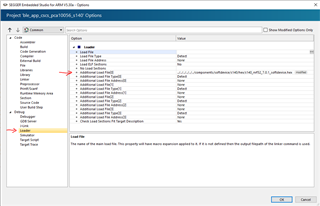
    The example SES projects we provide include the SoftDevice as an additional load file, so it is programmed together with the application when you program from SES:

    SES will program the SoftDevice and application without any problem when you have a bootloader. But the bootloader cannot start the app so you will not be able to run it unless you program a valid settings page for every time you change the app, or alternatively modify the bootloader as I mentioned earlier in this post.

    ziv123 said:

    6. if i want to update only the softdevice (though i guess app will also require an update in that case) via dfu then in the packet generate command i put write: 

    " ... --application softdevice.hex --application-version 7.01 (in case of s132 v7.01) ... " ??

    sorry for being a little tidies but i am trying to understand it fully and be able to repeat and understand when things don't work as expected 

    No, you cannot provide a softdevice with the --application option. There is a separate option for providing a SoftDevice (--softdevice). Please see "nrfutil pkg generate --help" for more details about this. I recommend you also go though this tutorial if you have not done so allready.

    ziv123 said:
    does it mean something with the bootloader is not working as it should or is it something to do with the physical connection ?

    It means that UART communication is not working, which could have a number of explanations. It could be an issue with the physical connection, or it could be a mismatch of parameters (baud rate, flow control, etc.)

  • ok

    going back to basic since things don't work i i don't get why

    flashed the softdevice hex and the bootloader from this example

    \examples\dfu\secure_bootloader\pca10040_uart\ses

    (untouched, beside the micro ecc issue) 

    then generated a pkg and dfu it and all is well .. so far

    in my app when i get a dfu command i do this:

    case SYS_OP_MODE_DFU_INIT:
    {
        NRF_POWER->GPREGRET = 0xB1;
        NVIC_SystemReset();
        break;
    }

    then i try to dfu with a second generated pkg of the same app with only minor change (version change)

    it takes some time and then i get 

    File "c:\program files (x86)\python383\lib\site-packages\nordicsemi\dfu\dfu_transport_serial.py", line 214, in open
        raise NordicSemiException("No ping response after opening COM port")
    pc_ble_driver_py.exceptions.NordicSemiException: No ping response after opening COM port

    and after i get that the old app loads (i see it by the version in the sttus message from the app)

    what am i missing ? 

Related