Based on nRF52 hardware,I want to develop a phone based on HID protocol to control the phone, send instructions to let the phone into the lock screen state,
How to go about the development, is it a basic source project?
Based on nRF52 hardware,I want to develop a phone based on HID protocol to control the phone, send instructions to let the phone into the lock screen state,
How to go about the development, is it a basic source project?
Hi
The Keyboard Power command, defined on page 56 of the HID Usage Table document, can be used to make the phone enter the lock screen.
This is defined under the Generic Device Controls page, rather than the Generic Desktop page normally used for keyboards, and we don't have any example showing how to do it out of the box.
The ble_app_hids_keyboard example in the SDK gives you a good starting point for making this change, and if you give me a couple of days I can try to do this for you and send you an updated example that includes the Keyboard Power command.
Best regards
Torbjørn
Hi,Torbjørn
OK, thank you, I can wait, The project is being pre-researched now, thank you very much for providing the source code to me
Best regards
alan11
Hi alan
That is good to hear. I am quite busy these days, but the second week of June I should have some time available.
If you need me to provide an example just let me know, and I will set aside some time for it then.
Best regards
Torbjørn
Hi Torbjørn
OK, waiting for your reply. Thank you,I will try this time too
Best regards
alan
Hi Alan
Do you have any updates to share on your end?
As I said I can set aside some time this week to provide an example for you.
Best regards
Torbjørn
Hi Alan
Do you have any updates to share on your end?
As I said I can set aside some time this week to provide an example for you.
Best regards
Torbjørn
Hi Torbjørn
I'm sorry, because I am busy with the production problem of another project, I am ready to carry out this project now. Do you have any update on this problem? I need your help
Best regards
alan
Hi Alan
Now I feel a bit stupid. After looking at this again I realized you only have to make a very small change to the ble_app_hids_keyboard example in order to support this command.
The keyboard power command is treated like any other keypress, which means you can send it in the same way that you send any other keys.
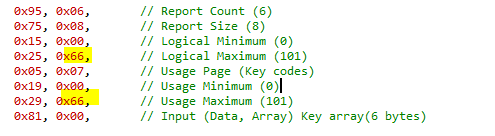
All you have to change to support this is to change the Logical Maximum and the Usage Maximum of the key codes from 0x65 to 0x66:

Once I made this change I updated the sample message to send the keyboard power command after typing "hello", instead of sending a newline:
static uint8_t m_sample_key_press_scan_str[] = /**< Key pattern to be sent when the key press button has been pushed. */
{
0x0b, /* Key h */
0x08, /* Key e */
0x0f, /* Key l */
0x0f, /* Key l */
0x12, /* Key o */
0x66 /* Keyboard power */
};
Now if you press Button 1 on the DK it should first type out hello, and then it should put the phone to sleep.
I have added the full project here for your reference:
270484_ble_app_hids_keyboard.zip
Best regards
Torbjørn
Hi Torbjørn
Thank you very much. I'll try
Best regards
alan
Hi Torbjørn
I have tested that for ios, it can only be turned on, but it has no effect when it is turned off.
Is the key value useless?
Best regards
alan
Hi
Are you saying that if the phone is on and you press the button it will not turn off?
This is what I tested, but I only tested it on an Android device, not on an iPhone.
Anyway, it is possible that the iPhone ignores this key. It is up to Apple to decide how they should handle these keys.
Best regards
Torbjørn