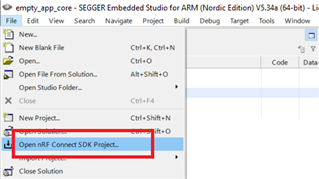
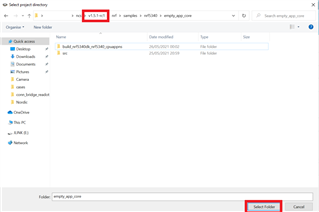
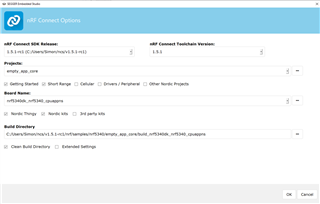
when using nRF5 SDK Release 1.4.99 the the projects open some have errors that prevent it from building for the nRF5340,
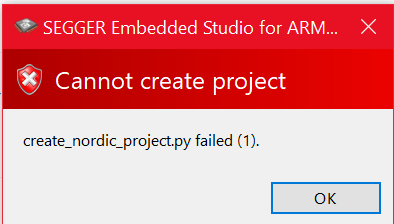
when I attempted to use nRF5 SDK 1.5.0 or 1.5.1 the sample projects (installed with the sdk using the toolchain manager) no longer open supplying this error.
I was hoping that the nRF5340 fail to build issues would be alleviated by the newer version of the SDK,
I am on windows 10, newest update. and am using nRF connect v3.6.1
I would like to know what is causing this error so that I may attempt to build the newer versions of the samples
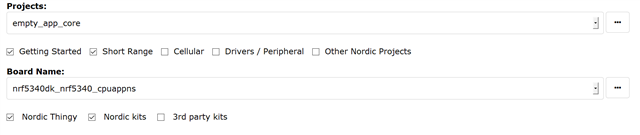
Creating solution empty_app_core.emProject
-- Application: C:/Users/c/ncs/v1.5.1-rc1/nrf/samples/nrf5340/empty_app_core
-- Zephyr version: 2.4.99 (C:/Users/c/ncs/v1.5.1-rc1/zephyr)
-- Found Python3: C:/Users/c/ncs/v1.5.0/toolchain/opt/bin/python.exe (found suitable exact version "3.8.2") found components: Interpreter
-- Found west (found suitable version "0.9.0", minimum required is "0.7.1")
-- Board: nrf5340dk_nrf5340_cpuappns
-- Cache files will be written to: C:/Users/c/ncs/v1.5.1-rc1/zephyr/.cache
-- Found dtc: C:/Users/c/ncs/v1.5.0/toolchain/opt/bin/dtc.exe (found suitable version "1.4.7", minimum required is "1.4.6")
-- Found toolchain: gnuarmemb (C:/Users/c/ncs/v1.5.0/toolchain/opt)
-- Found BOARD.dts: C:/Users/c/ncs/v1.5.1-rc1/zephyr/boards/arm/nrf5340dk_nrf5340/nrf5340dk_nrf5340_cpuappns.dts
-- Generated zephyr.dts: C:/Users/c/ncs/v1.5.1-rc1/nrf/samples/nrf5340/empty_app_core/build_nrf5340dk_nrf5340_cpuappns/zephyr/zephyr.dts
-- Generated devicetree_unfixed.h: C:/Users/c/ncs/v1.5.1-rc1/nrf/samples/nrf5340/empty_app_core/build_nrf5340dk_nrf5340_cpuappns/zephyr/include/generated/devicetree_unfixed.h
-- Generated device_extern.h: C:/Users/c/ncs/v1.5.1-rc1/nrf/samples/nrf5340/empty_app_core/build_nrf5340dk_nrf5340_cpuappns/zephyr/include/generated/device_extern.h
Parsing C:/Users/c/ncs/v1.5.1-rc1/zephyr/Kconfig
Loaded configuration 'C:/Users/c/ncs/v1.5.1-rc1/zephyr/boards/arm/nrf5340dk_nrf5340/nrf5340dk_nrf5340_cpuappns_defconfig'
Merged configuration 'C:/Users/c/ncs/v1.5.1-rc1/nrf/samples/nrf5340/empty_app_core/prj.conf'
-- Configuring incomplete, errors occurred!
Including boilerplate (Zephyr base): C:/Users/c/ncs/v1.5.1-rc1/zephyr/cmake/app/boilerplate.cmake
-- Using NCS Toolchain 1.5.0 for building. (C:/Users/c/ncs/v1.5.0/toolchain/cmake)
warning: THREAD_STACK_INFO (defined at kernel/Kconfig:183) was assigned the value 'n' but got the
value 'y'. See docs.zephyrproject.org/.../CONFIG_THREAD_STACK_INFO.html
and/or look up THREAD_STACK_INFO in the menuconfig/guiconfig interface. The Application Development
Primer, Setting Configuration Values, and Kconfig - Tips and Best Practices sections of the manual
might be helpful too.
warning: the hex symbol NRF_MODEM_LIB_SHMEM_CTRL_SIZE (defined at C:/Users/c/ncs/v1.5.1-rc1/nrf\lib\nrf_modem_lib/Kconfig:69) has a non-hex default NRF_MODEM_SHMEM_CTRL_SIZE (undefined)
warning: <choice CC3XX_LOCK_VARIANT> (defined at C:/Users/c/ncs/v1.5.1-rc1/nrf\subsys\net\openthread/Kconfig:57) defined with type unknown
warning: <choice CC3XX_LOCK_VARIANT> (defined at C:/Users/c/ncs/v1.5.1-rc1/nrf\subsys\net\openthread/Kconfig:57) defined without a prompt
warning: the default selection CC3XX_ATOMIC_LOCK (undefined) of <choice CC3XX_LOCK_VARIANT> (defined at C:/Users/c/ncs/v1.5.1-rc1/nrf\subsys\net\openthread/Kconfig:57) is not contained in the choice
warning: the default selection CC3XX_HW_MUTEX_LOCK (undefined) of <choice CC3XX_LOCK_VARIANT> (defined at C:/Users/c/ncs/v1.5.1-rc1/nrf\subsys\net\openthread/Kconfig:57) is not contained in the choice
error: Aborting due to Kconfig warnings
CMake Error at C:/Users/c/ncs/v1.5.1-rc1/zephyr/cmake/kconfig.cmake:262 (message):
command failed with return code: 1
Call Stack (most recent call first):
C:/Users/c/ncs/v1.5.1-rc1/zephyr/cmake/app/boilerplate.cmake:534 (include)
C:/Users/c/ncs/v1.5.1-rc1/zephyr/share/zephyr-package/cmake/ZephyrConfig.cmake:24 (include)
C:/Users/c/ncs/v1.5.1-rc1/zephyr/share/zephyr-package/cmake/ZephyrConfig.cmake:35 (include_boilerplate)
CMakeLists.txt:9 (find_package)
error: cmake failed
create_nordic_project.py failed (1)