

Hi,
We have nRF52840 DK board and trying to get the first time debug log from this DK board, we are not able see the log from DK board. Please provide the steps or instructions to get the debug log from DK board.
Below are steps we followed in DK board:
1. Connected USB cable to J2 and other end to my PC.
2. Switch ON SW8 switch.
3. SW9 position to VDD.
4. LED1 & LED5 are glowing.
5. We got JLINK removable Disc in my pc. It is showing with MBED, Segger and User guide html files.

6. We have opened Teraterm to check the log, we set the baud rate to 9600, 19200, 115200 but nothing is coming on console.
Downloaded nRFconnect App in my mobile and trying to scan the device but not detected the device.
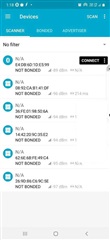
We want to power up the nRF52840 section alone because we have used only nRF52811 section in our custom board. Custom board does not have USB, we are having only debug connector (SWDIO, SWDCLK, SWO and RESET, VCC & GND).
I followed below steps to enable nRF section, Please check and confirm
1. Connected USB cable to J3 connector (i didn't connect USB cable to J2 connector in this case).
2. power ON Sw8.
3. LED1 is glowing.
My requirement is nRF52840 SoC should power ON and communicate through Bluetooth. Kindly provide the steps to achieve my requirement.
Note: Please confirm DK is pre programmed or not.
Regards,
Jyothi.
