

Hello -
I have been trying to go back to editing and using the tools to program my nrF52832 device . I have not touched this for several months and was working with SDK v1.3.0-rc1.
First problem was that I could not open the segger embedded studio when i pressed open IDE (sorry dont recall what it is called). liscence failed.
with the help of your support guy we went through several steps in trying to update to the latest version of pretty much everything. we eventually updated and reinstalled everything from scratch after trying to download each of the packages step by step.
We renamed my existing directory so I would not lose my changes.
we ran cclean to try to resolve.
after all of this I still have a screen that looks like
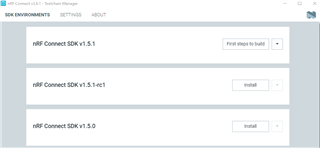
. I cannot get past the first "steps to build." It will not convert to "open ide"
I am on a windows 10 64 bit machine running the version 20H2
Please help.
Thanks
mark

