This post is older than 2 years and might not be relevant anymore
More Info: Consider searching for newer posts

How to change overlay settings on ncs?

Hi,

sdk: ncs v1.5.0

path:D:\ncs\v1.5.0\applications\2_hello_world_board

overlay file path:D:\ncs\v1.5.0\applications\2_hello_world_board\board.overlay

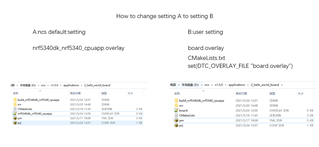
if i change the overlay file name as nrf5340dk_nrf5340_cpuapp.overlay,Settings are available.

if i change the overlay file name as board.overlay,Settings are not available.

How to set it up to change the name of the overlay file to:board.overlay.
Thank you for all your assistance.
Kind regards,
Peter.Min

Parents
  • Hi,


    You can either create a $(BOARD).overlay file, as you describe in option A.

    Or you can explicitly set this in the CMakeLists.txt file:

    # SPDX-License-Identifier: Apache-2.0
    
    cmake_minimum_required(VERSION 3.13.1)
    
    set(DTC_OVERLAY_FILE "board.overlay")
    
    find_package(Zephyr REQUIRED HINTS $ENV{ZEPHYR_BASE})
    project(hello_world)
    
    target_sources(app PRIVATE src/main.c)


    Note the overlay is defined just below the cmake_minimum_required().

    Note2: you need to delete your build folder and re-generate the project


    Kind regards,

    Håkon

Reply
  • Hi,


    You can either create a $(BOARD).overlay file, as you describe in option A.

    Or you can explicitly set this in the CMakeLists.txt file:

    # SPDX-License-Identifier: Apache-2.0
    
    cmake_minimum_required(VERSION 3.13.1)
    
    set(DTC_OVERLAY_FILE "board.overlay")
    
    find_package(Zephyr REQUIRED HINTS $ENV{ZEPHYR_BASE})
    project(hello_world)
    
    target_sources(app PRIVATE src/main.c)


    Note the overlay is defined just below the cmake_minimum_required().

    Note2: you need to delete your build folder and re-generate the project


    Kind regards,

    Håkon

Children
Related