how to set UART/USB console output to be non-blocking? We use printk() to output some debug info to USB console. When the USB isn't connected, the program stalls. How to configure console output to be non-blocking?
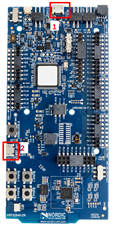
I assume it's number 1, since you're talking about printk (it sends the data to UART0->interface MCU->USB->Computer). However, if you disconnect that, the DK won't be powered anymore. Are you powering it in another way? Could you explain your setup in more detail, and how to reproduce it?
I assume it's number 1, since you're talking about printk (it sends the data to UART0->interface MCU->USB->Computer). However, if you disconnect that, the DK won't be powered anymore. Are you powering it in another way? Could you explain your setup in more detail, and how to reproduce it?
No, we use this on our project target board with USB CDC ACM interface (two virtual ports defined - CDC_ACM_0 for console and CDC_ACM_1 for shell and log).
I'm not able to reproduce your problem. I modified the sample zephyr/samples/subsys/usb/console by adding a blinking LED. I got the USB log output in a terminal on my computer while the LED was blinking. Then I disconnected the USB, but the program didn't stall, the LED continued blinking. However, for some reason the delay between the LED toggling increased after disconnecting the USB.
Can you test the sample and see if you get the same result: