This post is older than 2 years and might not be relevant anymore
More Info: Consider searching for newer posts

Error launching SES with nRF connect sdk v1.5.1

Hi,

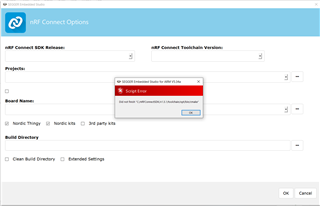
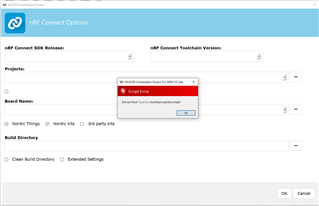
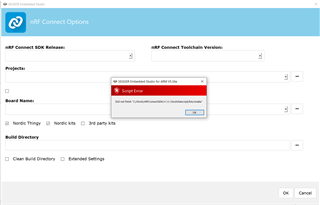
I followed instructions mentioned here https://devzone.nordicsemi.com/nordic/nrf-connect-sdk-guides/b/getting-started/posts/nrf-connect-sdk-tutorial to install Toolchain Manager and then used it to install nRF Connect SDK v1.5.1. When I click "Open IDE" then SES is launched but I get following error and cannot set any option. What am I missing?
regards

Ankur

Parents Reply Children
  • Ankur, sorry to hear that did not solve the issue. When exactly does this pop-up show?

    Are you using a personal machine or a corporate machine? Can there be any anti virus software, or any limitations to what your computer can run in regards to software? I.e. if a corporate machine, does your IT department allow the computer to run anything?

    Does Segger provide any other output e.g. in the output tab?

    In the Toolchain Manager, under the About tab, can you please share the system report? 

  • pop-up comes when I click on "Open IDE" in Toolchain Manager.

    It is a corporate machine but I don't suspect any issue as I have been doing development on nRF52840 with SDK17 and SES.

    Sorry, can you please elaborate what SES output should I share?

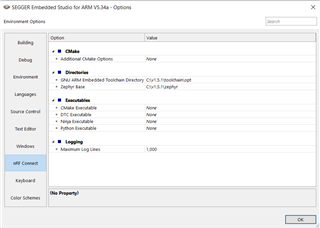
    This is how options looks in SES (after I dismiss pop-up)

    Here is the system report:

    # nRFConnect System Report - 2021-06-03T07-37-28.489Z

    - System: Dell Inc. Precision 5540
    - BIOS: Dell Inc. DELL - 1072009
    - CPU: 1 x Intel® CoreTm i7-9750H 2.60 GHz 12 cores (6 physical)
    - Memory: 13.2 GB free of 31.7 GB total
    - Filesystem: C: (NTFS) 943.7 GB 70.4% used

    - OS: Microsoft Windows 10 Pro (10.0.19042) win32 ia32

    - Versions
    - kernel: 10.0.19042
    - git: 2.26.2.windows.1
    - node: 12.13.0
    - python:
    - python3:

    - Connected devices:

  • The toolchain manager downloads from some sources, i.e. github. Are you on the corporate network? Do you have access to e.g. github.com?

    In the Toolchain Manager, in the bottom of the window, please open log file and provide this log file here. 

    nRF Connect SDK (NCS) is different from the nRF5 SDK in the way that it consists of several GitHub repositories which are downloaded to you computer. The nRF5 SDK is one zip file hosted on our webserver http://developer.nordicsemi.com/. More information about NCS can be found here

    Kind regards,
    Øyvind

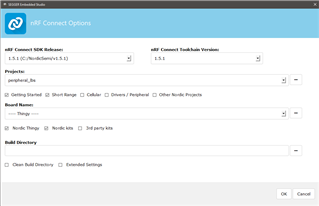
  • Also, can you please provide a screenshot of your NCS folder. From the screenshot you provided it looks like there is no link to the correct folder in SES. Ref. my screenshot:

  • I finally managed to get it working by creating a new Windows VM and then using it. I was playing with zephyr last year and that might be messing up with Toolchain Manager installation? Don't know but this is how I am working now on my same corporate laptop

Related