This post is older than 2 years and might not be relevant anymore
More Info: Consider searching for newer posts

uart_ble_app changing the uart_event_handle

I'm working on modifying the ble_app_uart pca10040_s132 to send strings stored in flash memory over BLE to the nRF connect app on an iphone.  From what I understand the uart_event_handle is called every time an input to uart is read and sends the data under the case APP_UART_DATA_READY if a new line is read.  I don't understand how the program is calling this uart_event_handle function though.  

To understand the program I tried to understand the sequence of events in main.  From what I understand the advertising_start() function is called (after everything is initialized) which I assume starts the advertising, and contains a ble_evt_handler function with the case BLE_GAP_EVT_CONNECTED which handles the connection from the phone and exits the advertising_start() function.  Assuming at this point I've just connected on the phone app, I don't understand how main knows when uart_events happen and how to handle subsequent disconnection and connection events as the only code left in main is the for loop to handle the idle state. 

How and from where is the uart_event_handle function called?  I want to modify the program by adding a different event handler that would get a string from flash memory and send it over BLE, but I don't know how to replace uart_event_handle since I don't understand where it is being called from.  If someone could explain how the advertising_start function handles the connection events and where the uart_event_handle is being called from or how the program knows when words have been sent to the uart port that would be greatly helpful, thanks!

Parents
  • Hi

    I don't understand how the program is calling this uart_event_handle function though.  

    This handler is called every time a byte is received over the physical UART interface on the chip, which by default is available through the virtual comport on the DK (the Segger programming chip on the DK acts as a bridge between the USB interface and the physical UART). 

    The callback is triggered by the app_uart_fifo.c file, which again is triggered by nrf_drv_uart.c and nrfx_uarte.c. 
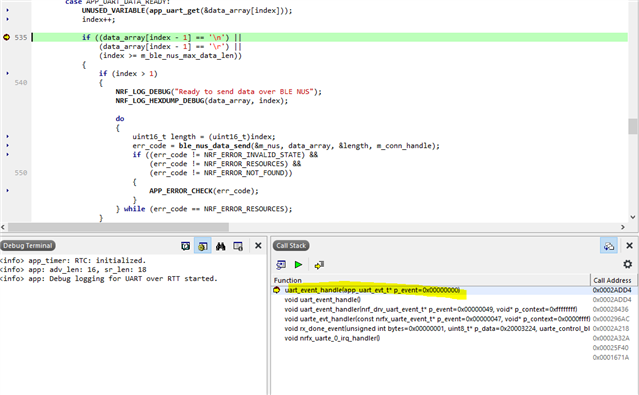
    To follow the entire program flow you can set a breakpoint in the uart_event_handle, run the debugger, send a byte to the board, and check the Call Stack in the debugger:

    Double click on each line in the call stack to see where in the code this happens. 

    From what I understand the advertising_start() function is called (after everything is initialized) which I assume starts the advertising, and contains a ble_evt_handler function with the case BLE_GAP_EVT_CONNECTED which handles the connection from the phone and exits the advertising_start() function. 

    The advertising_start() function initiates the process of sending advertise packets at regular intervals from the Bluetooth stack, which is needed to make the device connectable, yes. But it is not a blocking function, and it will exit as soon as the advertising procedure is started. 

    The ble_evt_handler function is a global event handler for all BLE events, not only those caused by starting advertising. The events most likely to follow after starting advertising is either the BLE_GAP_EVT_CONNECTED event when a connection happens, or the BLE_GAP_EVT_TIMEOUT event if no one connects to you before the advertising timeout period is reached. 

    The ble_app_uart example uses the ble_advertising.c module to handle advertising events, and in the case of a timeout the on_adv_evt() callback in main.c will be called. 

    The timeout time is set by the APP_ADV_DURATION define in main.c, which defaults to 18000 (180 seconds). 

    In order to check what happens after a timeout you can set it to a smaller value, so you don't have to wait for 3 minutes to test it ;)

    I don't understand how main knows when uart_events happen and how to handle subsequent disconnection and connection events as the only code left in main is the for loop to handle the idle state. 

    The nRF5 SDK is strongly based on events, which means that the application needs to register callback functions (such as uart_event_handle(..), bsp_event_handler(..), gatt_evt_handler(..), ble_evt_handler(..), on_adv_evt(..) and nus_data_handler(..)) that will be called when some lower level event occurs in one of the library modules. 

    All of these events start out as hardware interrupts in one of the hardware peripherals, such as the TIMER or RADIO peripherals (in case of Bluetooth events) o the UARTE peripheral (in case of uart events). 

    Because any hardware interrupt will wake up the CPU from sleep the event handlers will be called even if you run the idle_state_handle() function first.  

    How and from where is the uart_event_handle function called?  I want to modify the program by adding a different event handler that would get a string from flash memory and send it over BLE, but I don't know how to replace uart_event_handle since I don't understand where it is being called from.

    Where it is called from should be answered earlier in my reply. Essentially an interrupt from the UARTE peripheral will be forwarded up three levels of UART drivers until it reaches the application event handler. 

    To change how the handler behaves simply replace the code in uart_event_handle(..), or provide the pointer to another function in the call to APP_UART_FIFO_INIT on line 600 of main.c:

    I don't know if this answered all your questions, so if something is still unclear just let me know and I will do my best to clarify. 

    Best regards
    Torbjørn

  • Thank you for such a detailed response, this definitely cleared up a lot of things for me.  

    Where it is called from should be answered earlier in my reply. Essentially an interrupt from the UARTE peripheral will be forwarded up three levels of UART drivers until it reaches the application event handler. 

    So does this mean that the application event handler is nonspecific, and will be triggered for any interrupt that causes the idle state to end, such as the ones generated by low level hardware?  I want to generate an interrupt based off of a button press, and then handle that event with a specific event handler function. 

    I was thinking that the program currently would only trigger the uart_event_handle function upon a UARTE peripheral event. Do I need to change anything to cause the program to recognize the button press event instead of the UART event?  And then would the event handler passed from  APP_UART_FIFO_INIT still determine the event handling function that will be executed upon this TWI event?

    To clarify further, I'm noticing that most of the init functions accept an event handler function as well.  If I wanted to define a button_init function that accepted some event handler for a button press, how would I define a button press event so that the program knew to call the button press event handler when a button is pressed in the same way that the program knows to call the uart event handler when data is received over uart?

  • Hi

    No, the various event handlers will typically be specific to a single peripheral. 

    There is a module in the SDK called bsp (short for "board support package") which handles buttons and LED's on the development kit. 

    The ble_app_uart example already configures the bsp module in the buttons_leds_init(..) function in main.c, and all button events will be forwarded to the bsp_event_handler(bsp_event_t event) callback function. 

    By default Button 1 on the kit is already used to force the application to enter sleep mode, but you can extend the bsp_event_handler function to also handle Button 2, 3 and 4. 

    The easiest way to do this is just to add handling of the BSP_EVENT_KEY_1, BSP_EVENT_KEY_2 and BSP_EVENT_KEY_3 events to the switch case in bsp_event_handler, like this:  

    void bsp_event_handler(bsp_event_t event)
    {
        uint32_t err_code;
        switch (event)
        {
            case BSP_EVENT_SLEEP:
                sleep_mode_enter();
                break;
    
            case BSP_EVENT_DISCONNECT:
                err_code = sd_ble_gap_disconnect(m_conn_handle, BLE_HCI_REMOTE_USER_TERMINATED_CONNECTION);
                if (err_code != NRF_ERROR_INVALID_STATE)
                {
                    APP_ERROR_CHECK(err_code);
                }
                break;
    
            case BSP_EVENT_WHITELIST_OFF:
                if (m_conn_handle == BLE_CONN_HANDLE_INVALID)
                {
                    err_code = ble_advertising_restart_without_whitelist(&m_advertising);
                    if (err_code != NRF_ERROR_INVALID_STATE)
                    {
                        APP_ERROR_CHECK(err_code);
                    }
                }
                break;
    
            case BSP_EVENT_KEY_1:
                NRF_LOG_INFO("Button 2 pressed");
                break;
    
            case BSP_EVENT_KEY_2:
                NRF_LOG_INFO("Button 3 pressed");
                break;        
                
            case BSP_EVENT_KEY_3:
                NRF_LOG_INFO("Button 4 pressed");
                break;
    
            default:
                break;
        }
    }

    Alternatively, if you need more fine control of the buttons you can use the bsp_event_to_button_assign function to set up custom events on button activity like this:

    #define EVENT_CUSTOM_BTN_PRESS      (BSP_EVENT_KEY_LAST + 0)
    #define EVENT_CUSTOM_BTN_RELEASE    (BSP_EVENT_KEY_LAST + 1)
    #define EVENT_CUSTOM_BTN_2_LONG_PRESS (BSP_EVENT_KEY_LAST + 2)
    
    // Configure button 2 push and assign to event
    bsp_event_to_button_action_assign(2, BSP_BUTTON_ACTION_PUSH, EVENT_CUSTOM_BTN_PRESS);
    
    // Configure button 2 release and assign to event
    bsp_event_to_button_action_assign(2, BSP_BUTTON_ACTION_PUSH, EVENT_CUSTOM_BTN_RELEASE);
    
    // Configure button 3 long press and assign to event
    bsp_event_to_button_action_assign(3, BSP_BUTTON_ACTION_LONG_PUSH, EVENT_CUSTOM_BTN_2_LONG_PRESS);
    
    // Inside bsp_event_handler, add the corresponding case handlers:
    
    case EVENT_CUSTOM_BTN_PRESS:
        NRF_LOG_INFO("Button 2 pressed");
        break;
    
    case EVENT_CUSTOM_BTN_RELEASE:
        NRF_LOG_INFO("Button 2 released");
        break;
        
    case EVENT_CUSTOM_BTN_2_LONG_PRESS:
        NRF_LOG_INFO("Button 3 long pressed");
        break;

    Best regards
    Torbjørn

Reply
  • Hi

    No, the various event handlers will typically be specific to a single peripheral. 

    There is a module in the SDK called bsp (short for "board support package") which handles buttons and LED's on the development kit. 

    The ble_app_uart example already configures the bsp module in the buttons_leds_init(..) function in main.c, and all button events will be forwarded to the bsp_event_handler(bsp_event_t event) callback function. 

    By default Button 1 on the kit is already used to force the application to enter sleep mode, but you can extend the bsp_event_handler function to also handle Button 2, 3 and 4. 

    The easiest way to do this is just to add handling of the BSP_EVENT_KEY_1, BSP_EVENT_KEY_2 and BSP_EVENT_KEY_3 events to the switch case in bsp_event_handler, like this:  

    void bsp_event_handler(bsp_event_t event)
    {
        uint32_t err_code;
        switch (event)
        {
            case BSP_EVENT_SLEEP:
                sleep_mode_enter();
                break;
    
            case BSP_EVENT_DISCONNECT:
                err_code = sd_ble_gap_disconnect(m_conn_handle, BLE_HCI_REMOTE_USER_TERMINATED_CONNECTION);
                if (err_code != NRF_ERROR_INVALID_STATE)
                {
                    APP_ERROR_CHECK(err_code);
                }
                break;
    
            case BSP_EVENT_WHITELIST_OFF:
                if (m_conn_handle == BLE_CONN_HANDLE_INVALID)
                {
                    err_code = ble_advertising_restart_without_whitelist(&m_advertising);
                    if (err_code != NRF_ERROR_INVALID_STATE)
                    {
                        APP_ERROR_CHECK(err_code);
                    }
                }
                break;
    
            case BSP_EVENT_KEY_1:
                NRF_LOG_INFO("Button 2 pressed");
                break;
    
            case BSP_EVENT_KEY_2:
                NRF_LOG_INFO("Button 3 pressed");
                break;        
                
            case BSP_EVENT_KEY_3:
                NRF_LOG_INFO("Button 4 pressed");
                break;
    
            default:
                break;
        }
    }

    Alternatively, if you need more fine control of the buttons you can use the bsp_event_to_button_assign function to set up custom events on button activity like this:

    #define EVENT_CUSTOM_BTN_PRESS      (BSP_EVENT_KEY_LAST + 0)
    #define EVENT_CUSTOM_BTN_RELEASE    (BSP_EVENT_KEY_LAST + 1)
    #define EVENT_CUSTOM_BTN_2_LONG_PRESS (BSP_EVENT_KEY_LAST + 2)
    
    // Configure button 2 push and assign to event
    bsp_event_to_button_action_assign(2, BSP_BUTTON_ACTION_PUSH, EVENT_CUSTOM_BTN_PRESS);
    
    // Configure button 2 release and assign to event
    bsp_event_to_button_action_assign(2, BSP_BUTTON_ACTION_PUSH, EVENT_CUSTOM_BTN_RELEASE);
    
    // Configure button 3 long press and assign to event
    bsp_event_to_button_action_assign(3, BSP_BUTTON_ACTION_LONG_PUSH, EVENT_CUSTOM_BTN_2_LONG_PRESS);
    
    // Inside bsp_event_handler, add the corresponding case handlers:
    
    case EVENT_CUSTOM_BTN_PRESS:
        NRF_LOG_INFO("Button 2 pressed");
        break;
    
    case EVENT_CUSTOM_BTN_RELEASE:
        NRF_LOG_INFO("Button 2 released");
        break;
        
    case EVENT_CUSTOM_BTN_2_LONG_PRESS:
        NRF_LOG_INFO("Button 3 long pressed");
        break;

    Best regards
    Torbjørn

Children
No Data
Related